
MCP server · Generative art
Fattly MCP server
Ask your AI to make images, videos, voiceovers and music through your Fattly account.
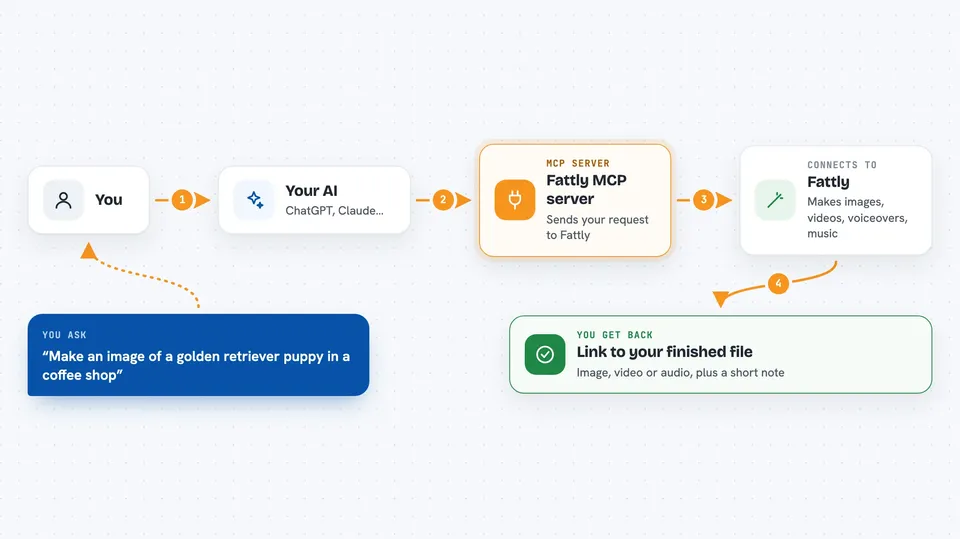
Fattly is a service that creates AI images, videos, voiceovers and music using many different AI models in one place. This MCP server is the bridge that lets your AI assistant, like Claude, use your Fattly account for you. It is handy if you make pictures, clips or voice tracks and would rather describe what you want in chat than click around a website.
What is an MCP server? The 30-second version
On its own, your AI can only chat. An MCP server is a small helper program that gives your AI a new skill or a connection to another service. This one connects your AI to Fattly, so when you ask for a picture or a voice clip, the AI can actually order it from Fattly and bring the result back into your chat.
What this MCP server does
You tell your AI what you want, for example a picture of an astronaut cat on Mars. The AI uses this helper to send your request to Fattly, which runs it on one of its AI models. Fattly makes the file and sends it back through the helper. Your AI then shows you the result in the chat, like a link to the finished image or video. It can also check your credit balance and list which models are available and what they cost.
 Click to zoom
What you can do with it
- Create images from a text description
- Edit an existing image or swap a face
- Turn a photo into a short video
- Make a video from a text prompt
- Generate a voiceover from written text
- Create music clips
- Check your remaining Fattly credits and model prices
Try asking your AI
- “Make me an image of a golden retriever puppy in a coffee shop”
- “Turn this photo into a short video of ocean waves at sunset”
- “Create a voiceover that says Welcome to our new store”
- “How many Fattly credits do I have left, and what video models can I use?”
What it gives back to you
You get back the finished file, usually as a link to an image, an mp4 video or an audio file, plus a short note about what was made. If you asked about credits or models, you get a simple list with names and prices. If a generation fails, Fattly refunds the credits automatically and the chat tells you what happened.
Before you start
What you need
- A Fattly account at fattly.app with some credits
- For the local setup: an API key from your Fattly dashboard (a kind of password for apps)
- For the local setup: Node.js 18 or newer on your computer
- For the hosted setup: just the connector URL, no key needed
Good to know
The image, video and audio tools spend real credits from your Fattly account, so check the model price before you ask for something big, and keep in mind that content must be safe for work.
Install it with your AI
Add Fattly MCP server to your AI, no technical skills needed
You don't install anything by hand. You copy one prompt, paste it into an AI that can work on your computer, and it checks, installs and connects the server for you, asking you when it needs something.
Sign in to get the install prompt
Members get a ready-made prompt that lets the Claude desktop app check Fattly MCP server, install it and connect it for them, step by step. You don't need any technical skills: you copy, paste and answer a few questions. Your connected AI can also find and install any of the 4,361 MCP servers here for you.
Who it's for
People who make images, short videos, voiceovers or music for work or social media and want to do it by chatting instead of using a web app.




