
MCP server · Generative art · official
WaveSpeed MCP server
by WaveSpeedAI · official
Let your AI create images, videos, audio and 3D from the WaveSpeed catalog, with prices checked first.
This is a small helper that connects your AI assistant to WaveSpeed, a service that makes images, videos, audio and 3D models. Once it is set up, you can just ask your AI in normal words to create something, and it will handle the request for you. It is handy for anyone who wants to make pictures or clips without learning a new tool.
What is an MCP server? The 30-second version
On its own, your AI can only chat. An MCP server is a small helper program that gives your AI a new skill or a connection to an app or service. This one connects your AI to WaveSpeed, so it can look up models, check prices, and create images, videos, audio or 3D for you when you ask. You do not need to know how it works inside; you just talk to your AI like always.
What this MCP server does
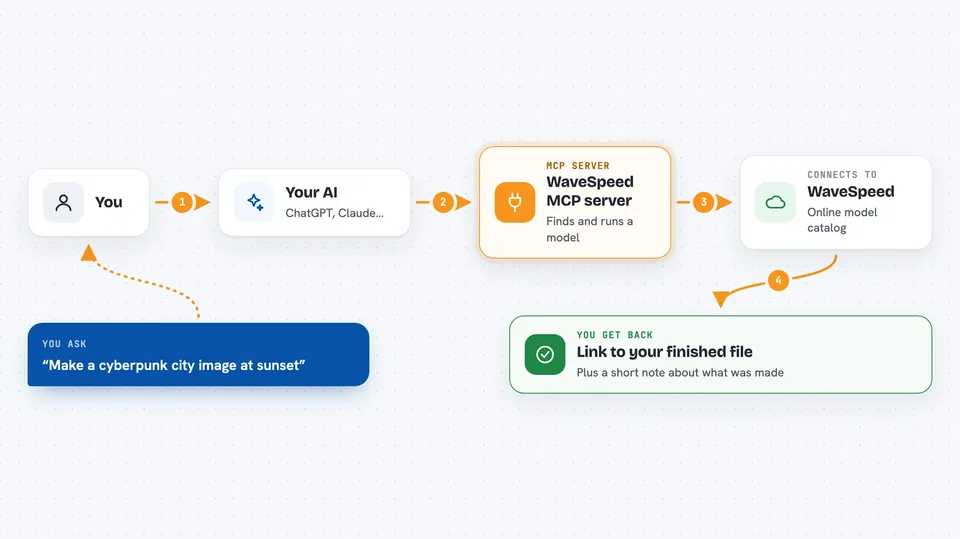
You ask your AI for something, like an image or a short video. The AI uses this helper to look through the WaveSpeed catalog and find a model that fits. It checks what that model needs and what it will cost, then sends the request. When the model finishes, the helper brings back the link to your finished file, and your AI shows it to you in the chat.
 Click to zoom
What you can do with it
- Search the WaveSpeed catalog for image, video, audio or 3D models
- Check what inputs a model needs before running it
- Get a price estimate before you spend anything
- Upload a file from your computer to use as input
- Create images, videos, audio or 3D from a text description
- Check your account credit balance
- Look up the status or result of a past run
Try asking your AI
- “Generate a 16:9 hero image of a cyberpunk skyline at golden hour.”
- “Take ./photo.jpg and replace the background with a sunlit kitchen.”
- “Animate ./hero.png with subtle parallax, and check the price first.”
- “What is my WaveSpeed balance right now?”
What it gives back to you
You get back the link to your finished file, plus a short note about what was made. If you asked for a price, you get a cost estimate and a note about anything the estimate could not include. If a job is still running, you get its id so you can check on it later.
Before you start
What you need
- A WaveSpeed account
- An API key from WaveSpeed (a kind of password for apps; you get one free at wavespeed.ai/accesskey)
- The Claude desktop app or another app that supports MCP servers
- Node.js installed on your computer
Good to know
Running models uses your WaveSpeed credits, so check the price first if you care about cost, and remember that anything you upload is sent to WaveSpeed.
Install it with your AI
Add WaveSpeed MCP server to your AI, no technical skills needed
You don't install anything by hand. You copy one prompt, paste it into an AI that can work on your computer, and it checks, installs and connects the server for you, asking you when it needs something.
Sign in to get the install prompt
Members get a ready-made prompt that lets the Claude desktop app check WaveSpeed MCP server, install it and connect it for them, step by step. You don't need any technical skills: you copy, paste and answer a few questions. Your connected AI can also find and install any of the 4,361 MCP servers here for you.
Who it's for
Anyone who makes images, videos or other media and wants to create them by chatting with their AI instead of using a separate tool.



