
MCP server · Analytics
Internet Speed Test MCP server
by inventer-dev
Ask your AI to check your internet download speed, upload speed, latency and jitter, and it reports the numbers in chat.
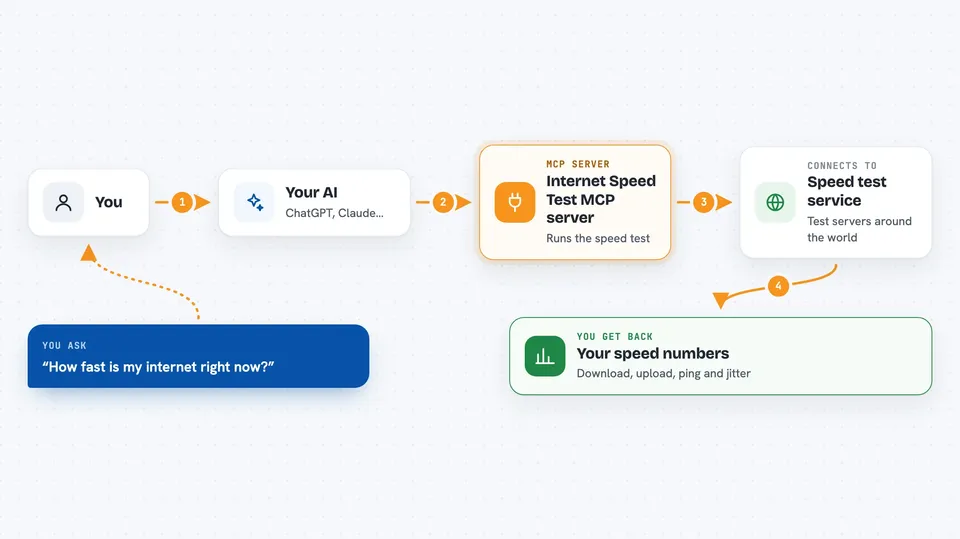
This is a small helper that lets your AI run an internet speed test for you. You ask in plain words, and it measures how fast your connection is and how stable it is. It is handy if you work from home, join video calls all day, or just want to know why things feel slow.
What is an MCP server? The 30-second version
On its own, your AI can only chat with you. An MCP server is a small helper program that gives your AI one new skill, here the skill of testing your internet connection. You add this helper to your AI app once, and after that the AI can run speed tests for you whenever you ask. Think of it as plugging a measuring tool into your AI.
What this MCP server does
You ask your AI something like how fast is my internet right now. The AI passes that request to this helper. The helper downloads and uploads sample files of increasing size to servers around the world, and times how long each one takes. It also pings a server several times to measure delay and how much that delay jumps around. Then it hands the numbers back to your AI, which explains them to you in the chat.
 Click to zoom
What you can do with it
- Measure your download speed in Mbps
- Measure your upload speed in Mbps
- Check your latency, also called ping, in milliseconds
- Check jitter, which shows how steady your connection is
- Run one full test that reports all the numbers together
- See which server handled the test and where it is located
- Look up server details for a web address without running a full test
Try asking your AI
- “How fast is my internet right now?”
- “Run a full internet speed test and tell me the download, upload, ping and jitter.”
- “My video calls keep freezing. Check my latency and jitter.”
- “Which server handled my speed test, and where is it located?”
What it gives back to you
You get the numbers back as a short report in the chat: download speed, upload speed, latency and jitter, each with its unit. A full test also tells you which server was used, which company runs it, and where that server sits in the world. Your AI usually adds a sentence or two explaining whether the result looks good or slow.
Before you start
What you need
- Python 3.12 or newer installed on your computer
- The Claude desktop app or another AI app that supports MCP servers
- An internet connection, since the test downloads and uploads real files
Good to know
A full test downloads and uploads large files, so it can use a noticeable amount of data and take a little while on a slow connection.
Install it with your AI
Add Internet Speed Test MCP server to your AI, no technical skills needed
You don't install anything by hand. You copy one prompt, paste it into an AI that can work on your computer, and it checks, installs and connects the server for you, asking you when it needs something.
Sign in to get the install prompt
Members get a ready-made prompt that lets the Claude desktop app check Internet Speed Test MCP server, install it and connect it for them, step by step. You don't need any technical skills: you copy, paste and answer a few questions. Your connected AI can also find and install any of the 4,066 MCP servers here for you.
Who it's for
People who work from home or in an office and want a quick, plain answer about their connection speed, especially before a big call or when something feels slow.



