
MCP server · Research
Forage MCP server
by isaac-levine
Lets your AI find, install, and start using new tools on its own, without restarting anything.
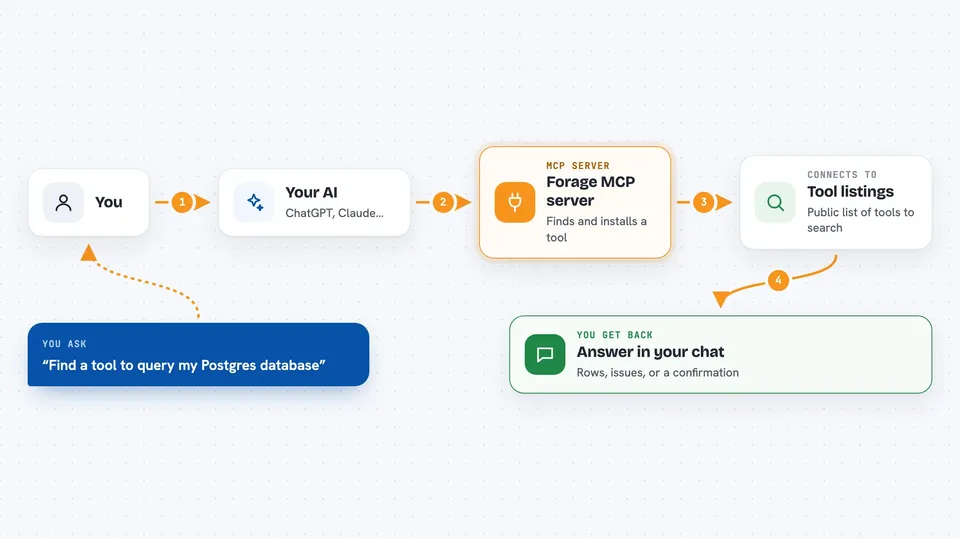
Forage is a helper that lets your AI go looking for new tools when it runs into something it cannot do. Instead of you hunting down and setting up each tool by hand, your AI searches, picks one, and starts using it right away. It is handy for people who use Claude Code or Cursor and keep hitting tasks their AI says it cannot handle yet.
What is an MCP server? The 30-second version
On its own, your AI can only chat with you. An MCP server is a small helper program that gives your AI a new skill or a connection to another app or service. Forage is one of those helpers, but a special kind: it goes out and finds other helpers for you. So you set up Forage once, and from then on your AI can add new abilities to itself when it needs them.
What this MCP server does
You ask your AI to do something it cannot do yet, like query a database or search Slack. Your AI uses Forage to search public tool listings for something that fits. If it finds a match, Forage asks your permission, then installs and starts that tool quietly in the background. Your AI can use the new tool right away, in the same session, with no restart. It also writes down how to use the tool so it remembers next time.
 Click to zoom
What you can do with it
- Search public tool listings for a tool that matches what you need
- Look up details about a tool before installing it, like downloads and instructions
- Install and start a new tool after you approve it
- Use the newly installed tool right away without restarting your AI
- Save notes about how to use a tool so your AI remembers it next session
- List all the tools that are currently installed and running
- Remove a tool and clean up its notes when you no longer need it
Try asking your AI
- “I need to query my Postgres database, can you find a tool for that?”
- “Search for an MCP server that lets you read my GitHub issues”
- “What tools do I have installed right now?”
- “Install the Postgres tool you found and show me how to use it”
What it gives back to you
You get plain answers in the chat: a list of matching tools with short descriptions, details about one tool, or a confirmation that something was installed or removed. When your AI uses a newly installed tool, the result comes back like any other reply, such as rows from your database or a list of issues. Forage also keeps a record of what it installed so you can check later.
Before you start
What you need
- The Claude Code app or the Cursor editor
- Node.js installed on your computer (the free program that runs these tools)
- Your approval each time Forage installs something new
Good to know
Forage can install and run other programs on your computer, so only approve installs you actually want, and remember that installed tools may be able to read or change things depending on what they do.
Install it with your AI
Add Forage MCP server to your AI, no technical skills needed
You don't install anything by hand. You copy one prompt, paste it into an AI that can work on your computer, and it checks, installs and connects the server for you, asking you when it needs something.
Sign in to get the install prompt
Members get a ready-made prompt that lets the Claude desktop app check Forage MCP server, install it and connect it for them, step by step. You don't need any technical skills: you copy, paste and answer a few questions. Your connected AI can also find and install any of the 4,609 MCP servers here for you.
Who it's for
People who use Claude Code or Cursor for coding or office work and want their AI to pick up new abilities without them setting up each tool by hand.


