
MCP server · Analytics
PostgreSQL Tuning MCP server
by isdaniel
Lets your AI inspect a PostgreSQL database and suggest ways to make slow queries faster.
This is a helper for people who look after a PostgreSQL database and want a hand finding what is slow. It connects your AI assistant to your database so it can read performance information and explain it in plain words. It is handy if you run reports, dashboards, or apps on PostgreSQL and queries sometimes crawl.
What is an MCP server? The 30-second version
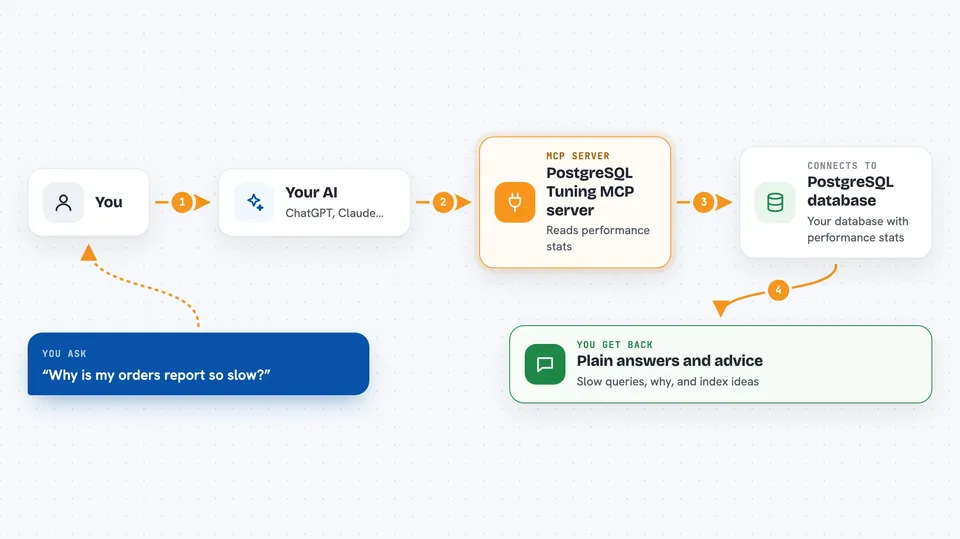
On its own, your AI can only chat with you. An MCP server is a small helper program that gives your AI a new skill or a connection to another system. This one connects your AI to a PostgreSQL database, so it can look up slow queries, table sizes, and index information for you. You ask a question, and the AI uses this helper to fetch the answers from your database.
What this MCP server does
You ask your AI something like which queries are slowest or why a report takes so long. The AI sends that request to this helper program. The helper connects to your PostgreSQL database and reads the performance statistics that PostgreSQL already keeps. It then hands the numbers back to the AI, which explains them to you and suggests what to change, such as adding an index or adjusting a setting.
 Click to zoom
What you can do with it
- List the slowest queries in your database
- Explain why a specific query is slow
- Suggest indexes that could speed up your workload
- Test a suggested index without actually creating it
- Find unused or duplicate indexes you could drop
- Check overall database health and cache hit ratios
- Watch long-running vacuum operations
Try asking your AI
- “What are the slowest queries in my database this week?”
- “Why is this query slow: SELECT * FROM orders WHERE customer_id = 42”
- “Which indexes are unused and could be removed?”
- “Would adding an index on orders(customer_id) help?”
What it gives back to you
You get back plain answers in the chat: lists of slow queries with their times, explanations of a query plan in everyday words, and suggestions for indexes or settings. It can also show health scores, table sizes, and which indexes are unused. Nothing in your data is changed unless you decide to act on the advice yourself.
Before you start
What you need
- A PostgreSQL database you can connect to
- The connection details for that database (host, port, database name, user, password)
- A database user with read access to statistics (the README shows the exact permissions)
- Python installed on your computer
Good to know
It reads your database statistics and can run EXPLAIN ANALYZE, which actually executes the query, so avoid pointing it at a production database with very heavy queries unless you are comfortable with that.
Install it with your AI
Add PostgreSQL Tuning MCP server to your AI, no technical skills needed
You don't install anything by hand. You copy one prompt, paste it into an AI that can work on your computer, and it checks, installs and connects the server for you, asking you when it needs something.
Sign in to get the install prompt
Members get a ready-made prompt that lets the Claude desktop app check PostgreSQL Tuning MCP server, install it and connect it for them, step by step. You don't need any technical skills: you copy, paste and answer a few questions. Your connected AI can also find and install any of the 4,361 MCP servers here for you.
Who it's for
Database administrators, developers, and anyone who looks after a PostgreSQL database and wants help finding slow queries.


