MCP server · Apple, iOS and Mac
Homebrew MCP server
by jeannier
Let your AI check, install, and tidy up the apps and tools Homebrew manages on your Mac.
This is a small helper that connects your AI assistant to Homebrew, the tool many Mac users rely on to install and update software. Once it is set up, you can just ask in normal words and the AI will run the right Homebrew commands for you. It is handy if you use a Mac and want to keep your installed tools in order without memorizing commands.
What is an MCP server? The 30-second version
On its own, your AI can only chat. An MCP server is a small helper program that gives your AI a new skill or a connection to an app or service. This one connects your AI to Homebrew on your Mac, so it can look up what you have installed, check for updates, or install and remove packages when you ask. You stay in the conversation, and the helper does the actual work behind the scenes.
What this MCP server does
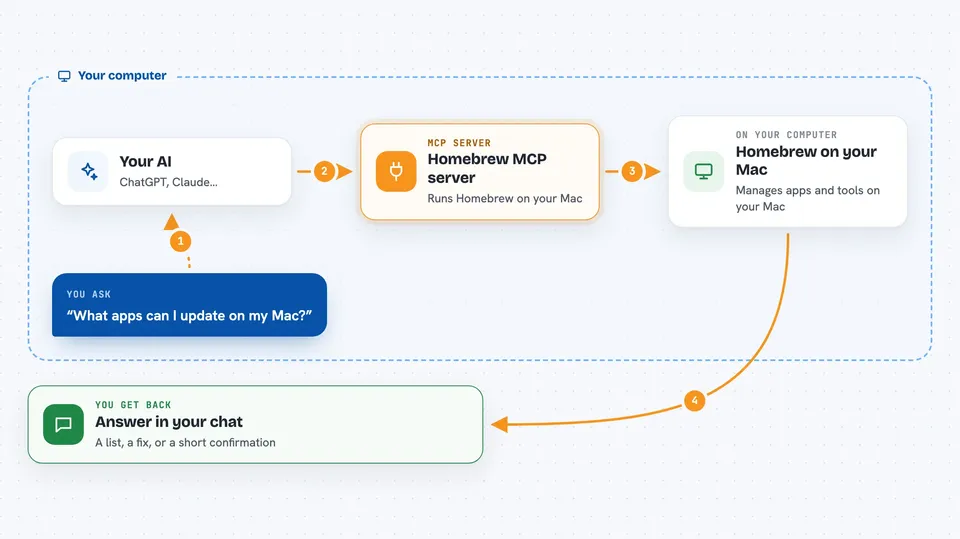
You ask your AI something about your Homebrew setup in plain words. The AI passes your request to this helper program. The helper runs the matching Homebrew command on your Mac, such as listing packages, searching, or installing. The result comes back to the AI, which explains it to you in the chat. If you asked for a change, that change is made on your Mac.
 Click to zoom
What you can do with it
- List all the packages you have installed
- Search for new packages to install
- Install or uninstall a package
- Upgrade outdated packages
- Check your Homebrew setup for problems with brew doctor
- Show details about a specific package
- Clean up old files Homebrew no longer needs
Try asking your AI
- “Give me a summary of all my installed packages”
- “Are there any problems with my Homebrew setup, and how can I fix them?”
- “Show me information about the python 3.13 package”
- “Install the wget package”
What it gives back to you
You get answers in the chat, like a list of installed packages, a list of outdated ones, or details about a single package. For brew doctor, you get the warnings and a plain explanation of what they mean. If you asked for an install or uninstall, you get a short confirmation that it was done.
Before you start
What you need
- A Mac running macOS
- Homebrew installed on your Mac
- Python 3.13 and the uv tool (the README shows how to install uv with Homebrew)
- Claude Desktop or Cursor if you want to use it from those apps
Good to know
It can install, upgrade, and remove software on your Mac, so check with your AI before agreeing to changes you did not intend.
Install it with your AI
Add Homebrew MCP server to your AI, no technical skills needed
You don't install anything by hand. You copy one prompt, paste it into an AI that can work on your computer, and it checks, installs and connects the server for you, asking you when it needs something.
Sign in to get the install prompt
Members get a ready-made prompt that lets the Claude desktop app check Homebrew MCP server, install it and connect it for them, step by step. You don't need any technical skills: you copy, paste and answer a few questions. Your connected AI can also find and install any of the 4,361 MCP servers here for you.
Who it's for
Mac users who use Homebrew and would rather ask their AI in plain words than remember brew commands.