
MCP server · Finance and crypto
Toss Securities MCP server
by Jeric1223
Lets your AI look up Korean and US stock prices, holdings, and place orders on your Toss Securities account.
This is a helper that connects your AI assistant to your Toss Securities account. Once it is set up, you can ask your AI things like the current price of a Korean or US stock, your holdings, or the exchange rate, and it will fetch the answer for you. It is handy for people who already trade on Toss Securities and want to ask questions in plain language instead of clicking around.
What is an MCP server? The 30-second version
On its own, your AI can only chat. An MCP server is a small helper program that gives your AI a new skill or a connection to an app or service. This one connects your AI to Toss Securities, so it can look up prices, your holdings, and other market data, and even prepare stock orders for you. You still have to approve any order before it actually goes through.
What this MCP server does
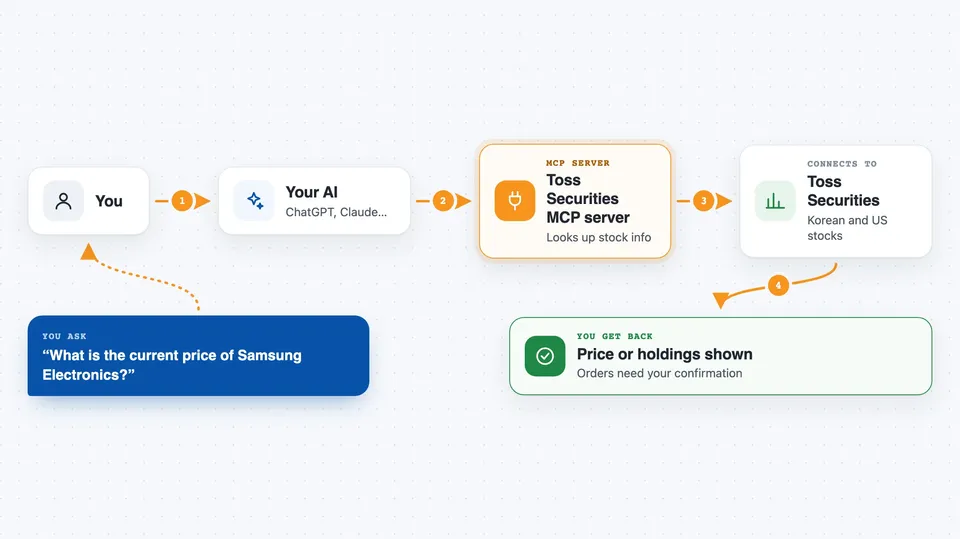
You ask your AI a question in plain words, like the price of Samsung or your current holdings. The AI uses this helper, which talks to the Toss Securities Open API on your behalf. The helper sends back the numbers or list it found, and the AI shows it to you in the chat. For orders, the helper first makes a preview, shows it to you, and only sends the real order after you clearly confirm it.
 Click to zoom
What you can do with it
- Look up current prices for Korean and US stocks
- Turn a company name into a ticker or Korean stock code
- Check your holdings and profit or loss
- See how much cash you can use to buy in KRW or USD
- Check the USD to KRW exchange rate
- View charts, order books, and recent trades
- Prepare a stock order and submit it after you confirm
Try asking your AI
- “What is the current price of Samsung Electronics?”
- “Show me my holdings and how much I am up or down.”
- “How much buying power do I have in USD right now?”
- “Prepare a buy order for 10 shares of Apple and show me the details before I confirm.”
What it gives back to you
You get back plain answers in the chat, like a price, a list of your holdings with profit and loss, or a small table of recent trades. For orders, you first get a preview showing the stock, quantity, and price, and nothing is sent until you say yes. After you confirm, the helper submits the order and tells you the result.
Before you start
What you need
- A Toss Securities account
- A Toss Securities Open API client ID and client secret (you get these from the Toss Securities developer console)
- Node.js 18 or newer on your computer
- An AI client that supports MCP, like Claude Desktop or Claude Code
Good to know
This tool can place real stock orders on your account, so always read the preview carefully and only confirm when you are sure.
Install it with your AI
Add Toss Securities MCP server to your AI, no technical skills needed
You don't install anything by hand. You copy one prompt, paste it into an AI that can work on your computer, and it checks, installs and connects the server for you, asking you when it needs something.
Sign in to get the install prompt
Members get a ready-made prompt that lets the Claude desktop app check Toss Securities MCP server, install it and connect it for them, step by step. You don't need any technical skills: you copy, paste and answer a few questions. Your connected AI can also find and install any of the 4,609 MCP servers here for you.
Who it's for
Toss Securities users who trade Korean or US stocks and want to ask their AI for prices, holdings, and order previews in plain language.



