MCP server · Finance and crypto
Blocksize Market Data MCP server
by jf-cmyk
Lets your AI look up Blocksize market data options and build links for paid live price feeds.

This is a helper for your AI that connects it to Blocksize, a service that sells real-time market data for crypto and other assets. It is handy if you work with prices, trading data, or research and want your AI to find out what data exists and how to get it. It does not fetch live prices itself. It helps your AI explore and prepare.
What is an MCP server? The 30-second version
On its own, your AI can only chat with you using what it already knows. An MCP server is a small helper program you plug in that gives your AI a new skill or a connection to an outside service. This one connects your AI to Blocksize, a market-data provider, so it can search their catalog, read their docs, and build the exact web links you would use to request paid live data. Think of it as giving your AI a phone book and a map for Blocksize, not the actual prices.
What this MCP server does
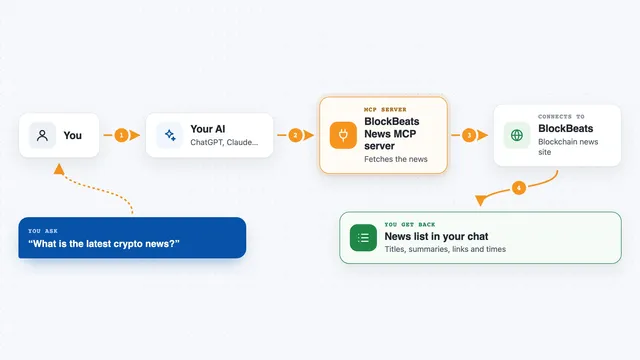
You ask your AI something like what crypto pairs does Blocksize cover, or how much does their live data cost. Your AI sends that question to this helper. The helper talks to Blocksize's public discovery pages and returns matching symbols, products, pricing info, and documentation. If you want live data, the helper can build the exact web address for a paid request, but it will not call it or pay for it. You then decide whether to use that link yourself.
 Click to zoom
What you can do with it
- Search for supported trading symbols and their details
- List instruments by category like vwap, bidask, fx, or metal
- Check current pricing and which payment methods are supported
- Browse the product catalog including starter-credit costs
- Build a paid data request URL for a specific pair
- Search Blocksize documentation and catalog entries
- Read a specific doc or catalog page your AI found
Try asking your AI
- “What crypto pairs does Blocksize support for live data?”
- “Show me the pricing for Blocksize market data and how I would pay”
- “Build me the URL to request live VWAP data for SOL/USD”
- “Search Blocksize docs for how state data works”
What it gives back to you
You get back lists of symbols, product names, prices, and short explanations, all shown as text in your chat. If you ask for a data link, you get a web address you can copy. Nothing is bought or changed on your behalf. It is all reading and preparing.
Before you start
What you need
- An AI app that supports MCP servers, like Claude Desktop or Cursor
- Python installed with the uvx tool (the README shows how)
- A Blocksize account or subscription if you later want live data (the discovery tools here are free)
Good to know
This server only reads and prepares links. It does not buy data, move money, or trade for you, so any actual purchase or payment is something you do yourself.
Install it with your AI
Add Blocksize Market Data MCP server to your AI, no technical skills needed
You don't install anything by hand. You copy one prompt, paste it into an AI that can work on your computer, and it checks, installs and connects the server for you, asking you when it needs something.
Sign in to get the install prompt
Members get a ready-made prompt that lets the Claude desktop app check Blocksize Market Data MCP server, install it and connect it for them, step by step. You don't need any technical skills: you copy, paste and answer a few questions. Your connected AI can also find and install any of the 4,361 MCP servers here for you.
Who it's for
People who research crypto or financial markets and want their AI to help them find and plan market-data purchases without doing it manually.