MCP server · Finance and crypto
Bank of Russia Rates MCP server
by atomno-mcp
Lets your AI look up official Russian ruble exchange rates, the key interest rate, and inflation from the Bank of Russia.
This is a small helper that connects your AI assistant to public data from the Bank of Russia (the country's central bank). It gives you official currency rates, the key interest rate, and inflation numbers without you having to dig through the bank's website. It is handy if you work with Russian rubles, prices, or economic reports and want quick answers in plain chat.
What is an MCP server? The 30-second version
On its own, your AI can only chat with you using what it already knows. An MCP server is a small helper program that gives your AI a new skill or a connection to an outside source. This particular helper connects your AI to the Bank of Russia's public data pages. So when you ask about a rate or inflation, your AI can go and fetch the current official number for you instead of guessing.
What this MCP server does
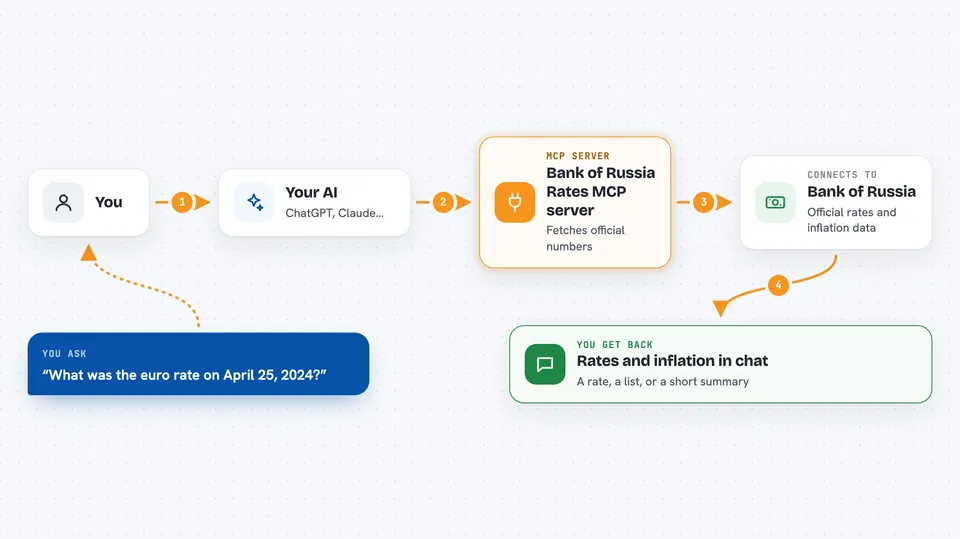
You ask your AI a question, like what the euro rate was on a certain date. Your AI passes that question to this helper. The helper then contacts the Bank of Russia's public data pages and pulls back the official numbers. Your AI reads the answer and shows it to you in the chat, usually as a short list or a small table. You do not need an account or a password for any of this.
 Click to zoom
What you can do with it
- Look up the official exchange rate for a currency on a specific date
- Get a series of daily rates over a period of up to about a year
- Check the Bank of Russia key interest rate for a range of dates
- See monthly inflation figures for recent years
- Get a quick snapshot with the key rate, main currencies, and inflation together
Try asking your AI
- “What was the official euro rate on April 25, 2024?”
- “Show me the daily US dollar to ruble rate for the last 90 days.”
- “What is the current key interest rate in Russia?”
- “Give me the latest key rate, dollar, euro, yuan, and inflation in one summary.”
What it gives back to you
You get back plain answers in the chat: a single rate for a date, a list of daily rates, a series of key rate values, or monthly inflation percentages. The snapshot tool returns a short combined view with the key rate plus the dollar, euro, and yuan rates and inflation. Everything comes as text you can read right away, and you can ask your AI to turn it into a table or a simple chart.
Before you start
What you need
- An AI app that supports MCP servers, like Claude Desktop, Cursor, or Claude Code
- Python installed on your computer, plus pipx or uv to install the helper
Good to know
The data comes from public Bank of Russia pages and is unofficial, so if the bank changes its website layout, some answers may stop working until the helper is updated.
Install it with your AI
Add Bank of Russia Rates MCP server to your AI, no technical skills needed
You don't install anything by hand. You copy one prompt, paste it into an AI that can work on your computer, and it checks, installs and connects the server for you, asking you when it needs something.
Sign in to get the install prompt
Members get a ready-made prompt that lets the Claude desktop app check Bank of Russia Rates MCP server, install it and connect it for them, step by step. You don't need any technical skills: you copy, paste and answer a few questions. Your connected AI can also find and install any of the 4,361 MCP servers here for you.
Who it's for
Anyone who works with Russian rubles, prices, or economic reports and wants quick official numbers without visiting the central bank's website.