
MCP server · Research
Seerr MCP server
by jhomen368
Lets your AI search, request, and manage movies and TV shows in your Seerr or Overseerr setup.
This is a small helper that connects your AI assistant to Seerr or Overseerr, the tools people use to ask for movies and TV shows on a home media server. Once it is set up, you can just type what you want in plain words and the AI will look it up or put in the request for you. It is handy if you run Plex, Jellyfin, or Emby at home and are tired of clicking through menus.
What is an MCP server? The 30-second version
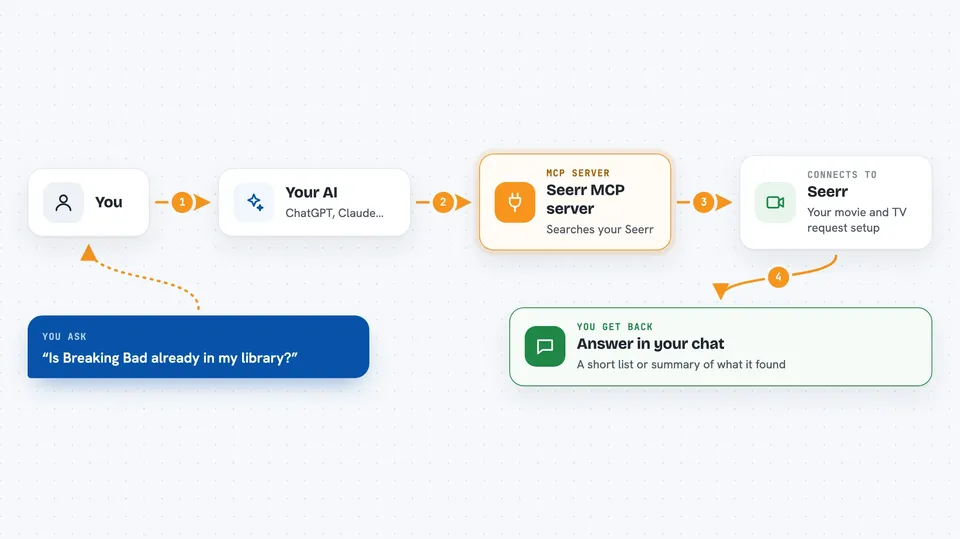
On its own, your AI can only chat. It cannot see your Seerr account or ask for a movie. An MCP server is a little helper program that gives your AI one new skill, and here that skill is talking to your Seerr or Overseerr instance. You ask in normal words, the AI passes the question to this helper, and the helper goes and does the work in Seerr.
What this MCP server does
You type something like check if this show is already in my library. Your AI sends that to this helper. The helper talks to your Seerr or Overseerr instance using your URL and API key, searches the catalog, and checks what is already requested or available. Then it hands the answer back to your AI, which shows it to you in the chat as a short list or summary.
 Click to zoom
What you can do with it
- Search for a movie or TV show by name
- Check many titles at once to see which are already requested
- Request a movie or specific seasons of a show
- List, approve, or decline pending requests
- Get details about a title, like its description or ID
- See which Radarr and Sonarr servers are connected
- Look up quality profiles and folders for a server
Try asking your AI
- “Search for Inception in Seerr”
- “Check if these 50 anime titles have already been requested”
- “Request Breaking Bad, all seasons”
- “Show me all pending media requests”
- “Approve request ID 123”
What it gives back to you
You get answers right in the chat. Sometimes that is a short list of titles with a pass or blocked note, sometimes a summary with counts like how many were already requested. It can also show details about a title or a list of your pending requests. When you ask it to request or approve something, it tells you what it changed.
Before you start
What you need
- A Seerr or Overseerr account you can log into
- The web address of your Seerr or Overseerr instance
- An API key from your Seerr or Overseerr settings (Settings, then General)
- Node.js 18 or newer if you install it on your own computer
Good to know
It can change things in your Seerr account, like adding or approving requests, so double-check before you tell it to go ahead.
Install it with your AI
Add Seerr MCP server to your AI, no technical skills needed
You don't install anything by hand. You copy one prompt, paste it into an AI that can work on your computer, and it checks, installs and connects the server for you, asking you when it needs something.
Sign in to get the install prompt
Members get a ready-made prompt that lets the Claude desktop app check Seerr MCP server, install it and connect it for them, step by step. You don't need any technical skills: you copy, paste and answer a few questions. Your connected AI can also find and install any of the 4,609 MCP servers here for you.
Who it's for
People who run a home media server with Plex, Jellyfin, or Emby and want to manage requests by just typing.


