MCP server · Developer tools
mcp-architect MCP server
by kannajune
Lets your AI read the structure of a code project on your computer and explain how it fits together.
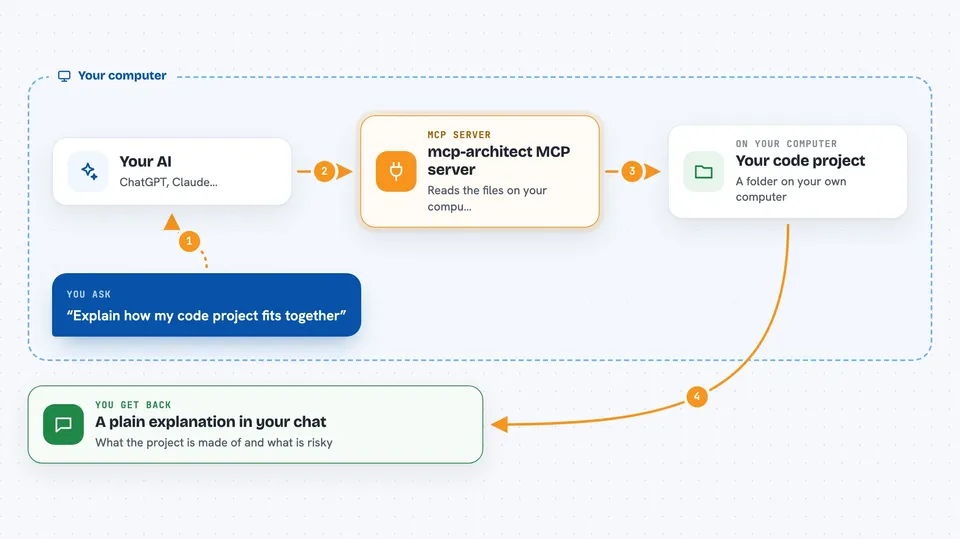
This is a small helper that lets your AI assistant look at a code project on your own computer and describe how it is built. Instead of you pasting a folder list and hoping the AI guesses, it reads the project itself. It is handy for developers and anyone who has to work with a codebase they did not write.
What is an MCP server? The 30-second version
On its own, your AI can only chat with you. An MCP server is a small helper program you attach to your AI that gives it a new skill. This one gives your AI the skill of reading a code project on your machine and mapping its structure. Once it is connected, you can ask your AI about a project and it will use this helper to look things up for you.
What this MCP server does
You point your AI at a folder on your computer that holds a code project. Your AI passes that folder to this helper, which reads the files locally and works out the languages used, the main entry points, and how the files import each other. It also spots the biggest and most tangled files, and flags any circular dependencies. Your AI then explains all of that back to you in plain words in the chat.
 Click to zoom
What you can do with it
- Get a plain overview of a project: languages, frameworks, size, and entry points
- See which files depend on which, and spot circular dependencies
- Find out what would break if you changed a particular file
- List the largest, most complex, or most-changed files
- Ask for a deep dive on any folder or file, including its classes and functions
Try asking your AI
- “Use the architect tools to give me an overview of ~/code/my-app”
- “Show me the dependency graph for this project and any circular dependencies”
- “What breaks if I change the file app/core/registry.py?”
- “Which files in this project are the biggest risks?”
What it gives back to you
You get back plain text answers in the chat: a summary of languages and frameworks, a list of the most depended-on files, any circular dependencies it found, and a ranked list of risky files. For a deep dive it lists classes, functions, and outside libraries used. Nothing is written to your project, it only reads and reports.
Before you start
What you need
- Python installed on your computer
- An MCP client such as Claude Desktop, Cursor, Windsurf, or Cline
- A code project saved as a folder on your computer
Good to know
It reads the code in the folder you point it at, so only aim it at projects you are allowed to look at.
Install it with your AI
Add mcp-architect MCP server to your AI, no technical skills needed
You don't install anything by hand. You copy one prompt, paste it into an AI that can work on your computer, and it checks, installs and connects the server for you, asking you when it needs something.
Sign in to get the install prompt
Members get a ready-made prompt that lets the Claude desktop app check mcp-architect MCP server, install it and connect it for them, step by step. You don't need any technical skills: you copy, paste and answer a few questions. Your connected AI can also find and install any of the 4,361 MCP servers here for you.
Who it's for
Developers, tech leads, and anyone who has to understand or review a code project they did not write themselves.