
MCP server · Research
Briefing MCP server
by jshelley
Your AI can pull hourly news briefings on AI, markets, sports, world news and more, ranked by an editor.
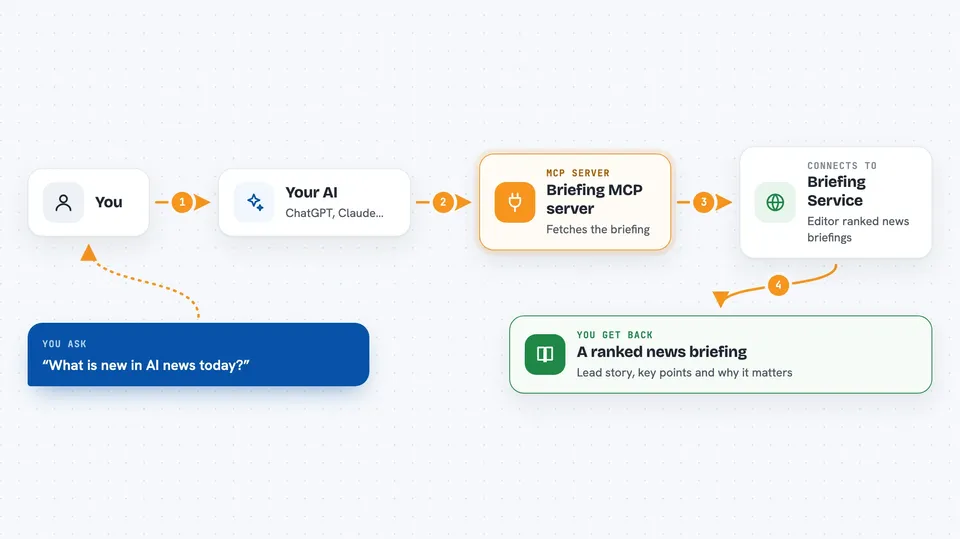
This is a helper that lets your AI fetch ready-made news briefings. Every hour, a service called Briefing Service reads about 100 news feeds per topic and ranks the stories, and this helper passes those briefings to your AI when you ask. It is handy if you want a quick, sorted catch-up on a topic without opening ten websites yourself.
What is an MCP server? The 30-second version
On its own, your AI can only chat with you using what it already knows. An MCP server is a small helper program that gives your AI a new skill or a connection to an outside service. This one connects your AI to Briefing Service, a site that publishes hourly news briefings. Once it is connected, your AI can look up the latest briefing on a topic and read it back to you when you ask.
What this MCP server does
You ask your AI something like "what is new in AI news today?" Your AI then uses this helper, which sends a request to the Briefing Service website over the internet. The service replies with the current briefing for that topic: a lead story, a ranked list of stories, a short why-it-matters note and key points. Your AI hands that back to you in the chat, already sorted by an editor rather than by you.
 Click to zoom
What you can do with it
- List all the briefing topics available and what they cost
- Get the full ranked briefing for a topic like AI news or markets
- Get just the headlines and one-line summaries for a quick scan
- See every candidate story the service looked at, including ones it did not pick
- Download the briefing as a small e-ink style page image
- Read the daily Grants and Funding edition with deadlines and amounts
- Read the daily simple-Spanish news edition with a glossary
Try asking your AI
- “What is the latest AI news briefing?”
- “Give me the headlines from the markets briefing today”
- “Show me the grants briefing with deadlines and amounts”
- “What stories did the world briefing consider but not pick?”
What it gives back to you
You get back text in the chat: a lead story, a ranked list of stories with short explanations, a why-it-matters note and key points. The headlines option gives you just titles and one-liners. The candidates option gives you the full list of stories the service saw this hour, with links and outlets, including ones it skipped. The page option gives you a small black-and-white image of the briefing.
Before you start
What you need
- The Claude desktop app, Claude Code, Cursor or another app that supports MCP servers
- Node.js installed on your computer (the helper runs through npx)
- Nothing else to start: there is a free daily limit of 25 calls per day
- A paid Reader key only if you want unlimited reads (optional)
Good to know
The free plan allows only 25 calls per day per address, and after that you need a paid Reader key or pay per call, so keep an eye on how often you ask.
Install it with your AI
Add Briefing MCP server to your AI, no technical skills needed
You don't install anything by hand. You copy one prompt, paste it into an AI that can work on your computer, and it checks, installs and connects the server for you, asking you when it needs something.
Sign in to get the install prompt
Members get a ready-made prompt that lets the Claude desktop app check Briefing MCP server, install it and connect it for them, step by step. You don't need any technical skills: you copy, paste and answer a few questions. Your connected AI can also find and install any of the 4,609 MCP servers here for you.
Who it's for
Anyone who wants a fast, pre-sorted news catch-up, like busy office workers, analysts, writers and people who follow AI, markets or world news closely.




