MCP server · Coding
GhidrAssistMCP for Ghidra
by jtang613
Lets your AI assistant look inside Ghidra and help you analyze the software you are reverse engineering.
GhidrAssistMCP is a small add-on for Ghidra, the tool many people use to take apart software and see how it works. It lets an AI assistant like Claude or your own GhidrAssist client talk to Ghidra and answer questions about the file you have open. It is handy for anyone doing reverse engineering or security work who wants a bit of help reading code.
What is an MCP server? The 30-second version
On its own, your AI can only chat with you. An MCP server is a small helper program that gives your AI a new skill or a connection to another app. This one connects your AI to Ghidra, so the AI can look things up inside the program you are analyzing and do small tasks there for you when you ask. You stay in charge; the AI just gets a way to reach Ghidra.
What this MCP server does
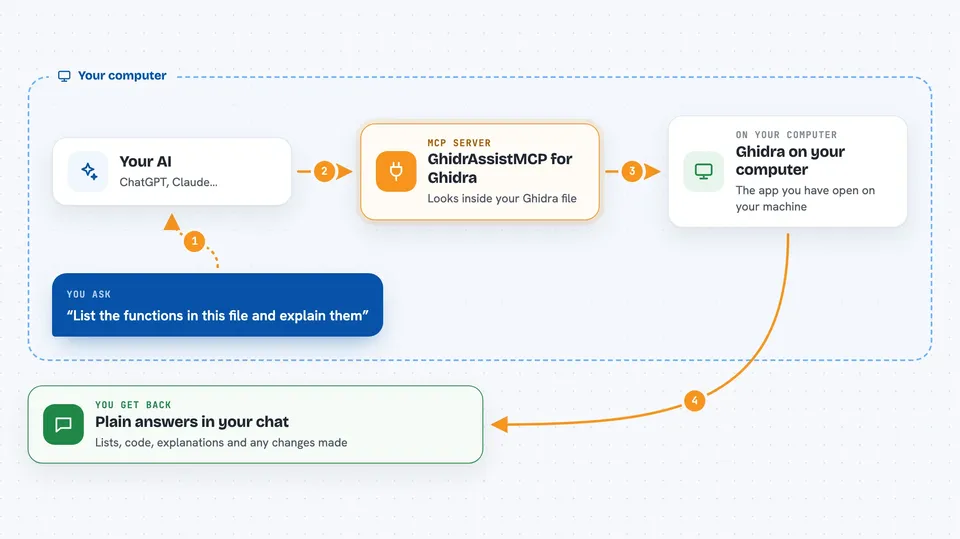
You ask your AI a question about the file you have open in Ghidra. The AI sends that request to this helper, which is running inside Ghidra. The helper looks at the program, finds the functions, strings, or code you asked about, and sends the answer back. Your AI then explains it to you in plain words in the chat. You can also ask it to make small changes, like renaming a function or adding a comment.
 Click to zoom
What you can do with it
- List the functions, strings, imports, and exports in the file you have open
- Show the decompiled or disassembled code at a specific address
- Explain what a function does and what variables it uses
- Find where a function or address is used elsewhere in the program
- Rename functions, variables, and data so the code is easier to read
- Add or read comments at addresses you are studying
- Run Ghidra's auto analysis and check its status
Try asking your AI
- “List all the functions in this binary and tell me which ones look interesting”
- “Show me the decompiled code at address 0x00401000 and explain what it does”
- “Find every place that calls the function named decrypt_string”
- “Rename function FUN_00401a20 to parse_config and add a comment saying so”
What it gives back to you
You get answers in the chat: lists of functions or strings, code snippets, short explanations, and summaries of what the AI found. If you asked it to change something, like a rename or a comment, it tells you what it changed. Numbers and addresses come back as plain text you can read.
Before you start
What you need
- Ghidra 11.4 or newer installed on your computer
- An MCP client, such as GhidrAssist, that can connect to Ghidra
- The GhidrAssistMCP extension installed and enabled in Ghidra
Good to know
Some tools can change your Ghidra project or run scripts, so only enable the ones you trust and double-check changes before saving.
Install it with your AI
Add GhidrAssistMCP for Ghidra to your AI, no technical skills needed
You don't install anything by hand. You copy one prompt, paste it into an AI that can work on your computer, and it checks, installs and connects the server for you, asking you when it needs something.
Sign in to get the install prompt
Members get a ready-made prompt that lets the Claude desktop app check GhidrAssistMCP for Ghidra, install it and connect it for them, step by step. You don't need any technical skills: you copy, paste and answer a few questions. Your connected AI can also find and install any of the 4,609 MCP servers here for you.
Who it's for
Reverse engineers, security analysts, and anyone who uses Ghidra and wants an AI assistant to help read and understand the code.