MCP server · Coding
Apktool MCP server
by zinja-coder
Let your AI open up Android app files, read the code inside, and help you understand or change them.
This is a helper program that connects your AI assistant to Apktool, a well known free tool for taking Android app files apart. Once it is set up, you can ask your AI to open an app file, show you what is inside, and explain it in plain words. It is handy for security researchers, students, and anyone curious about how an Android app is built.
What is an MCP server? The 30-second version
On its own, your AI can only chat with you. An MCP server is a small helper program that gives your AI a new skill or a connection to another tool. This one connects your AI to Apktool, the tool that unpacks Android app files. So when you ask about an app, your AI can actually go look inside it and answer with real details instead of guessing.
What this MCP server does
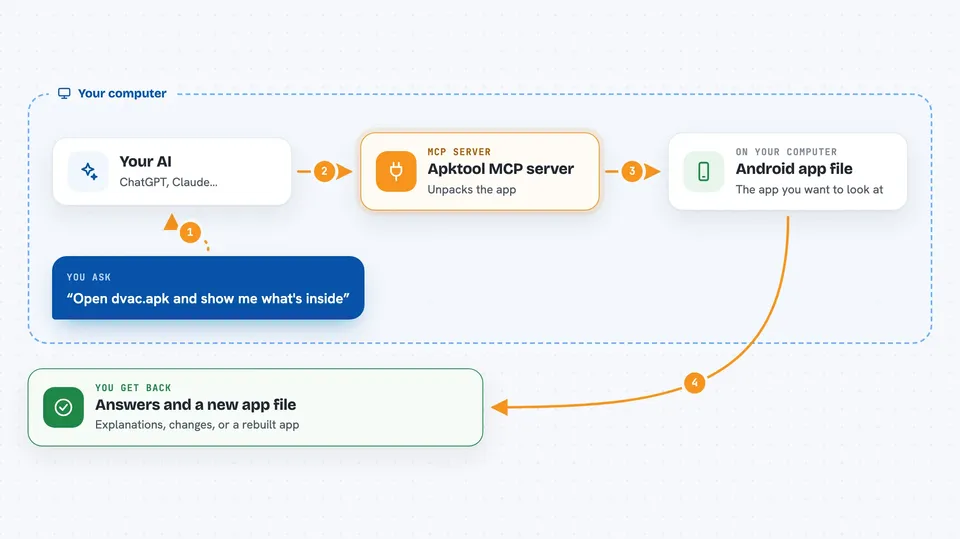
You point your AI at an Android app file and ask it to open it up. Your AI passes that request to this helper program, which runs Apktool behind the scenes. Apktool unpacks the app into readable pieces, like its settings file, its code, and its images. The helper then hands those pieces back to your AI, which reads them and explains what it found or makes the change you asked for. When you are ready, it can also pack everything back into a working app file.
 Click to zoom
What you can do with it
- Unpack an Android app file into readable code and resources
- Show the app's settings file and flag risky permissions
- List and read the code files inside the app
- Search all files for words like passwords or web addresses
- Edit a code file or a resource file
- Repack the app into a new app file when you are done
- Clean up a project folder before rebuilding
Try asking your AI
- “Open the app file dvac.apk and create a project called dvac”
- “Show me the AndroidManifest.xml and point out any dangerous permissions”
- “Search all files in the project for hardcoded web addresses or IP numbers”
- “Add a log line at the start of onCreate in MainActivity.smali”
What it gives back to you
You get answers in the chat: lists of files, the contents of a settings or code file, search results, or a short explanation of what your AI found. If you asked it to change something, it tells you what it changed. If you asked it to repack the app, it produces a new app file you can use.
Before you start
What you need
- Apktool installed on your computer and set up so the command apktool works
- The uv tool installed (the setup guide shows a one line install command)
- The Claude desktop app or another AI app that supports MCP servers
- An Android app file you are allowed to look at, such as your own app
Good to know
This tool can change and repack app files, so only use it on apps you own or have clear permission to inspect, and keep a backup of the original file.
Install it with your AI
Add Apktool MCP server to your AI, no technical skills needed
You don't install anything by hand. You copy one prompt, paste it into an AI that can work on your computer, and it checks, installs and connects the server for you, asking you when it needs something.
Sign in to get the install prompt
Members get a ready-made prompt that lets the Claude desktop app check Apktool MCP server, install it and connect it for them, step by step. You don't need any technical skills: you copy, paste and answer a few questions. Your connected AI can also find and install any of the 4,609 MCP servers here for you.
Who it's for
Security researchers, students learning about Android apps, and developers who want to inspect or modify their own app files with AI help.