MCP server · API
OpenAPI Schema Explorer MCP server
by kadykov
Let your AI read and explain parts of a big API spec without loading the whole file.
This is a small helper that lets your AI look inside an API description file, the kind developers call an OpenAPI or Swagger spec. Instead of dumping the whole thing into the chat, your AI can peek at just the piece you ask about. It is handy if you work with developers and keep hearing about endpoints, paths, or schemas.
What is an MCP server? The 30-second version
On its own, your AI can only chat with you. An MCP server is a small helper program that gives your AI a new skill or a connection to something. This one connects your AI to an API description file, either on your computer or at a web address. Once it is set up, your AI can look up specific parts of that file for you when you ask.
What this MCP server does
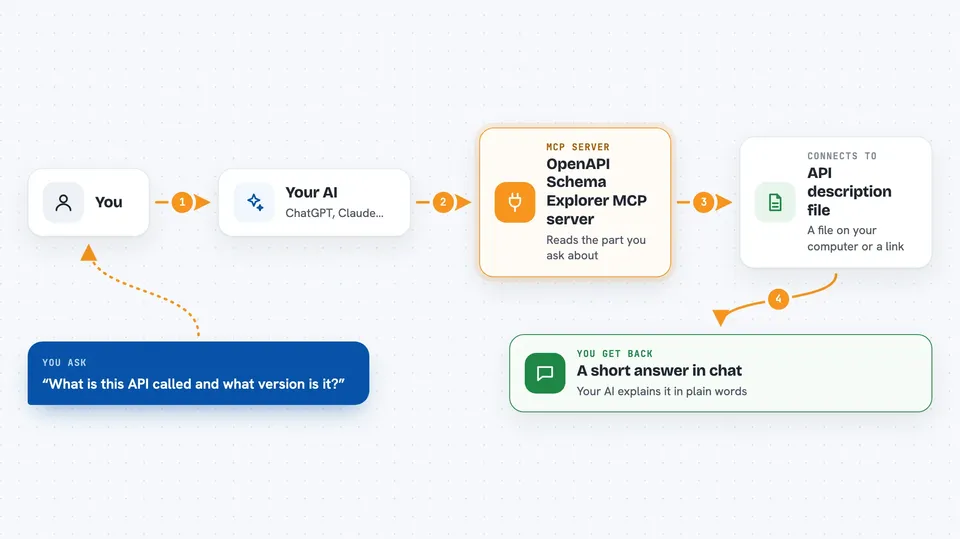
You point this helper at one API description file, either a file on your computer or a link. Then you ask your AI something about that API. The AI uses this helper to open just the part you asked about, like one path or one schema. The helper sends that small piece back, and your AI explains it to you in plain words. Nothing gets changed in the file, it only reads.
 Click to zoom
What you can do with it
- Ask what an API is about and see its title and version
- List all the paths (the web addresses) an API offers
- See which actions are allowed on a path, like GET or POST
- Look up the details of one specific action on a path
- List the schemas (the shapes of data) the API uses
- Read the details of one schema by name
- Fetch several paths or schemas at once to compare them
Try asking your AI
- “What is this API called and what version is it?”
- “List all the paths in this API spec.”
- “Show me the details of the GET method on the users path.”
- “What does the User schema look like?”
What it gives back to you
You get back a short answer or a small structured block in the chat, not the whole file. For lists, you see a simple list of names, like paths or schemas. For details, you see the exact piece of the spec, in JSON or YAML, that your AI can then explain. It never changes the file, only reads from it.
Before you start
What you need
- An MCP client like Claude Desktop, Cline, or Windsurf
- One OpenAPI (v3.0) or Swagger (v2.0) spec file, either on your computer or at a web link
- Node.js 18 or newer if you use the npx method, or Docker if you use the Docker method
Good to know
It only reads the spec file, so it will not change or delete anything, but the spec itself may contain private details about your company's systems.
Install it with your AI
Add OpenAPI Schema Explorer MCP server to your AI, no technical skills needed
You don't install anything by hand. You copy one prompt, paste it into an AI that can work on your computer, and it checks, installs and connects the server for you, asking you when it needs something.
Sign in to get the install prompt
Members get a ready-made prompt that lets the Claude desktop app check OpenAPI Schema Explorer MCP server, install it and connect it for them, step by step. You don't need any technical skills: you copy, paste and answer a few questions. Your connected AI can also find and install any of the 4,609 MCP servers here for you.
Who it's for
People who work alongside developers, like product managers, technical writers, or support folks, and want plain answers about an API without reading the whole spec.