MCP server · Developer tools
Kitsune MCP server
by kaiser-data
Lets your AI test and reload MCP servers it is building, and borrow tools from thousands of other servers mid-chat.
Kitsune is a helper for people who build or try out MCP servers with an AI assistant. It lets the AI start a server, use its tools, then reload it after you change the code, all without restarting your chat app. It is handy if you are a developer or a curious tinkerer who wants to test servers quickly.
What is an MCP server? The 30-second version
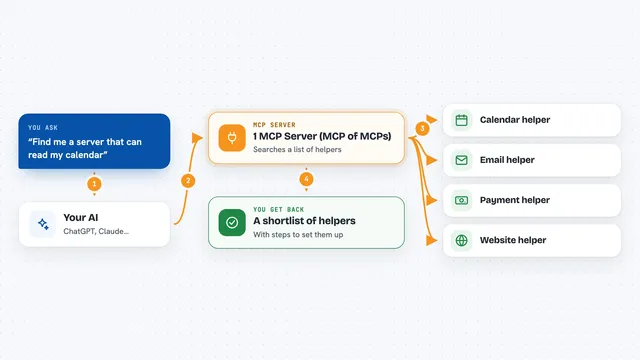
On its own, your AI can only chat. An MCP server is a small helper program that gives your AI a new skill or a connection to an app or service. Kitsune is itself an MCP server, but a special one: it lets your AI start other MCP servers, use their tools, and reload them. So your AI can test the server it is building, or borrow a tool from a server you have not set up, all inside the same conversation.
What this MCP server does
You ask your AI to connect to a server, for example the one you are working on. Kitsune starts that server and makes its tools available to your AI. You or the AI then edit the code, ask Kitsune to reload, and the AI can call the tool again with the new code, without restarting your chat app. Kitsune can also search thousands of public servers, mount one of them for a single task, and then drop it when you are done.
What you can do with it
- Start your own MCP server and test its tools inside the chat
- Reload a server after you change its code, without restarting your app
- Search over 130,000 servers from several public registries
- Mount just one tool from another server for a single task
- Run community npm or PyPI packages in a Docker container for safety
- Add an API key mid-session without restarting
- Check the status of connected servers and your session
Try asking your AI
- “Connect to my server with uvx --from . my-mcp-server and call the summarize tool on https://example.com”
- “Search for a web scraping server and mount only its scrape_url tool”
- “Reload the dev server and call summarize again with the same URL”
- “Find a PDF text extraction server, mount it with confirmation, and extract text from report.pdf”
What it gives back to you
You get answers and results from the tools you call, shown right in the chat. Kitsune also tells you which servers are connected and what tools are available. When you reload, it confirms the server restarted on fresh code. Search results come back as a list of servers you can mount.
Before you start
What you need
- Python 3.12 or newer
- uv (a tool for running Python programs)
- Node.js and npx if you want to use npm-based servers
- Docker (optional, used to run community servers in a safe container)
Good to know
It can run commands and community code on your computer, so only approve connect and mount actions you trust, and do not use it with production admin or billing credentials.
Install it with your AI
Add Kitsune MCP server to your AI, no technical skills needed
You don't install anything by hand. You copy one prompt, paste it into an AI that can work on your computer, and it checks, installs and connects the server for you, asking you when it needs something.
Sign in to get the install prompt
Members get a ready-made prompt that lets the Claude desktop app check Kitsune MCP server, install it and connect it for them, step by step. You don't need any technical skills: you copy, paste and answer a few questions. Your connected AI can also find and install any of the 4,609 MCP servers here for you.
Who it's for
Developers and technical tinkerers who build or test MCP servers, or who want to try tools from many servers without adding them all to their config.