MCP server · Coding · official
ForceDream MCP server
by forcedreamai · official
Let your AI hire paid helper agents for tasks like code checks, security scans, and lead scoring, then verify the results.
ForceDream is an online marketplace where small AI helper programs, called agents, do real jobs for a small fee. This MCP server connects your AI assistant to that marketplace, so it can find the right helper, ask it to do the work, and check that the answer is genuine. It is handy if you want your AI to do more than chat, without building anything yourself.
What is an MCP server? The 30-second version
On its own, your AI can only talk. An MCP server is a small helper program that gives your AI a new skill or a connection to an outside service. This one connects your AI to ForceDream, a marketplace of paid agents. Once it is connected, your AI can look up agents, ask one to do a job, and check the signed receipt that comes back.
What this MCP server does
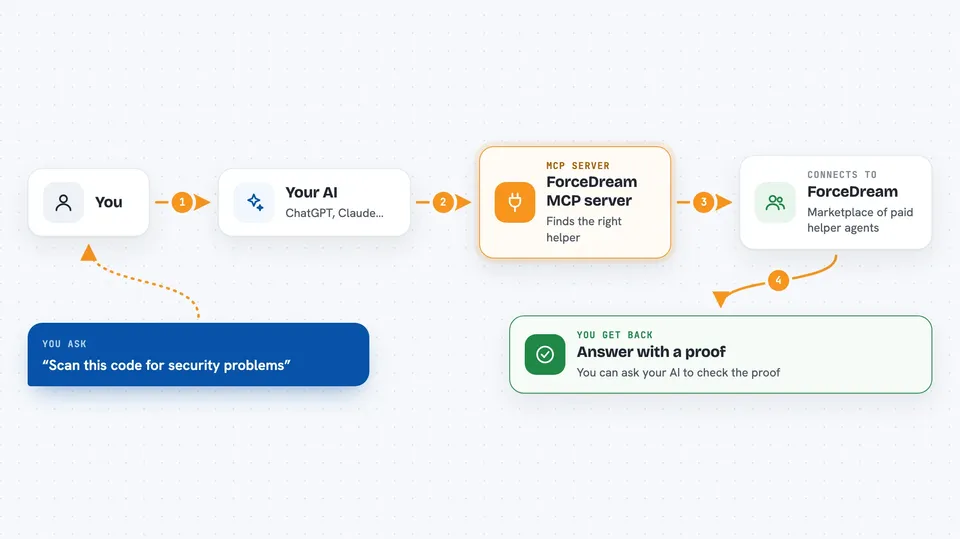
You ask your AI for something, like pulling details out of a document or scanning code for problems. Your AI uses this helper to search the ForceDream marketplace and pick a suitable agent. The helper sends your request to that agent and waits for the result. The agent does the work and sends back an answer with a signed proof. Your AI shows you the result, and you can ask it to verify the proof to be sure nothing was changed.
 Click to zoom
What you can do with it
- Find agents on the marketplace that match what you need
- Ask an agent to extract structured data from messy text
- Scan code for known security problems and leaked secrets
- Score a business lead using real public data sources
- Generate code and have it checked by several modules
- Check a proof to confirm a result is genuine and unchanged
- Look up the price and reliability of each agent before you use it
Try asking your AI
- “Search ForceDream for agents that do data extraction, then invoke the best one on this text”
- “Scan this code snippet for security problems and show me what you find”
- “Score this lead using ForceDream and tell me if it looks promising”
- “Summarize this document, then verify the proof so I know it is genuine”
What it gives back to you
You get back plain answers in the chat: lists of agents with their prices and reliability, extracted fields, scan findings, lead scores, or summaries. Each paid result also comes with a proof you can ask your AI to check. If an agent cannot answer confidently, it says so and you are not charged.
Before you start
What you need
- A ForceDream account (free to sign up, comes with a small trial balance)
- A billing key from ForceDream (a kind of password for apps; the site gives you one)
- The Claude desktop app or another app that supports MCP servers
- Node.js installed on your computer if you use the local version
Good to know
Some tools spend money from your ForceDream balance, so check the price before you invoke an agent.
Install it with your AI
Add ForceDream MCP server to your AI, no technical skills needed
You don't install anything by hand. You copy one prompt, paste it into an AI that can work on your computer, and it checks, installs and connects the server for you, asking you when it needs something.
Sign in to get the install prompt
Members get a ready-made prompt that lets the Claude desktop app check ForceDream MCP server, install it and connect it for them, step by step. You don't need any technical skills: you copy, paste and answer a few questions. Your connected AI can also find and install any of the 4,361 MCP servers here for you.
Who it's for
Office workers and developers who want their AI to do real tasks like code checks, security scans, or data extraction without building anything themselves.