MCP server · Developer tools
Depwire MCP server
by depwire
Lets your AI see how your code files connect, so it knows what breaks before it changes anything.

Depwire is a helper that maps out how the pieces of a code project are connected. It reads your files and builds a picture of which functions, classes and imports depend on each other. It is handy for developers who use an AI assistant to change code and want to avoid breaking things they did not know about.
What is an MCP server? The 30-second version
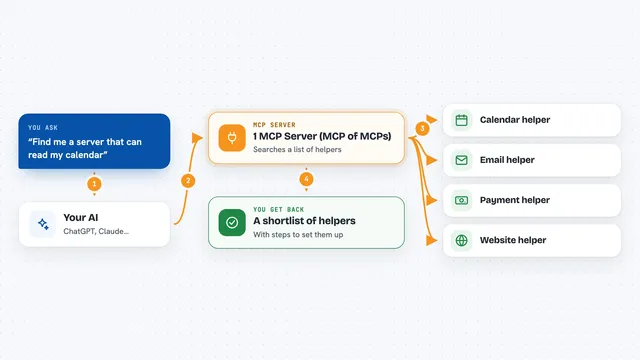
On its own, your AI can only chat with you. An MCP server is a small helper program that gives your AI a new skill or a connection to a tool. This one connects your AI to Depwire, which has already mapped your code project. So when you ask about your code, the AI can look things up in that map instead of guessing.
What this MCP server does
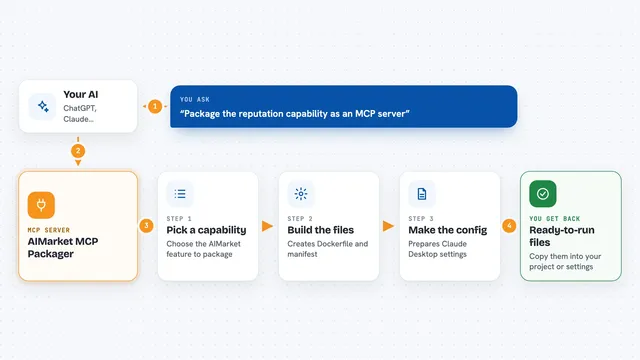
You ask your AI a question about your code, like what would break if you delete a file. The AI calls this helper, and the helper looks at the dependency map it built from your project. It finds the exact files and symbols that depend on the thing you want to change. Then it hands that list back to the AI, which explains it to you in the chat. Nothing is guessed, because the map comes from reading your actual code.
 Click to zoom
What you can do with it
- Find out which files break if you delete or rename something
- Simulate a change before you actually make it
- Scan your project for security problems
- Get a health score for your code structure
- Find code that is never used anywhere
- Compare how your code changed between two commits
- See a picture of how all your files connect
Try asking your AI
- “What breaks if I delete src/utils/encode.ts?”
- “Run a security scan on this project and tell me the worst findings.”
- “Show me the unused functions in this codebase.”
- “Compare the dependency graph between main and my feature branch.”
What it gives back to you
You get back plain answers in the chat: lists of affected files, broken imports, a health score, or security findings. For a simulation, it tells you how many files are affected and which ones. For a security scan, it groups findings by how serious they are. Everything shows up as text you can read and act on.
Before you start
What you need
- Node.js installed on your computer
- The depwire-cli package installed (npm install -g depwire-cli)
- An MCP-compatible AI tool like Claude Desktop
Good to know
It reads your whole code project to build the map, so point it at code you are allowed to share with your AI tool.
Install it with your AI
Add Depwire MCP server to your AI, no technical skills needed
You don't install anything by hand. You copy one prompt, paste it into an AI that can work on your computer, and it checks, installs and connects the server for you, asking you when it needs something.
Sign in to get the install prompt
Members get a ready-made prompt that lets the Claude desktop app check Depwire MCP server, install it and connect it for them, step by step. You don't need any technical skills: you copy, paste and answer a few questions. Your connected AI can also find and install any of the 4,361 MCP servers here for you.
Who it's for
Developers and technical teams who use an AI assistant to edit code and want to avoid breaking things they cannot see.