
MCP server · Coding
MartinLoop MCP server
by Keesan12
Keep your AI coding agent on a leash: budgets, checks, and a clear outcome for each run.
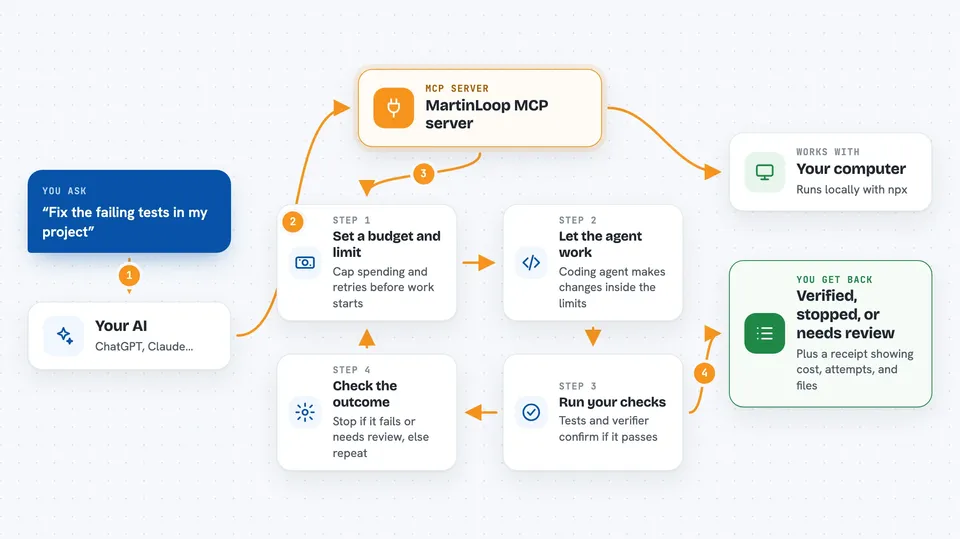
MartinLoop is a helper that watches over your AI coding agent while it works. It sets limits on how much it can spend and how many times it can retry, checks the work before calling it done, and gives you a simple report at the end. It is handy if you let an AI write or fix code and want to stop it from going off the rails.
What is an MCP server? The 30-second version
On its own, your AI can only chat. An MCP server is a small helper program that gives your AI a new skill or a connection to an app or service. Here, the MartinLoop MCP server connects your AI to MartinLoop, so your AI can start governed coding runs, check budgets, and look at past results for you. You just ask in plain words, and the helper does the technical part.
What this MCP server does
You tell your AI what coding job you want done, like 'fix the tests' or 'add a feature'. Your AI uses the MartinLoop helper to set up a run with a spending cap and a retry limit. The helper then lets your coding agent work inside those limits, runs your chosen checks, and stops if something goes wrong. When it is done, it gives you a clear result: verified, stopped, or needs review, along with a receipt you can look at.
 Click to zoom
What you can do with it
- Start a governed coding run with a budget and iteration cap
- Run a verifier command to check if the work passes
- See a summary of the latest run and its outcome
- Check how much money was spent on a run
- Look at past runs and their receipts
- Validate the integrity of a run's stored evidence
- Generate a shareable proof card for a run
What it gives back to you
You get back a clear outcome: VERIFIED, STOPPED, or NEEDS REVIEW. You also see details like how much was spent, how many attempts were made, which checks passed or failed, and what files changed. Sometimes it gives you a shareable proof card or a receipt file you can look at.
Before you start
What you need
- Node.js 18 or newer (to run the npx command)
- A coding agent like Claude Code, Codex, or Gemini CLI (or an OpenAI-compatible model)
- For hosted sync: a MartinLoop API token and telemetry endpoint (optional)
Good to know
It can run commands and change files in your project, so make sure you trust the coding agent and set sensible budget and iteration limits.
Install it with your AI
Add MartinLoop MCP server to your AI, no technical skills needed
You don't install anything by hand. You copy one prompt, paste it into an AI that can work on your computer, and it checks, installs and connects the server for you, asking you when it needs something.
Sign in to get the install prompt
Members get a ready-made prompt that lets the Claude desktop app check MartinLoop MCP server, install it and connect it for them, step by step. You don't need any technical skills: you copy, paste and answer a few questions. Your connected AI can also find and install any of the 4,609 MCP servers here for you.
Who it's for
Developers, team leads, or anyone who uses AI coding agents and wants to keep them from running wild.



