MCP server · Developer tools
Design Token Bridge MCP server
by kenneives
Turn your design colors, fonts and spacing into ready-made themes for Android, iOS, Tailwind and CSS.
This is a small helper that takes the design values you already have (colors, fonts, spacing, shadows) and rewrites them into the format each platform expects. If you work on a website or an app and you keep copying the same colors into different files, this saves you that boring part. It is handy for designers, front-end developers and anyone who moves a design between Figma, Tailwind and a mobile app.
What is an MCP server? The 30-second version
On its own, your AI can only chat. An MCP server is a small helper program that gives your AI a new skill, here the skill of translating design tokens. Once it is connected, your AI can read your design values and produce the theme files for Material 3, SwiftUI, Tailwind or plain CSS when you ask. You stay in the chat; the helper does the conversion work behind the scenes.
What this MCP server does
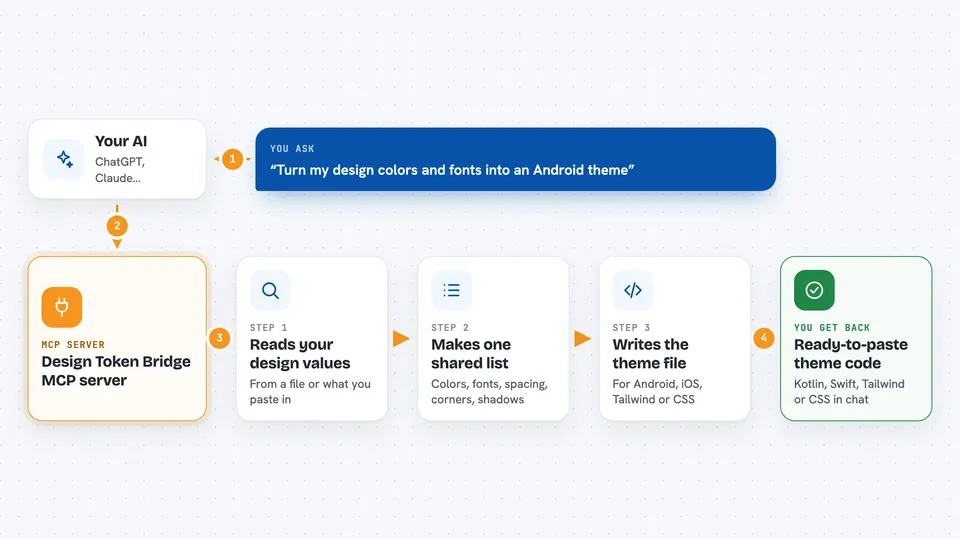
You paste your design values into the chat, or point your AI at a file like your tailwind.config.js or a CSS file. The AI sends that to this helper, which reads the colors, fonts, spacing, rounded corners and shadows and turns them into one common list. Then you tell the AI which platform you want, and the helper writes the matching theme file for you. It can also check whether your text colors are readable against your background colors, using the WCAG rules. You get the finished code back in the chat, ready to copy into your project.
 Click to zoom
What you can do with it
- Read your Tailwind config and pull out all your colors, fonts and spacing
- Read a CSS file and collect your custom properties like --color-* and --space-*
- Read Figma Variables or a W3C DTCG JSON file and turn them into one shared list
- Generate a Material 3 theme in Kotlin for Android apps
- Generate a SwiftUI theme in Swift for iPhone and iPad apps
- Generate a Tailwind config or a CSS variables file for the web
- Check your color pairs against WCAG AA or AAA contrast rules
Try asking your AI
- “Use extract_tokens_from_tailwind with the contents of my tailwind.config.js”
- “Take those tokens and generate a Material 3 theme for Android”
- “Generate a SwiftUI theme with liquidGlass turned on for iOS”
- “Run validate_contrast on those tokens at AAA level”
What it gives back to you
You get back text you can paste straight into your project: a Kotlin theme file, a Swift file, a tailwind.config.js block, or a CSS :root block with light and dark mode. For contrast checks you get a short report with pass or fail and the actual ratio numbers. Everything shows up as a normal message in the chat, so you can read it, copy it, or ask the AI to tweak it.
Before you start
What you need
- Node.js installed on your computer (the free runtime that runs this helper)
- The Claude Code app or another AI tool that supports MCP servers
- Your design values, either pasted in or in a file like tailwind.config.js or a CSS file
Good to know
It only reads the files you paste or point it at and writes new theme text back, so nothing in your project is changed unless you copy the result in yourself.
Install it with your AI
Add Design Token Bridge MCP server to your AI, no technical skills needed
You don't install anything by hand. You copy one prompt, paste it into an AI that can work on your computer, and it checks, installs and connects the server for you, asking you when it needs something.
Sign in to get the install prompt
Members get a ready-made prompt that lets the Claude desktop app check Design Token Bridge MCP server, install it and connect it for them, step by step. You don't need any technical skills: you copy, paste and answer a few questions. Your connected AI can also find and install any of the 4,361 MCP servers here for you.
Who it's for
Designers and front-end or mobile developers who move a design system between Figma, Tailwind, Android and iOS.