MCP server · Health and learning
Arvo MCP server
by khaoss85
Let your AI look up your Arvo workouts, personal records and body progress, and make small changes for you.
This is a small helper that connects your AI assistant to Arvo, an online fitness coach. Once it is set up, you can just ask your AI about your training instead of clicking around a website. It is handy if you already use Arvo and want your workout info in the same chat window where you plan your day.
What is an MCP server? The 30-second version
On its own, your AI can only chat. It cannot see your gym log or your personal records. An MCP server is a small helper program that gives your AI a new skill or a connection to an app, and here that app is Arvo, your fitness coach. You install this helper once, and after that your AI can look things up in Arvo or make small changes there when you ask.
What this MCP server does
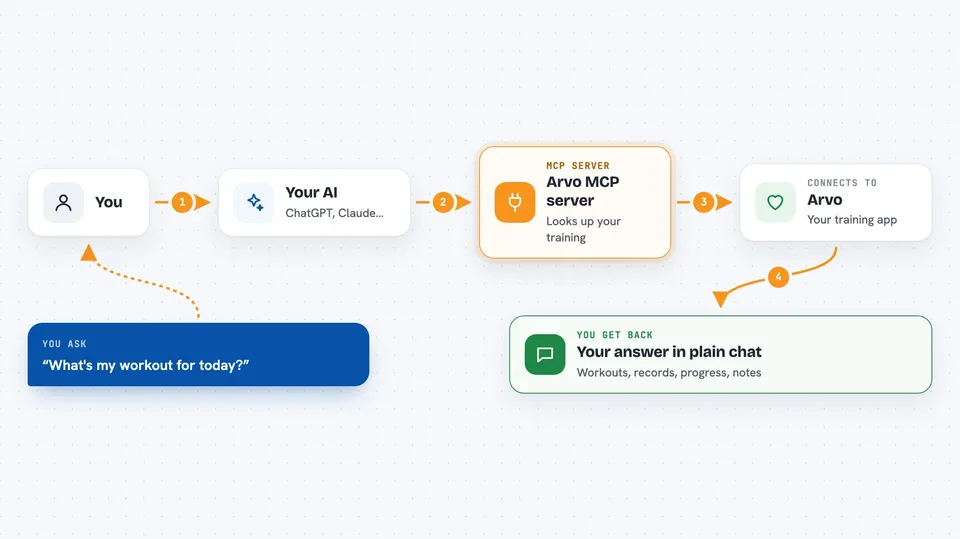
You type a question in your AI chat, like what your workout is today. Your AI passes that question to this helper, which runs quietly on your computer. The helper talks to the Arvo servers over the internet using your personal Arvo key. Arvo sends back your training data, and your AI turns it into a normal, readable answer for you. It also works the other way: if you ask it to change something, the helper sends that change to Arvo.
 Click to zoom
What you can do with it
- See the workout planned for today or any cycle day
- Look up your personal records for each exercise
- Check how a specific exercise, like bench press, is progressing
- Review your recent workouts and training statistics
- Track body composition changes over time
- Read notes from your coach and AI insights about your training
- Log a physical issue, skip an exercise, or ask for a swap
Try asking your AI
- “What's my workout for today?”
- “Show me my recent personal records”
- “How is my bench press progressing?”
- “What muscle groups am I training this week?”
What it gives back to you
You get answers in plain chat text: lists of workouts, numbers for your personal records, short summaries of your progress, and notes about your training. If you ask it to change something, it tells you what it changed. Everything shows up right in the conversation, no separate app needed.
Before you start
What you need
- A free Arvo account at arvo.guru
- An Arvo API key (a kind of password for apps; you create one in your Arvo settings on the web)
- Node.js 18 or newer installed on your computer
- An AI app that supports MCP, like Claude Desktop or Cursor
Good to know
Some tools can change your Arvo data, like skipping an exercise or updating your training phase, so check what the AI is about to do before you say yes.
Install it with your AI
Add Arvo MCP server to your AI, no technical skills needed
You don't install anything by hand. You copy one prompt, paste it into an AI that can work on your computer, and it checks, installs and connects the server for you, asking you when it needs something.
Sign in to get the install prompt
Members get a ready-made prompt that lets the Claude desktop app check Arvo MCP server, install it and connect it for them, step by step. You don't need any technical skills: you copy, paste and answer a few questions. Your connected AI can also find and install any of the 4,361 MCP servers here for you.
Who it's for
People who already use Arvo to track their gym training and want to ask their AI about workouts, records and progress without opening the website.