MCP server · Developer tools
KRDS Accessibility MCP server
by kim-dongho
Build Korean government style pages with accessibility rules built in, and get them checked before you finish.
This is a helper for people building Korean public sector web pages. It gives your AI ready-made KRDS components (Korea's government design system) that already follow the KWCAG 2.2 accessibility standard. It is handy if you work on government or public websites and need to keep accessibility in mind from the start.
What is an MCP server? The 30-second version
On its own, your AI can only chat with you. An MCP server is a small helper program that gives your AI a new skill or a connection to a service. This one connects your AI to the KRDS design system and a set of accessibility checks, so it can hand you proper page parts and test the pages you build. You just ask in plain words, and the helper does the technical work behind the scenes.
What this MCP server does
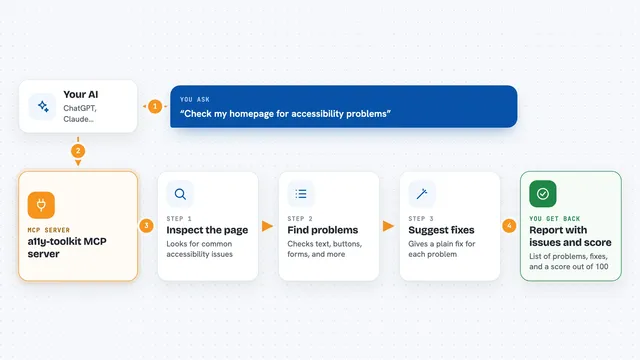
You ask your AI to build a page, for example a login page. The AI asks this helper for the right KRDS components and page templates. The helper only gives back markup if the required details are filled in, like labels and alt text, so nothing important is skipped. When the page is done, the helper opens it in a browser and checks it against the Korean accessibility rules, including real keyboard navigation and color contrast. If problems remain, it tells the AI what to fix and will not let the work finish until they are gone.
What you can do with it
- Get ready-made KRDS components with accessibility already handled
- Build full page templates like login, sign-up, search, and board pages
- Check a finished page against KWCAG 2.2 and get a numbered report
- Test real keyboard navigation, contrast, and hidden interactive elements
- Look up design tokens for colors, spacing, and font sizes
- Get a fix guide for known issues in the KRDS kit
- Stop the AI from ending work while accessibility problems remain
Try asking your AI
- “Build a login page using the KRDS design system”
- “Create a sign-up form with proper labels and error messages”
- “Check this page for accessibility problems and fix them”
- “Make a main page with the government header and footer”
What it gives back to you
You get back ready-to-use page markup, lists of components, and a report of any accessibility problems found. The report shows each issue with its KWCAG number and a suggested fix. It also saves a report file and screenshots in a reports folder. If something is missing, like a label, it tells you what to fill in instead of giving you broken code.
Before you start
What you need
- Node.js 20 or newer
- A project folder where you build your web pages
- To run the setup command in your project root
- Chromium (installed through Playwright) if you want the page checking to work
Good to know
It can block your AI from finishing work until accessibility checks pass, and it will refuse to give markup if required details like labels are missing.
Install it with your AI
Add KRDS Accessibility MCP server to your AI, no technical skills needed
You don't install anything by hand. You copy one prompt, paste it into an AI that can work on your computer, and it checks, installs and connects the server for you, asking you when it needs something.
Sign in to get the install prompt
Members get a ready-made prompt that lets the Claude desktop app check KRDS Accessibility MCP server, install it and connect it for them, step by step. You don't need any technical skills: you copy, paste and answer a few questions. Your connected AI can also find and install any of the 4,609 MCP servers here for you.
Who it's for
Web developers and teams building Korean government or public sector websites who need to follow KRDS and KWCAG accessibility rules.