MCP server · Developer tools
a11y-toolkit MCP server
by kinti
Check web pages for accessibility problems and get plain fixes your AI can apply.
This is a helper for checking whether a web page is accessible to people with disabilities. It looks at things like colour contrast, keyboard use, form errors and what a screen reader would say out loud. It is handy for anyone who has to make a website meet accessibility rules, even if you are not an expert.
What is an MCP server? The 30-second version
On its own, your AI can only chat with you. An MCP server is a small helper program that gives your AI a new skill or a connection to something useful. This one connects your AI to an accessibility checking toolkit, so it can look at a web page and tell you what is wrong. You ask in normal words, and the AI uses this helper behind the scenes to do the checking for you.
What this MCP server does
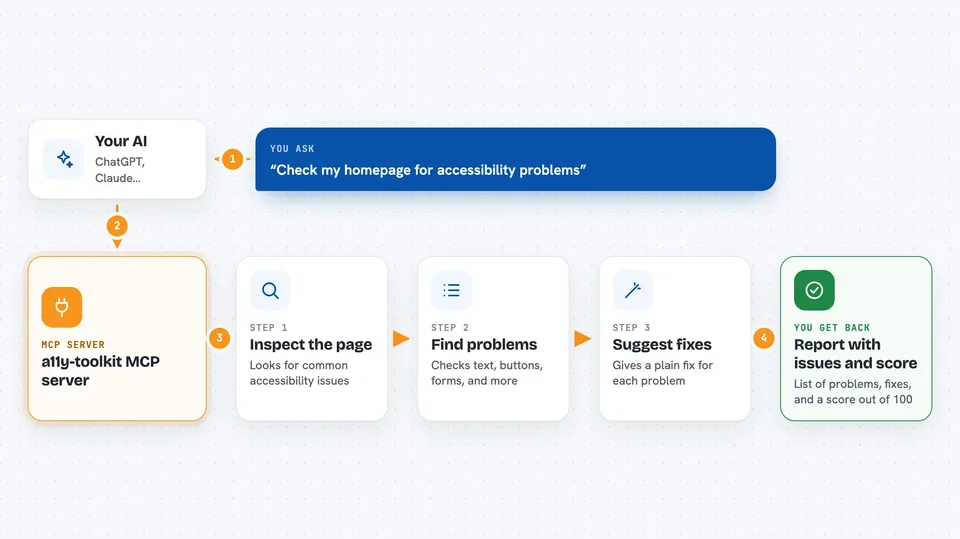
You give your AI a web address, or paste in some page code. The AI passes it to this toolkit, which inspects the page for accessibility issues. It checks things like text that is hard to read, buttons you cannot reach with a keyboard, and forms that do not explain their errors. Then it hands back a list of problems, a score, and a suggested fix for each one. You can also ask it to write an accessibility statement or save a report you can share with a reviewer.
 Click to zoom
What you can do with it
- Check a web page for accessibility problems and get a score out of 100
- Test whether text is readable over a photo or a coloured background
- Find out if a form shows clear errors when someone types something wrong
- See what a screen reader would announce on a page, in plain sentences
- Check whether a page still works when zoomed in or viewed on a small screen
- Get a suggested colour that passes the contrast rules
- Generate an accessibility declaration document in English or Spanish
- Save a report pack you can hand to a human reviewer to sign off
Try asking your AI
- “Check https://example.com for accessibility problems and tell me what to fix first”
- “Is the text on my homepage readable over the background image?”
- “Test the contact form on my site and tell me if the errors are clear”
- “Write me an accessibility declaration for my company website under the European rules”
What it gives back to you
You get back a report in the chat: a list of issues, each with a short explanation and a suggested fix. There is also a score from 0 to 100, and notes on which checks passed, failed, or need a human to look. Some tools return a file, like an accessibility statement document or a report pack you can download and share.
Before you start
What you need
- An MCP-capable AI app, such as Claude Desktop or Cursor
- Python installed on your computer (the tool runs locally)
- For the page-checking tools that open a real browser: a browser like Chrome, Firefox or Edge
Good to know
This tool reads web pages and local files you point it at, and it can change page code when you ask it to fix things, so use it on pages and files you are allowed to work with.
Install it with your AI
Add a11y-toolkit MCP server to your AI, no technical skills needed
You don't install anything by hand. You copy one prompt, paste it into an AI that can work on your computer, and it checks, installs and connects the server for you, asking you when it needs something.
Sign in to get the install prompt
Members get a ready-made prompt that lets the Claude desktop app check a11y-toolkit MCP server, install it and connect it for them, step by step. You don't need any technical skills: you copy, paste and answer a few questions. Your connected AI can also find and install any of the 4,361 MCP servers here for you.
Who it's for
Web developers, content editors, and anyone who has to make a website meet accessibility rules but is not a specialist.