
MCP server · Developer tools · official
CometChat Docs MCP server
by cometchat · official
Let your AI assistant read CometChat's official setup guides and write chat, call and moderation code for your app.
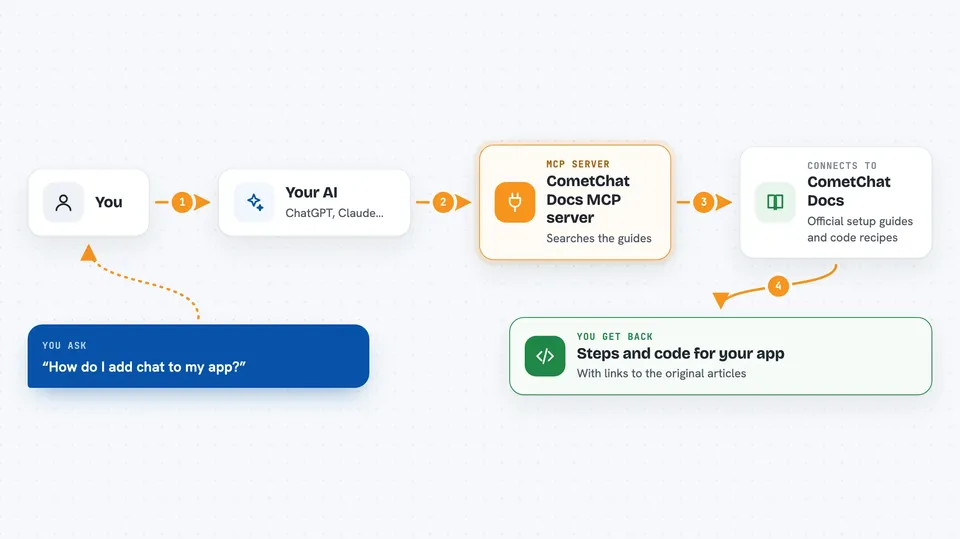
This is a helper from CometChat that lets your AI assistant look inside CometChat's own instruction manuals while helping you build. If you want to add messaging, calls or comment filtering to an app and don't know where to start, this saves you hours of hunting around online help pages.
What is an MCP server? The 30-second version
On its own, your AI can only talk based on what it already learned during training. An MCP server is a little bridge between your AI and some outside knowledge or service. This particular bridge connects your AI to CometChat's published documentation. So when you say 'help me add chat', your AI goes and reads those documents, then explains and writes the matching code for you.
What this MCP server does
When you connect this server, your AI gains three abilities plus extra background material called bundles. First, it can search CometChat's whole document library and find the parts related to whatever you asked. Second, it can pull down a full guide page, such as the steps for setting up chat in a phone app. Third, for popular tasks like building group chats or blocking bad words, it grabs a pre-written recipe containing requirements, installation lines and sample code. Then it takes all of that and produces actual code tailored to your situation.
 Click to zoom
What you can do with it
- Ask how to put a chat feature into a website built with a certain toolkit
- Request step-by-step directions for making two users message each other privately
- Find out whether someone else has received or seen your latest message
- Learn how to keep separate groups' conversations apart in a product sold to many companies
- See how to block offensive images or rude words automatically
- Look up limits on how quickly messages may be sent
Try asking your AI
- “Help me add a way for customers to leave comments underneath products in my online shop”
- “Explain how to show green dots next to names of friends currently logged in”
- “Give me instructions for putting a simple chat box onto my webpage without hiring anyone”
- “If too many people join our meeting room suddenly, what errors might appear?”
What it gives back to you
Your AI replies in normal conversational form after checking the materials. That answer typically includes numbered steps, pieces of finished-looking computer instructions known as code blocks, warnings about tricky spots, and clickable addresses pointing straight to the original CometChat article used. Nothing gets changed anywhere until you choose to act upon what was suggested.
Install it with your AI
Add CometChat Docs MCP server to your AI, no technical skills needed
You don't install anything by hand. You copy one prompt, paste it into an AI that can work on your computer, and it checks, installs and connects the server for you, asking you when it needs something.
Sign in to get the install prompt
Members get a ready-made prompt that lets the Claude desktop app check CometChat Docs MCP server, install it and connect it for them, step by step. You don't need any technical skills: you copy, paste and answer a few questions. Your connected AI can also find and install any of the 4,361 MCP servers here for you.
Who it's for
Anyone responsible for getting instant communication functions running smoothly within software projects, particularly developers handling websites or smartphone applications.




