MCP server · Health and learning
Ping-Pong MCP server
by kimtth
A tiny practice server that answers ping, pong and count so you can see how MCP works.
This is a small teaching project. It is a ping-pong server that shows how an AI can talk to another program through MCP. It is handy if you are curious about how these connections work and want a safe, simple example to try.
What is an MCP server? The 30-second version
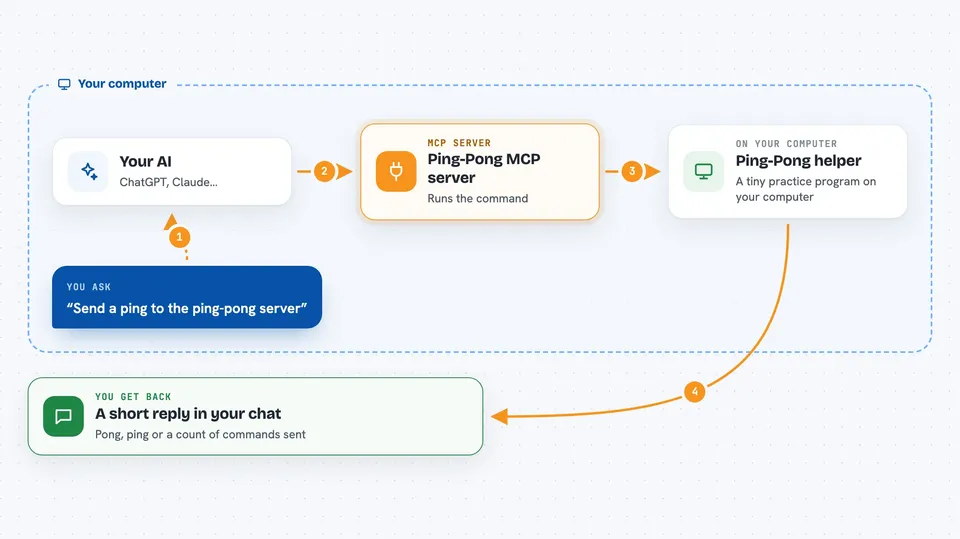
On its own, your AI can only chat with you. An MCP server is a small helper program that gives your AI a new skill or a connection to something else. This one connects your AI to a tiny ping-pong game running on your own computer. When you ask for a ping, the AI passes the request to this helper, and the helper answers back.
What this MCP server does
You type a simple command like ping, pong or count. Your AI sends that command to this helper program. The helper runs the matching action and sends the result back. For example, ping comes back as pong, pong comes back as ping, and count tells you how many commands have been sent. You see the answer right in your chat.
 Click to zoom
What you can do with it
- Send a ping and get pong back
- Send a pong and get ping back
- Ask for a count of how many commands were sent
- Try the same commands through a small web page
- Try the same commands through a live connection called SSE
- Learn how an AI talks to another program step by step
Try asking your AI
- “Send a ping to the ping-pong server”
- “Send a pong to the ping-pong server”
- “Ask the ping-pong server for the count”
- “Run the ping command through the ping-pong tool”
What it gives back to you
You get short text answers in the chat. A ping returns pong, a pong returns ping, and count returns a number. There are no files or long reports, just quick replies so you can see the round trip happen.
Before you start
What you need
- Python installed on your computer
- Poetry (a tool that installs the project's Python packages)
- The project files from the GitHub page
Good to know
This is an experimental learning project, so do not use it for real work or with private data.
Install it with your AI
Add Ping-Pong MCP server to your AI, no technical skills needed
You don't install anything by hand. You copy one prompt, paste it into an AI that can work on your computer, and it checks, installs and connects the server for you, asking you when it needs something.
Sign in to get the install prompt
Members get a ready-made prompt that lets the Claude desktop app check Ping-Pong MCP server, install it and connect it for them, step by step. You don't need any technical skills: you copy, paste and answer a few questions. Your connected AI can also find and install any of the 4,609 MCP servers here for you.
Who it's for
People who are learning how MCP works and want a safe, tiny example to try before connecting real apps.