MCP server · Health and learning
Anki MCP server
by anki-mcp
Let your AI review, create, and edit your Anki flashcards by just talking to it.
This is a helper that connects your AI assistant to Anki, the flashcard app used for spaced repetition study. Once it is set up, you can chat with your AI about your decks and cards instead of clicking around. It is handy for students, language learners, and anyone who studies with flashcards.
What is an MCP server? The 30-second version
On its own, your AI can only chat with you. An MCP server is a small helper program that gives your AI a new skill or a connection to an app. This one connects your AI to Anki on your own computer, so the AI can look up your cards, show them to you, and make changes when you ask. You stay in charge; the AI just does the clicking for you.
What this MCP server does
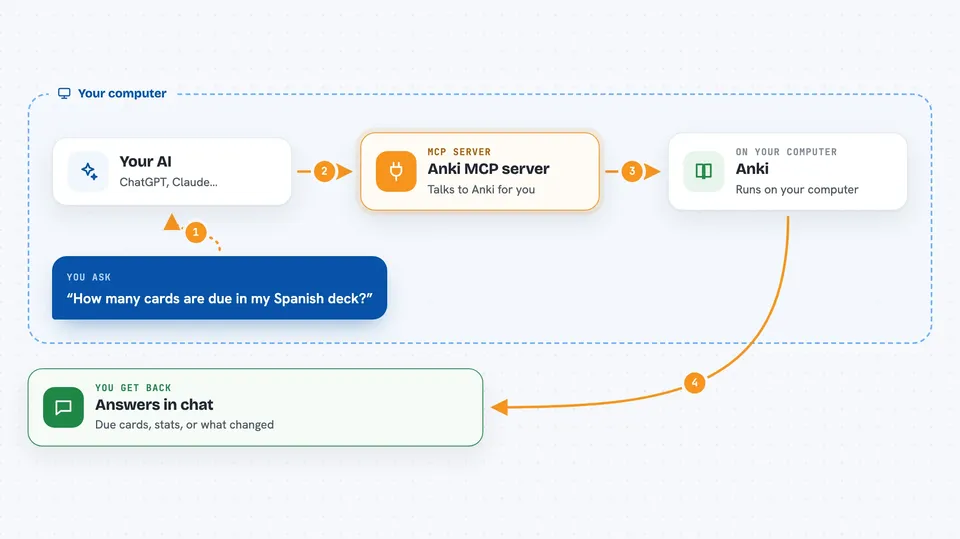
You ask your AI something about your flashcards, like reviewing a deck or adding new cards. The AI passes your request to this helper program running on your computer. The helper talks to Anki through a small add-on called AnkiConnect. Anki then sends back your cards, decks, or stats, and the AI explains the result to you in the chat. If you asked for a change, like adding a note or a tag, the helper makes that change in Anki for you.
 Click to zoom
What you can do with it
- Review due cards from a deck and rate how well you did
- Create new notes and batch-add up to 100 cards at once
- Search your notes with Anki search terms like deck or tag
- Add, remove, or rename tags on your notes
- Upload images or audio into your card media folder
- Check deck statistics and your review history
- Suspend, unsuspend, or reschedule cards
What it gives back to you
You get answers in plain chat: lists of due cards, one card at a time during a review, deck statistics, or a summary of what changed. When the AI creates or edits notes, it tells you what it did, like how many cards were added or which tags were applied. You can also see the changes directly in Anki.
Before you start
What you need
- Anki installed on your computer
- The AnkiConnect add-on installed inside Anki
- Node.js version 22.12.0 or newer
- An MCP client like Claude Desktop, Cursor, Cline, or Zed
Good to know
Some actions change or delete your cards, tags, and media, so check with your AI before letting it delete or reset things, and keep a backup of your Anki collection.
Install it with your AI
Add Anki MCP server to your AI, no technical skills needed
You don't install anything by hand. You copy one prompt, paste it into an AI that can work on your computer, and it checks, installs and connects the server for you, asking you when it needs something.
Sign in to get the install prompt
Members get a ready-made prompt that lets the Claude desktop app check Anki MCP server, install it and connect it for them, step by step. You don't need any technical skills: you copy, paste and answer a few questions. Your connected AI can also find and install any of the 4,609 MCP servers here for you.
Who it's for
Students, language learners, and anyone who studies with Anki flashcards and wants to manage them by chatting.