MCP server · Health and learning
Rember MCP server
by rember
Turn things you learn in a chat into flashcards that Rember reviews with you over time.
This is a small helper that connects your AI chat to Rember, a study app that helps you remember things using spaced repetition. When you learn something useful in a chat, you can ask your AI to save it as flashcards. It is handy for anyone who studies, reads a lot, or just wants to keep the good bits from their chats.
What is an MCP server? The 30-second version
On its own, your AI can only chat with you. An MCP server is a small helper program that gives your AI a new skill or a connection to an app. This one connects your AI to Rember, so when you ask it to help you remember something, it can actually send that to your Rember account and make flashcards for you.
What this MCP server does
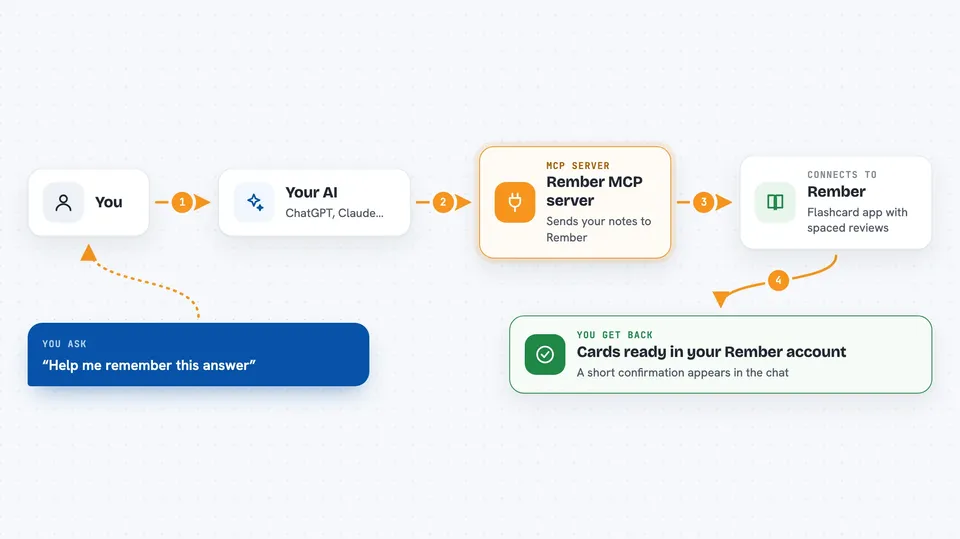
You ask your AI to help you remember something from your chat, or to make flashcards from part of a document. Your AI passes those notes to this helper. The helper sends them to Rember, and Rember's own AI writes a few flashcards for each note. The cards land in your Rember account, ready for your spaced repetition reviews.
 Click to zoom
What you can do with it
- Turn a chat answer into flashcards
- Create flashcards from a chapter of a PDF
- Save a key idea to Rember without leaving the chat
- Ask for a few flashcards on a topic you just discussed
- Add notes to Rember in one step
Try asking your AI
- “Help me remember this answer”
- “Create a few flashcards from what you just explained”
- “Add this to Rember”
- “Create flashcards from chapter 2 of this PDF”
What it gives back to you
You get a short confirmation in the chat that your notes were sent to Rember and cards were created. Rember's AI writes a few flashcards for each note, and they show up in your Rember account. The chat itself stays short, since the real cards live in Rember.
Before you start
What you need
- A Rember account
- Your Rember API key from the Settings page (a kind of password for apps; Rember gives you one)
- The Claude desktop app if you want to use it there
Good to know
It sends the notes you choose to Rember, so avoid asking it to save anything private or sensitive.
Install it with your AI
Add Rember MCP server to your AI, no technical skills needed
You don't install anything by hand. You copy one prompt, paste it into an AI that can work on your computer, and it checks, installs and connects the server for you, asking you when it needs something.
Sign in to get the install prompt
Members get a ready-made prompt that lets the Claude desktop app check Rember MCP server, install it and connect it for them, step by step. You don't need any technical skills: you copy, paste and answer a few questions. Your connected AI can also find and install any of the 4,609 MCP servers here for you.
Who it's for
Students, lifelong learners, and anyone who wants to keep and review the useful things they pick up in AI chats.