MCP server · Health and learning
Oura MCP server
by tomekkorbak
Ask your AI about your Oura sleep, readiness, and resilience data, and get answers right in the chat.
This is a small helper that connects your AI assistant to your Oura account, the ring and app that track your sleep and recovery. Once it is set up, you can just ask questions in plain words instead of digging through the app. It is handy if you already wear an Oura ring and want to talk about your sleep and readiness numbers with your AI.
What is an MCP server? The 30-second version
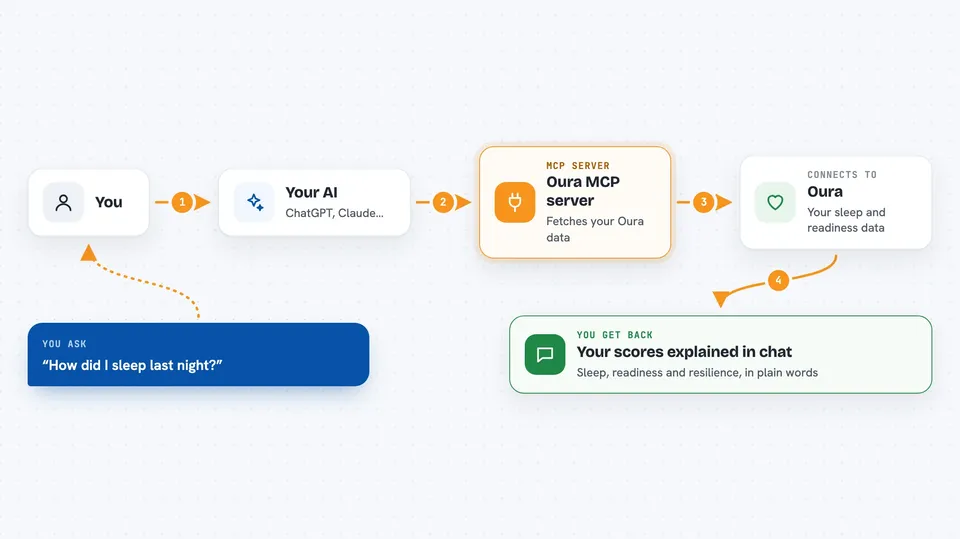
On its own, your AI can only chat. It cannot see your Oura data. An MCP server is a small helper program that gives your AI a new skill or a connection to an app, and this one connects it to Oura. So when you ask about your sleep, your AI asks this helper, the helper fetches the numbers from Oura, and you get an answer in the chat.
What this MCP server does
You ask your AI a question about your Oura data, like how you slept last night. Your AI passes that request to this helper program. The helper signs in to Oura using a personal token you set up, and asks Oura for the sleep, readiness, or resilience data you wanted. Oura sends the data back, and the helper hands it to your AI. Your AI then explains it to you in normal words in the chat.
 Click to zoom
What you can do with it
- Ask for your sleep score for today
- Ask for your readiness data for a specific date range
- Ask for your resilience score today
- Look up how you slept between two dates
- Check your readiness for the past week
- Get today's sleep, readiness, and resilience data in one chat
Try asking your AI
- “What's my sleep score for today?”
- “Show me my readiness data for the past week”
- “How was my sleep from January 1st to January 7th?”
- “What's my resilience score today?”
What it gives back to you
You get answers in the chat, not raw files. Depending on what you ask, your AI gives you sleep, readiness, or resilience data for today or for a date range you pick. It usually shows the numbers and explains what they mean in plain words. It reads data only, so nothing in your Oura account is changed.
Before you start
What you need
- An Oura account with a ring or app data
- An Oura personal access token (a kind of password for apps; you create it for free in the Oura Developer Portal)
- A tool that can run MCP servers, like the Claude desktop app
- uvx installed on your computer (it comes with the uv tool for Python)
Good to know
It can read your personal Oura health data, so keep your Oura token private and only share it with a tool you trust.
Install it with your AI
Add Oura MCP server to your AI, no technical skills needed
You don't install anything by hand. You copy one prompt, paste it into an AI that can work on your computer, and it checks, installs and connects the server for you, asking you when it needs something.
Sign in to get the install prompt
Members get a ready-made prompt that lets the Claude desktop app check Oura MCP server, install it and connect it for them, step by step. You don't need any technical skills: you copy, paste and answer a few questions. Your connected AI can also find and install any of the 4,609 MCP servers here for you.
Who it's for
Oura ring users who want to ask their AI about sleep, readiness, and recovery without opening the app.