
MCP server · Security
rqwstr MCP server
by Kjopstad-IT
Lets your AI send and test web requests at a low level, for security checks and fuzzing.
rqwstr is a helper that connects your AI to a toolkit for testing how websites and web services respond to requests. It is made for security work, like checking how a site handles odd or repeated traffic. It is most useful if you already do web security testing and want your AI to drive the tools for you.
What is an MCP server? The 30-second version
On its own, your AI can only chat with you. An MCP server is a small helper program that gives your AI a new skill or a connection to a service. This one connects your AI to rqwstr, an HTTP security testing toolkit, so the AI can send requests, run fuzzing, and gather results when you ask. You stay in the chat, and the helper does the technical work behind the scenes.
What this MCP server does
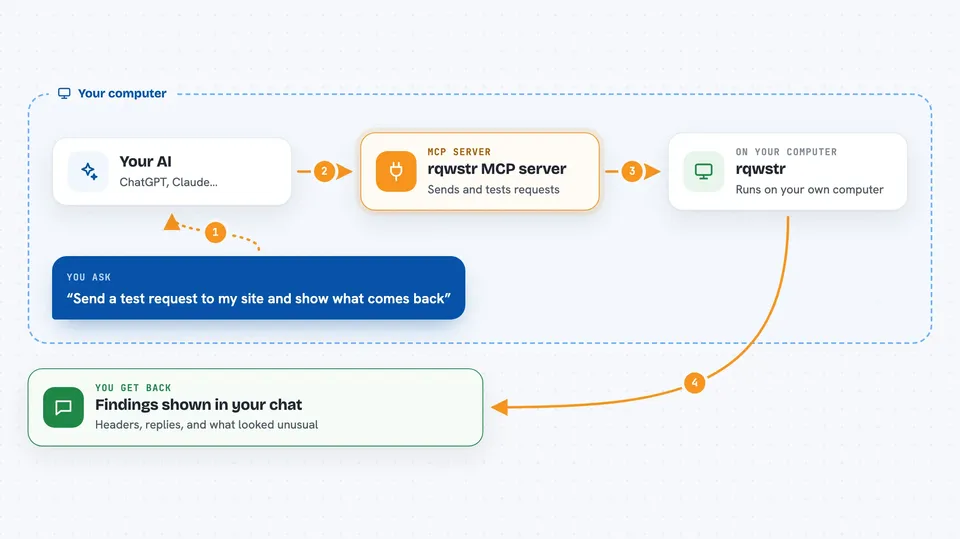
You ask your AI to send a request or run a test against a web address. The AI passes that to rqwstr, which sends the raw request over HTTP/1.1 or HTTP/2 with fine control over how it is built. rqwstr collects the responses, filters them, and stores the results. Then your AI shows you the findings in the chat, such as which inputs caused unusual replies. It can also run repeated or racing requests and watch for out-of-band signals.
 Click to zoom
What you can do with it
- Send a single HTTP/1.1 or HTTP/2 request and read the response
- Run intruder-style fuzzing with different payload patterns
- Race many requests at once to check for timing issues
- Chain several requests together in one workflow
- Watch for out-of-band callbacks from a target
- Import traffic from Burp or HAR files and export as curl or Python
- Save, search, and profile findings across a hunt
Try asking your AI
- “Send a GET request to https://example.com and show me the headers”
- “Run an intruder attack on the id parameter with these values”
- “Race 20 requests to this login endpoint and tell me if any differ”
- “Import this HAR file and list the unique endpoints”
What it gives back to you
You get answers in the chat: response headers and bodies, lists of requests and results, and summaries of what stood out. rqwstr also stores per-hunt state, so you can search past findings and pull them back later. For attacks, it reports which payloads or timings produced different responses. Exports come back as text you can copy, like curl commands or Python code.
Before you start
What you need
- A license key from rqwstr.com (a free tier covers the core tools, Pro unlocks the heavier attack tools)
- The rqwstr binary for your platform, or the Claude Desktop .mcpb bundle
- An MCP client, such as the Claude desktop app
Good to know
This tool sends real requests to web addresses you choose, so only point it at systems you are allowed to test, and remember it can change or delete data on those systems.
Install it with your AI
Add rqwstr MCP server to your AI, no technical skills needed
You don't install anything by hand. You copy one prompt, paste it into an AI that can work on your computer, and it checks, installs and connects the server for you, asking you when it needs something.
Sign in to get the install prompt
Members get a ready-made prompt that lets the Claude desktop app check rqwstr MCP server, install it and connect it for them, step by step. You don't need any technical skills: you copy, paste and answer a few questions. Your connected AI can also find and install any of the 4,609 MCP servers here for you.
Who it's for
Security testers, penetration testers, and bug bounty hunters who want an AI to drive their HTTP testing.



