
MCP server · Analytics
QueryWise MCP server
by kosminus
Ask your AI questions about your SQLite, PostgreSQL, BigQuery or Databricks data in plain English.
QueryWise is a helper that lets your AI look inside your databases and answer questions in normal language. You describe your tables and business terms once, and then you can just ask things like what was revenue last month. It is handy for anyone who has data in a database but does not write SQL.
What is an MCP server? The 30-second version
On its own, your AI can only chat with you. An MCP server is a small helper program that gives your AI a new skill or a connection to another app. This one connects your AI to your databases, so it can look up your tables, understand your business words, and run safe read-only queries when you ask. You install it once, and then your AI can use it during your normal conversation.
What this MCP server does
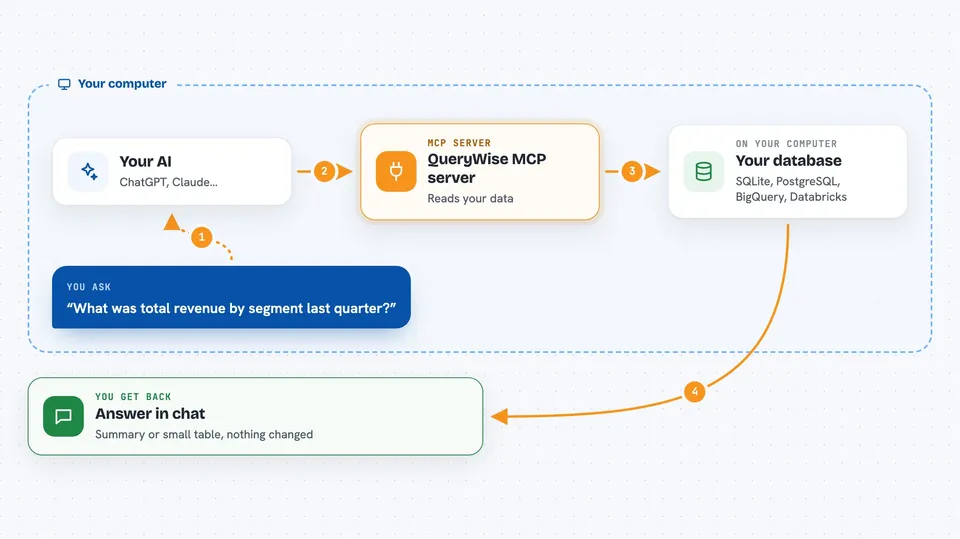
You ask your AI a question about your data in plain words. The AI calls this helper to get the relevant context, like which tables matter, what your business terms mean, and what the columns are. The helper talks to your database and runs a read-only query. Then you get an answer back in the chat, usually a short summary or a small table of results.
 Click to zoom
What you can do with it
- Ask questions about your data in plain English
- List the tables and columns in a connected database
- Look up what a business term like active customer means
- Run a read-only query and see the results
- Save your own glossary terms and metric definitions
- Keep a history of the questions you have asked
- Connect to SQLite, PostgreSQL, BigQuery or Databricks
Try asking your AI
- “What was total revenue by segment last quarter?”
- “Show me the top 10 customers by order value.”
- “How many active customers did we have in March?”
- “What does the column booking_status mean in the loans table?”
What it gives back to you
You get a written answer in the chat, often with a short table or a few numbers. If you asked for a list of tables or columns, you get that list. If you asked a question, you get a summary of what the data shows. The helper only reads data, so nothing in your database is changed.
Before you start
What you need
- Python 3 installed on your computer
- A database you can connect to (SQLite file, PostgreSQL, BigQuery or Databricks)
- The Claude desktop app or another MCP client
- Optional: an API key from Anthropic or OpenAI, or Ollama running locally, if you want the server to write SQL for you
Good to know
It only reads your data, but it can see everything in the databases you connect, so be careful about connecting databases with private or sensitive information.
Install it with your AI
Add QueryWise MCP server to your AI, no technical skills needed
You don't install anything by hand. You copy one prompt, paste it into an AI that can work on your computer, and it checks, installs and connects the server for you, asking you when it needs something.
Sign in to get the install prompt
Members get a ready-made prompt that lets the Claude desktop app check QueryWise MCP server, install it and connect it for them, step by step. You don't need any technical skills: you copy, paste and answer a few questions. Your connected AI can also find and install any of the 4,361 MCP servers here for you.
Who it's for
Office workers, analysts and managers who have data in a database but do not write SQL themselves.


