
MCP server · Security
AgentForge Trust MCP server
by KOVY
Lets your AI check how safe and trustworthy other MCP servers are before you connect to them.
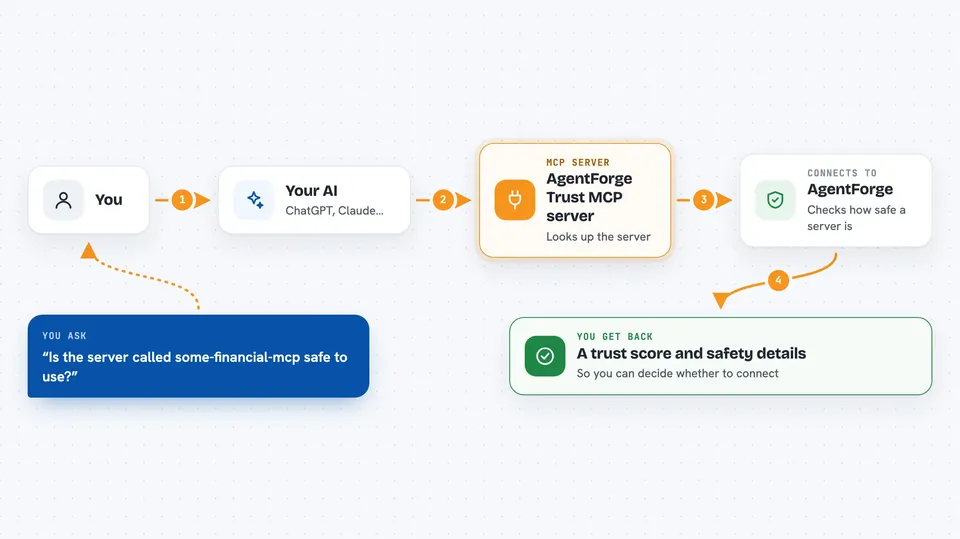
This is a helper that lets your AI look up trust scores for other MCP servers, so you can see whether a server is safe and well-maintained before you use it. It is handy if you are curious about MCP servers but do not want to connect to something sketchy. You can also search a catalog of servers and, if you register, run tools on them through one connection.
What is an MCP server? The 30-second version
On its own, your AI can only chat with you. An MCP server is a small helper program that gives your AI a new skill or a connection to an app or service. This one connects your AI to AgentForge, a service that keeps trust scores for MCP servers. Once it is connected, your AI can ask AgentForge about a server's safety and get an answer back for you.
What this MCP server does
You ask your AI something like whether a certain MCP server is safe to use. Your AI sends that question to this helper, which talks to AgentForge. AgentForge looks up the server and returns a trust score from 0 to 100, plus details like security scan results and badges. Your AI then tells you what it found, so you can decide whether to connect or look for something better.
 Click to zoom
What you can do with it
- Check the trust score of an MCP server before you connect to it
- Set a minimum trust level and get a simple allow or deny answer
- Search for MCP servers in a category that meet a trust threshold
- Describe what you need in plain words and get ranked server suggestions
- Browse the whole AgentForge catalog with search
- Register your agent to get a key for running tools on other servers
- Run a search across many servers at once and get combined results
Try asking your AI
- “Is the MCP server called some-financial-mcp safe to use?”
- “Find me a database MCP server with a trust score of at least 80”
- “I need to validate Czech VAT IDs, which server should I use?”
- “Show me trusted travel MCP servers”
What it gives back to you
You get back a trust score from 0 to 100, along with details like security scan status, badges, and which dimensions were checked. For searches, you get a ranked list of servers with their scores and categories. For policy checks, you get a simple allowed true or false with the reasons. It all shows up as text in your chat.
Before you start
What you need
- Node.js installed on your computer (the npx command needs it)
- An API key from AgentForge for the action tools (you get one by asking the AI to register your agent, no signup needed)
- The trust tools work without any key
Good to know
The action tools can run searches and call tools on other servers, and broadcast_search and call_tool may cost money through your wallet, so check before using them.
Install it with your AI
Add AgentForge Trust MCP server to your AI, no technical skills needed
You don't install anything by hand. You copy one prompt, paste it into an AI that can work on your computer, and it checks, installs and connects the server for you, asking you when it needs something.
Sign in to get the install prompt
Members get a ready-made prompt that lets the Claude desktop app check AgentForge Trust MCP server, install it and connect it for them, step by step. You don't need any technical skills: you copy, paste and answer a few questions. Your connected AI can also find and install any of the 4,609 MCP servers here for you.
Who it's for
Anyone who uses MCP servers and wants a quick safety check before connecting, especially people setting up AI agents for work.



