MCP server · Browser automation
ESPN Fantasy Football Manager MCP server
by krmisystems
Lets your AI read your ESPN fantasy league and suggest or make lineup and roster moves.
This is a helper for people who play ESPN fantasy football and want their AI to do some of the boring parts. It connects your AI to your ESPN league so it can look at your roster, compare projections, and suggest a legal lineup for the week. It is handy if you manage one team or several and do not want to click through ESPN every Sunday morning.
What is an MCP server? The 30-second version
On its own, your AI can only chat. It cannot see your ESPN league or change your lineup. An MCP server is a small helper program that gives your AI a new skill or a connection to an app, and here it connects your AI to your ESPN fantasy football account. Once it is connected, you can ask your AI about your team and it can look things up or, if you allow it, make moves for you.
What this MCP server does
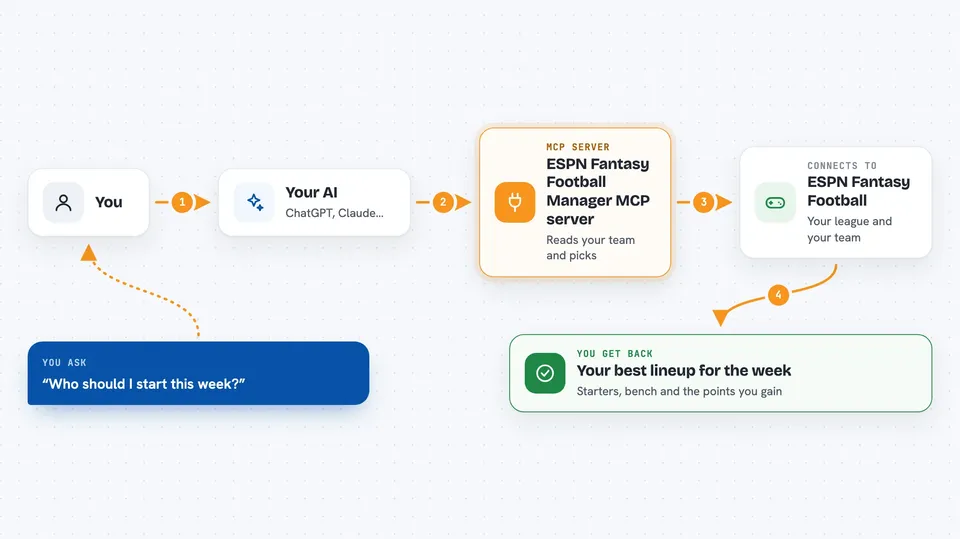
You ask your AI something like which players should start this week. Your AI passes that request to this helper program. The helper logs into ESPN using a saved session file, reads your roster, projections, and player locks, and works out a legal lineup. Then it sends the answer back to your AI, which shows it to you in the chat. If you turn on the right mode, it can also submit the lineup or a free-agent move to ESPN for you.
 Click to zoom
What you can do with it
- Read your ESPN roster and current projections
- Suggest a legal starting lineup for the week
- Compare players and estimate the points change from a move
- Add a free agent or drop a player when you allow it
- Submit a waiver claim or an IR move
- Run a draft assistant with simulated opponent picks
- Manage several teams from one dashboard
Try asking your AI
- “Connect to my ESPN league and sync my team for this week.”
- “What is my best legal lineup for Week 1 based on current projections?”
- “Should I drop my backup tight end and add the best available free agent?”
- “Start the draft assistant and tell me who to pick next.”
What it gives back to you
You get back a lineup report, usually with the starters, the bench, and an estimated points change. It can also return roster lists, player projections, and notes about missing information or locks. When it makes a move, it tells you what it submitted and whether ESPN confirmed it. Everything shows up as text in your chat.
Before you start
What you need
- An ESPN fantasy football account and a league
- A protected session file with your ESPN cookies (the setup guide explains how to make one)
- Python 3.11 or newer and uv if you install it yourself
- An MCP client like Codex or Claude Desktop
Good to know
If you turn on automatic mode, it can add, drop, or bench players on your real ESPN team without asking each time, so start in advisory or review mode until you trust it.
Install it with your AI
Add ESPN Fantasy Football Manager MCP server to your AI, no technical skills needed
You don't install anything by hand. You copy one prompt, paste it into an AI that can work on your computer, and it checks, installs and connects the server for you, asking you when it needs something.
Sign in to get the install prompt
Members get a ready-made prompt that lets the Claude desktop app check ESPN Fantasy Football Manager MCP server, install it and connect it for them, step by step. You don't need any technical skills: you copy, paste and answer a few questions. Your connected AI can also find and install any of the 4,361 MCP servers here for you.
Who it's for
Fantasy football players who use an AI assistant and want help with weekly lineups, roster moves, or draft picks without clicking through ESPN by hand.