MCP server · Finance and crypto
Crypto Whitepapers MCP server
by kukapay
Lets your AI find, store and read crypto whitepaper PDFs, then answer questions about them.
This is a small helper that gives your AI a place to keep crypto whitepapers and look things up in them. You ask a question, your AI reads the papers you have loaded, and it answers in plain words. It is handy if you follow crypto projects and want quick answers without scrolling through 40-page PDFs.
What is an MCP server? The 30-second version
On its own, your AI can only chat with you using what it already learned. An MCP server is a small helper program that gives your AI a new skill or a connection to another place. This one connects your AI to a knowledge base of crypto whitepapers. Once it is connected, your AI can search for papers, save them, and read them when you ask a question.
What this MCP server does
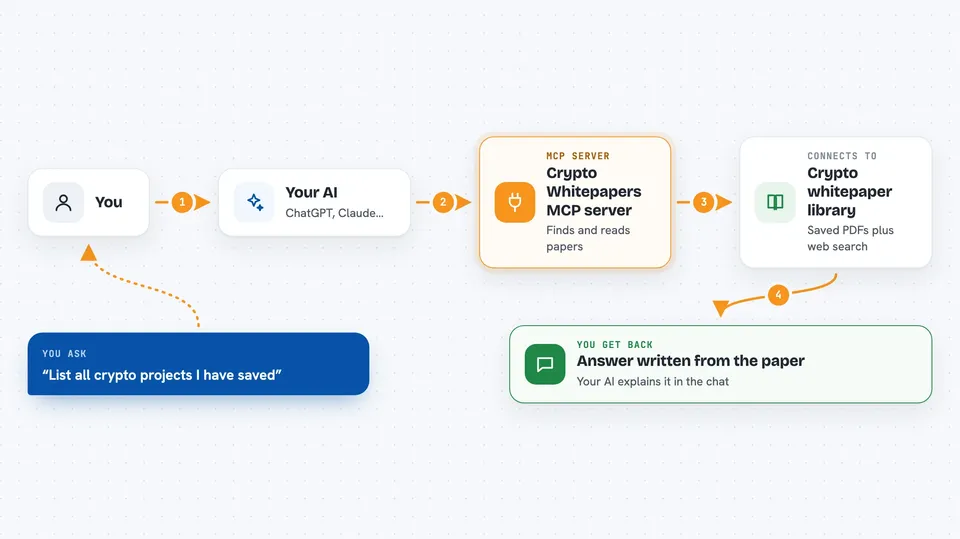
You ask your AI something about a crypto project, like what its token supply looks like. Your AI passes the question to this helper. The helper looks through the whitepaper PDFs you have stored, or searches the web with DuckDuckGo to find a paper you do not have yet. It sends back the matching pieces of text, and your AI turns them into a normal answer in the chat.
 Click to zoom
What you can do with it
- List all crypto projects already saved in the knowledge base
- Search the web for a project's whitepaper PDF
- Download a whitepaper PDF and add it to the knowledge base
- Ask questions across all stored whitepapers
- Ask questions about one specific project only
- Get a tokenomics breakdown of a project's whitepaper
Try asking your AI
- “List all available projects in the knowledge base.”
- “Search for the Bitcoin whitepaper PDF.”
- “Load the Bitcoin whitepaper from https://bitcoin.org/bitcoin.pdf.”
- “Ask the knowledge base about blockchain technology in the Bitcoin whitepaper.”
- “Analyze the tokenomics of Ethereum.”
What it gives back to you
You get answers in the chat, written by your AI from the paper text it found. Behind the scenes you also get lists of project names, up to five search results with titles and links, and short matching text snippets. When you load a paper, you get a simple success or error message.
Before you start
What you need
- Python 3.10 or newer
- The uv tool installed (a helper for running Python programs)
- Internet access, so it can search and download PDFs
- The Claude desktop app if you want to use it inside Claude
Good to know
It downloads PDFs from links it finds on the web, so only load papers from sources you trust.
Install it with your AI
Add Crypto Whitepapers MCP server to your AI, no technical skills needed
You don't install anything by hand. You copy one prompt, paste it into an AI that can work on your computer, and it checks, installs and connects the server for you, asking you when it needs something.
Sign in to get the install prompt
Members get a ready-made prompt that lets the Claude desktop app check Crypto Whitepapers MCP server, install it and connect it for them, step by step. You don't need any technical skills: you copy, paste and answer a few questions. Your connected AI can also find and install any of the 4,609 MCP servers here for you.
Who it's for
People who follow crypto projects and want fast, plain answers from whitepapers without reading every page.