MCP server · Finance and crypto
DeFi Yields MCP server
by kukapay
Lets your AI look up DeFi yield pools and their interest rates from DefiLlama.

This is a small helper that connects your AI assistant to DeFi yield data from DefiLlama. DeFi means finance apps that run on blockchains, and a yield pool is basically a place where people park crypto to earn interest. If you follow crypto rates and want quick answers without clicking around websites, this is for you.
What is an MCP server? The 30-second version
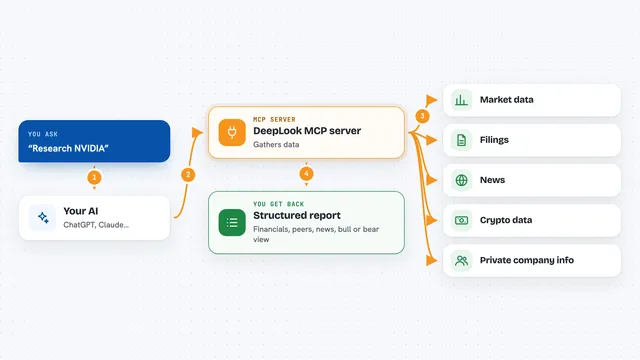
On its own, your AI can only chat with you using what it already knows. An MCP server is a small helper program that gives your AI a new skill or a connection to an outside service. This one connects your AI to DefiLlama, a site that tracks DeFi yield pools. Once it is set up, you can ask your AI about those pools and it will go fetch the numbers for you.
What this MCP server does
You ask your AI something like which pools on Ethereum are paying the most. The AI uses this helper to ask DefiLlama for the current yield pool data. The helper can narrow the list down by chain, such as Ethereum or Solana, or by project, such as Lido or Aave. Then the AI reads the results and explains them to you in the chat, including things like the current rate and the 30-day average. There is also a built-in analysis prompt that nudges the AI to give you a more structured breakdown.
 Click to zoom
What you can do with it
- Look up DeFi yield pools on a specific chain, like Ethereum or Solana
- Filter pools by project, like Lido or Aave
- Compare current rates with the 30-day average rate
- Ask for a written analysis of the pools you care about
- Check how much money is sitting in a pool (its total value)
- Get a quick read on whether a pool's rate looks stable or rising
Try asking your AI
- “Fetch yield pools for the Lido project.”
- “Analyze yield pools on Ethereum.”
- “What are the 30-day mean APYs for Solana pools?”
- “Show me Aave pools and how their rates compare to last month.”
What it gives back to you
You get back a list of yield pools with details like the chain, the pool name, the project, the total value locked, the current rate, and the 30-day average rate. Some entries also include a simple prediction label, such as stable or up, with a rough confidence number. The AI usually turns this into a short summary or a small table right in the chat. Nothing is changed anywhere; it only reads data.
Before you start
What you need
- The Claude desktop app (or another AI app that supports MCP servers)
- Python and the uvx tool installed on your computer
- An internet connection so it can reach DefiLlama
Good to know
The numbers come from an outside site and can be delayed or wrong, and DeFi rates change fast, so do not treat them as financial advice.
Install it with your AI
Add DeFi Yields MCP server to your AI, no technical skills needed
You don't install anything by hand. You copy one prompt, paste it into an AI that can work on your computer, and it checks, installs and connects the server for you, asking you when it needs something.
Sign in to get the install prompt
Members get a ready-made prompt that lets the Claude desktop app check DeFi Yields MCP server, install it and connect it for them, step by step. You don't need any technical skills: you copy, paste and answer a few questions. Your connected AI can also find and install any of the 4,361 MCP servers here for you.
Who it's for
People who follow crypto and DeFi rates, like crypto hobbyists, analysts, and anyone comparing yield pools without wanting to browse multiple sites.