MCP server · Finance and crypto
FalsifyLab market research MCP server
by FalsifyLab
Lets your AI pull live market data like insider buys, ETF flows, DeFi yields and whale positions.

This is a helper you plug into your AI so it can look up real market numbers instead of guessing from old training data. It pulls public finance data like SEC insider filings, crypto ETF flows, DeFi yields and prediction-market positions. It is handy for anyone who does market research and wants their AI to answer with actual figures.
What is an MCP server? The 30-second version
On its own, your AI can only chat with you using what it already learned. An MCP server is a small helper program that gives your AI a new skill or a connection to a service. This one connects your AI to FalsifyLab, a market data service, so when you ask a question the AI can go fetch live numbers and answer with them. You do not need to understand how it works under the hood, you just ask and it looks things up for you.
What this MCP server does
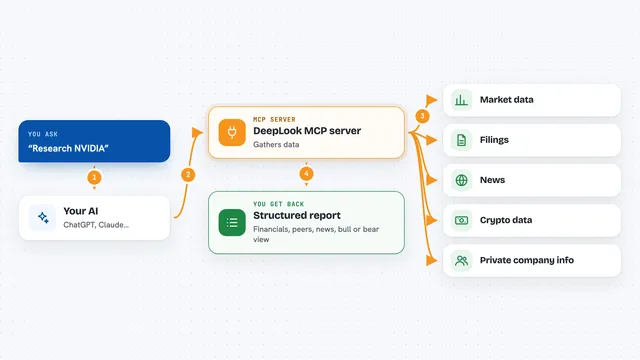
You ask your AI something like what insider buys are happening today. The AI passes your question to this helper, which calls FalsifyLab's data service. FalsifyLab gathers public data from sources like SEC filings, DefiLlama, Hyperliquid, Polymarket and Yahoo Finance, then sends back a clean answer. Your AI reads that answer and writes it up for you in the chat, with the numbers included.
 Click to zoom
What you can do with it
- Check which company insiders are buying stock in clusters
- See today's crypto ETF flows for Bitcoin and Ethereum
- Compare DeFi yields with reward tokens stripped out
- Look up Hyperliquid vault performance and drawdowns
- Scan recent 8-K filings for earnings or M&A news
- Find Polymarket whales with strong win rates
- Get a quick macro snapshot of stocks, bonds, gold and crypto
Try asking your AI
- “What insider buy clusters are forming today?”
- “Show me Hyperliquid vaults with good Sharpe and under 10% drawdown”
- “Are BTC ETF flows confirming or diverging from price?”
- “What's in the macro tape right now?”
What it gives back to you
You get back plain answers in the chat with real numbers: lists of tickers, tables of vaults or wallets, filing summaries, and short written briefs. For example, asking about insider clusters gives you ticker names, who bought, and how much. The AI writes it up in sentences, so you can read it like a short report.
Before you start
What you need
- An AI app that supports MCP servers, like Claude Code, Cursor, Cline or Windsurf
- Python 3 if you install it locally (the hosted option needs nothing installed)
- An FalsifyLab API key only if you want the paid Pro tier (the free tier needs no signup)
Good to know
This is public market data for research, not investment advice, and the free tier can be up to 24 hours old, so check the numbers before acting on them.
Install it with your AI
Add FalsifyLab market research MCP server to your AI, no technical skills needed
You don't install anything by hand. You copy one prompt, paste it into an AI that can work on your computer, and it checks, installs and connects the server for you, asking you when it needs something.
Sign in to get the install prompt
Members get a ready-made prompt that lets the Claude desktop app check FalsifyLab market research MCP server, install it and connect it for them, step by step. You don't need any technical skills: you copy, paste and answer a few questions. Your connected AI can also find and install any of the 4,361 MCP servers here for you.
Who it's for
People who do market research, trading or investing analysis and want their AI to answer with live numbers instead of guesses.