
MCP server · Finance and crypto
DeepLook MCP server
by OSOJDJD
Ask your AI to research a company and get real numbers instead of made-up ones.
DeepLook is a helper that lets your AI look up real company information before it answers you. Instead of guessing numbers, your AI pulls live data about stocks, crypto, private companies, VC firms and even failed companies. It is handy if you research companies for work, write reports, or just want to check facts before a meeting.
What is an MCP server? The 30-second version
On its own, your AI can only chat with you using what it already learned during training. An MCP server is a small helper program that gives your AI a new skill or a connection to an outside service. This one connects your AI to DeepLook, which gathers company data from many sources. So when you ask about a company, your AI can actually look things up instead of guessing.
What this MCP server does
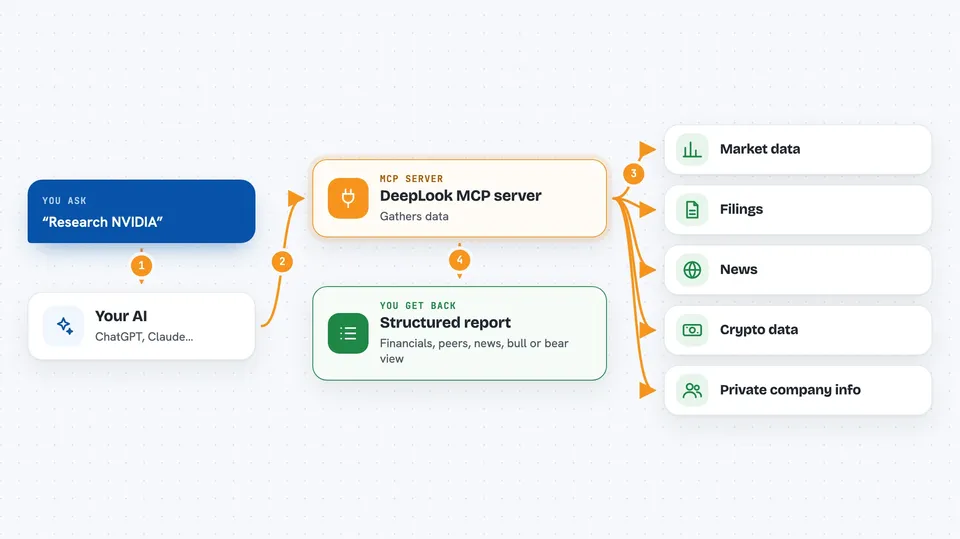
You ask your AI something like research NVIDIA. Your AI sends that request to the DeepLook helper. DeepLook then queries many data sources at once, such as market data, filings and news, and checks the numbers before passing them back. Your AI uses that real information to write you a structured report with a bull or bear view. You get a clear answer in the chat instead of a made-up one.
 Click to zoom
What you can do with it
- Research a public stock like Apple or Tesla
- Look up crypto like Bitcoin or Solana
- Check private companies like Stripe or OpenAI
- Get a bull or bear verdict on a company
- Compare a company with its peers
- Pull recent news and technical signals into one view
- Research a VC firm or a defunct company like FTX
Try asking your AI
- “Research NVIDIA”
- “Give me a bull or bear view on Tesla”
- “Compare Stripe and Adyen”
- “What is the latest on FTX”
What it gives back to you
You get a structured report in the chat. It usually includes financials, peer comparisons, technical signals and recent news, plus a bull or bear verdict. Everything is written out in plain text so you can read it at a glance or copy it into a document.
Before you start
What you need
- An AI app that supports MCP, like Claude.ai, Claude Desktop, Cursor, VS Code or Windsurf
- Nothing else if you use the hosted version at mcp.deeplook.dev
Good to know
The reports are built from outside data sources, so double-check anything important before you act on it.
Install it with your AI
Add DeepLook MCP server to your AI, no technical skills needed
You don't install anything by hand. You copy one prompt, paste it into an AI that can work on your computer, and it checks, installs and connects the server for you, asking you when it needs something.
Sign in to get the install prompt
Members get a ready-made prompt that lets the Claude desktop app check DeepLook MCP server, install it and connect it for them, step by step. You don't need any technical skills: you copy, paste and answer a few questions. Your connected AI can also find and install any of the 4,361 MCP servers here for you.
Who it's for
Anyone who needs to understand a company quickly, like analysts, investors, founders, journalists and business students.



