
MCP server · Finance and crypto
Crypto ETF Flow MCP server
by kukapay
Lets your AI pull daily Bitcoin and Ethereum ETF flow numbers and show them as a neat table.
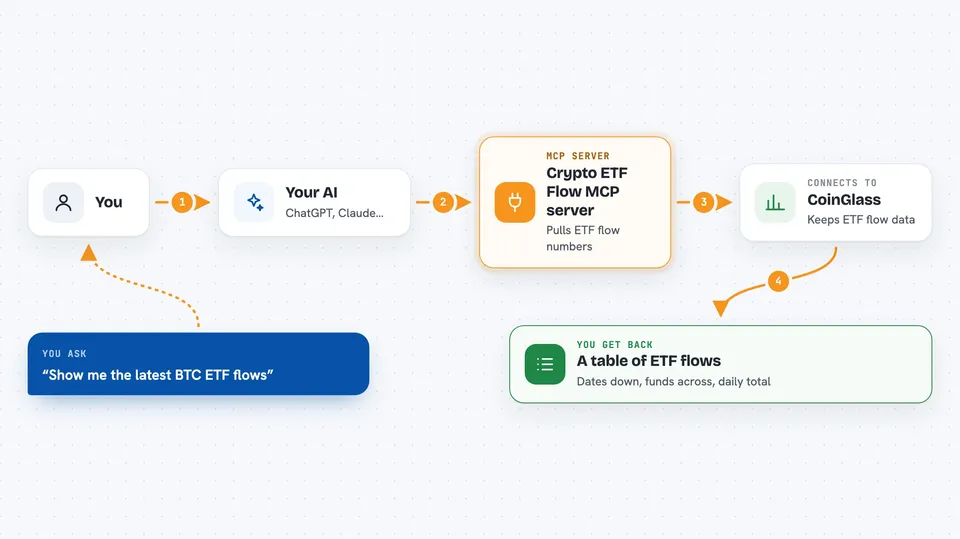
This is a small helper that connects your AI to crypto ETF flow data. ETF flow means how much money moved into or out of exchange-traded funds, the funds that track Bitcoin or Ethereum. It is handy if you follow crypto markets and want quick daily numbers without hunting through websites.
What is an MCP server? The 30-second version
On its own, your AI can only chat with you using what it already knows. An MCP server is a small helper program that gives your AI a new skill or a connection to an outside service. This one connects your AI to CoinGlass, a site that tracks crypto ETF flows, so the AI can look up the latest numbers for you. You just ask in normal words, and the helper does the fetching.
What this MCP server does
You ask your AI something like show me the latest BTC ETF flows. The AI passes that request to this helper. The helper talks to CoinGlass, which keeps the flow data, and pulls the history for Bitcoin or Ethereum ETFs. It then arranges the numbers into a table with each fund as a column, each date as a row, and a total at the end. You see that table right in your chat.
 Click to zoom
What you can do with it
- Look up recent Bitcoin ETF flow data
- Look up recent Ethereum ETF flow data
- See flows broken down by individual ETF ticker
- Get a total column that sums the flows for each day
- View the data as a clean table you can read at a glance
Try asking your AI
- “Show me the latest BTC ETF flow data in a table”
- “Get the ETH ETF flow history”
- “What were the Bitcoin ETF flows over the last few days?”
- “Give me the Ethereum ETF flows by fund”
What it gives back to you
You get back a table in the chat. Each row is a date, each column is an ETF ticker like GBTC or IBIT, and the last column is the daily total. Numbers are in dollars, and negative numbers mean money flowed out. It is a snapshot of the data CoinGlass has for that period.
Before you start
What you need
- Python 3.10 or newer
- uv, a tool for running Python programs (the README links to install instructions)
- A CoinGlass API key (a kind of password for apps; you get one free from the CoinGlass website)
- Git, to download the project files
Good to know
It needs a CoinGlass API key, and CoinGlass may limit how many times you can ask per day depending on your plan.
Install it with your AI
Add Crypto ETF Flow MCP server to your AI, no technical skills needed
You don't install anything by hand. You copy one prompt, paste it into an AI that can work on your computer, and it checks, installs and connects the server for you, asking you when it needs something.
Sign in to get the install prompt
Members get a ready-made prompt that lets the Claude desktop app check Crypto ETF Flow MCP server, install it and connect it for them, step by step. You don't need any technical skills: you copy, paste and answer a few questions. Your connected AI can also find and install any of the 4,609 MCP servers here for you.
Who it's for
People who follow crypto markets, like analysts, traders, or anyone curious about where ETF money is moving each day.



