
MCP server · Research
Nearby Search MCP server
by kukapay
Let your AI find coffee shops, restaurants, and other places near your current location.
This is a small helper that lets your AI look up places close to where you are right now. You ask for something like a coffee shop or a pharmacy, and it finds nearby options for you. It is handy if you travel, work from different spots, or just want quick local suggestions without opening a map.
What is an MCP server? The 30-second version
On its own, your AI can only chat with you using what it already knows. An MCP server is a small helper program that gives your AI a new skill or a connection to an outside service. This one connects your AI to two things: a service that guesses your location from your internet address, and Google Places, which knows about businesses and spots around the world. So when you ask for something nearby, your AI can actually go look it up instead of guessing.
What this MCP server does
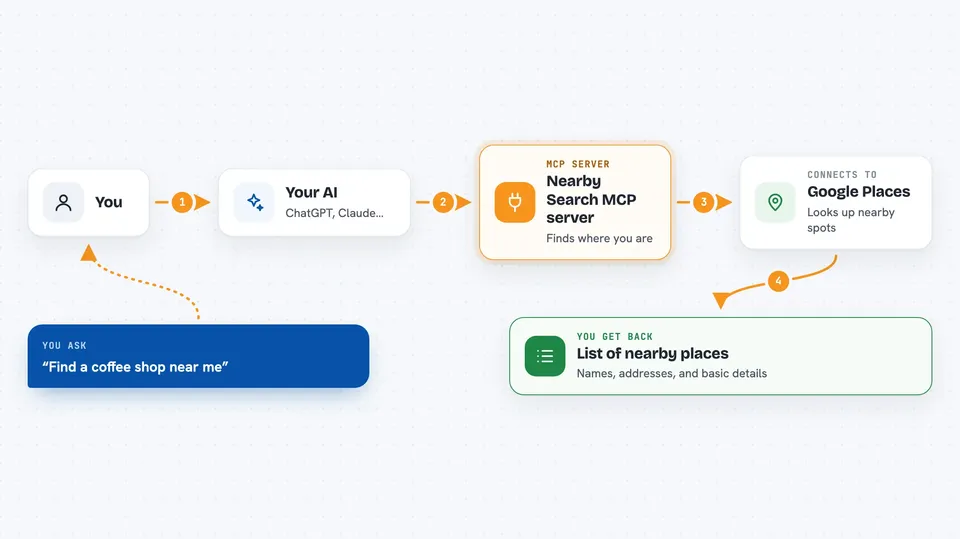
You ask your AI something like find a coffee shop near me. Your AI passes that request to this helper program. The helper first asks a service called ipapi.co to figure out roughly where you are, based on your internet connection. Then it asks Google Places for matching spots within a certain distance, usually about 1500 meters. The results come back to your AI, which shows them to you in the chat.
 Click to zoom
What you can do with it
- Find coffee shops, restaurants, or cafes near your current location
- Search for a specific kind of place by keyword, like pharmacy or bookstore
- Set how far away to look, from a short walk to a longer trip
- Filter by place type, such as restaurant or cafe
- Get quick local suggestions while traveling or working from a new spot
Try asking your AI
- “Find a coffee shop near me”
- “What restaurants are within a 10 minute walk?”
- “Look for a pharmacy close by”
- “Search for cafes within 2 kilometers”
What it gives back to you
You get back a list of nearby places that match what you asked for. Each result usually includes the name, address, and other basic details about the spot. Your AI shows this as a simple list or short summary right in the chat, so you can pick one and go.
Before you start
What you need
- Python 3.10 or newer installed on your computer
- A Google Cloud API key with the Places API turned on (this is like a password that lets apps use Google's place data; you create it in your Google Cloud account)
- An internet connection
Good to know
It guesses your location from your internet address, which is only approximate and can be wrong, especially if you use a VPN.
Install it with your AI
Add Nearby Search MCP server to your AI, no technical skills needed
You don't install anything by hand. You copy one prompt, paste it into an AI that can work on your computer, and it checks, installs and connects the server for you, asking you when it needs something.
Sign in to get the install prompt
Members get a ready-made prompt that lets the Claude desktop app check Nearby Search MCP server, install it and connect it for them, step by step. You don't need any technical skills: you copy, paste and answer a few questions. Your connected AI can also find and install any of the 4,609 MCP servers here for you.
Who it's for
Anyone who wants quick local suggestions, like travelers, remote workers, or people new to an area.



