MCP server · Research · official
Off-Nadir Delta MCP server
by Off-Nadir-Lab · official
Your AI can track world events, check the reporting behind them, and plan satellite imagery collection.
Off-Nadir Delta is a service that watches world events, puts them on a map, and checks what is being reported about them. This MCP server connects your AI to that service. It is handy if you follow geopolitics, security, or news and want your AI to work from current, source-linked information instead of what it remembers from training.
What is an MCP server? The 30-second version
On its own, your AI can only chat with you using what it already learned. An MCP server is a small helper program that gives your AI a new skill or a connection to an app or service. This one connects your AI to Off-Nadir Delta, a live world-event and satellite imagery service. Once connected, your AI can look things up there and bring answers back to your chat when you ask.
What this MCP server does
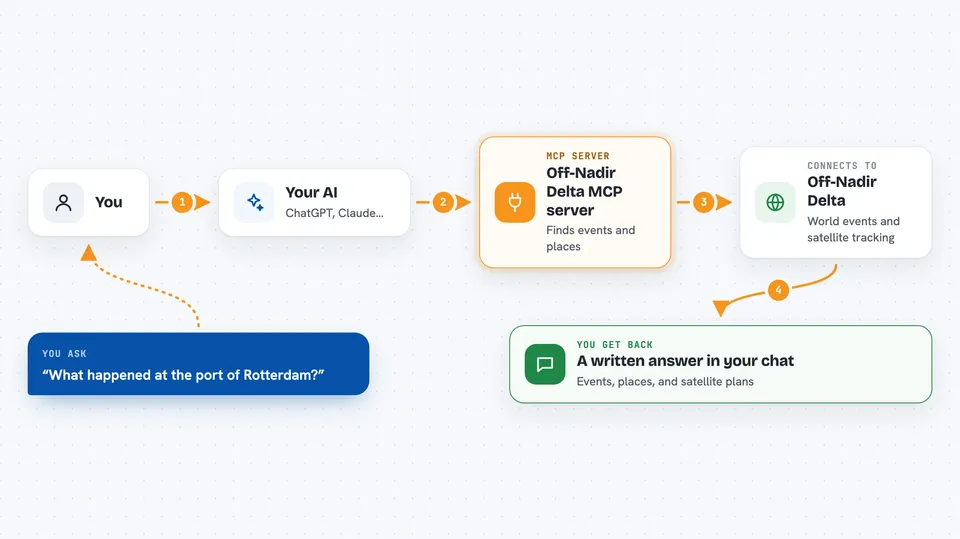
You ask your AI a question about what is happening in the world, or about a specific place. Your AI sends that request to this helper, which talks to the Off-Nadir Delta service. The service returns geolocated events, source-linked reporting, and satellite collection options. Your AI then turns that into a written answer for you, with the events, places, and recommendations laid out in the chat.
 Click to zoom
What you can do with it
- Get the latest Daily World Brief with the top developments explained
- Find geolocated world events in an area you care about
- Check what actually changed about an event, not just which articles are new
- Look up a place like an airport, port, or base and see what happened there
- Check whether a satellite could observe an event and when one next passes
- Ask an OSINT/GEOINT analyst question and get a structured brief back
- Set up a watch on a target and get told when something changes
Try asking your AI
- “Give me the latest Daily World Brief. Lead with the three most significant developments and cite the supporting signals.”
- “Find the highest-priority observable event from the last 24 hours, verify the reporting, and recommend a satellite collection plan.”
- “What has happened recently at the port of Rotterdam?”
- “Set up a watch on this area and tell me when the situation changes.”
What it gives back to you
You get answers written in the chat: lists of events with their locations and severity, a daily or weekly brief, source-linked summaries, and satellite collection plans. Some tools return structured briefs or status updates. For analyst questions, you get a job id first and then the finished brief once the run completes.
Before you start
What you need
- A free Off-Nadir Delta account (the API and MCP server work on every plan, including Free)
- An API key from offnadir-delta.com/account/api if you use the local package (a kind of password for apps; the site gives you one)
- Tokens in your account for the paid tools (11 of the 22 tools are free)
Good to know
Some tools use paid tokens from your account, so check your balance with get_usage before running metered calls, and remember that watches and notes you create are stored on the service.
Install it with your AI
Add Off-Nadir Delta MCP server to your AI, no technical skills needed
You don't install anything by hand. You copy one prompt, paste it into an AI that can work on your computer, and it checks, installs and connects the server for you, asking you when it needs something.
Sign in to get the install prompt
Members get a ready-made prompt that lets the Claude desktop app check Off-Nadir Delta MCP server, install it and connect it for them, step by step. You don't need any technical skills: you copy, paste and answer a few questions. Your connected AI can also find and install any of the 4,361 MCP servers here for you.
Who it's for
Analysts, journalists, researchers, and anyone who follows geopolitics, security, or world events and wants their AI to work from current, source-linked information.