MCP server · Research
Aiwen IP Location MCP server
by ipfred
Ask your AI about any IP address and get its country, city, coordinates, internet provider and owner.
This is a helper for your AI that looks up where an IP address comes from. An IP address is the number every device uses to connect to the internet, a bit like a phone number. If you ever need to know which country, city or company an address belongs to, this makes that easy.
What is an MCP server? The 30-second version
On its own, your AI can only chat with you. An MCP server is a small helper program that gives your AI a new skill or a connection to an app or service. This one connects your AI to Aiwen, a service that keeps detailed information about IP addresses around the world. Once it is set up, you can simply ask your AI about an IP address and it will go and fetch the answer for you.
What this MCP server does
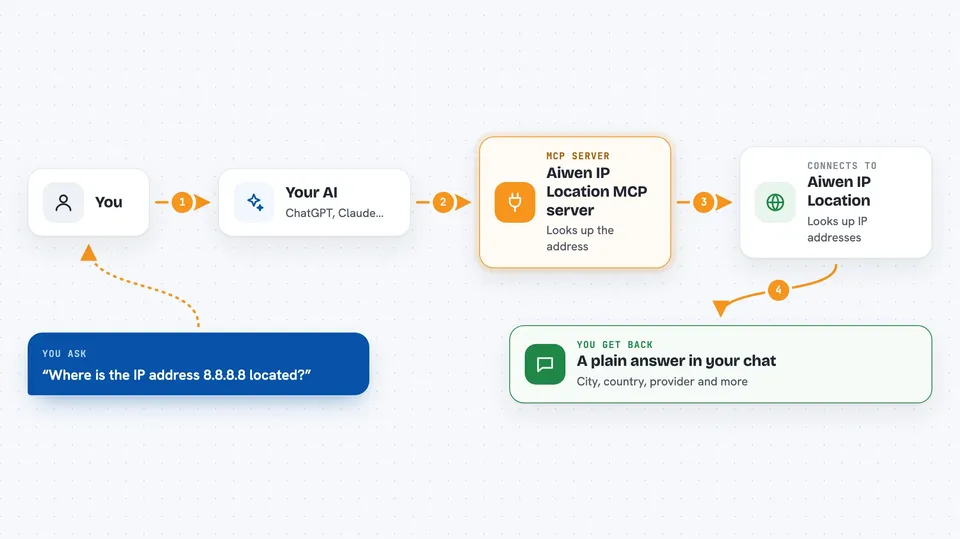
You type a question about an IP address into your AI chat. Your AI passes that address to this helper program. The helper sends it to the Aiwen service, which looks it up in its database. The answer comes back and your AI shows it to you in the chat, in plain words. You never have to visit a website or copy anything by hand.
 Click to zoom
What you can do with it
- Find the country, province and city of an IP address
- Get the latitude and longitude coordinates for an IP address
- See which internet provider and company an IP address belongs to
- Check the time zone and postal code linked to an IP address
- Look up who registered an IP address and who to contact about it
- See what kind of network an IP address is on, like home broadband or a data centre
- Check whether an IP address looks risky, like a VPN or a proxy
Try asking your AI
- “Where is the IP address 8.8.8.8 located?”
- “What internet provider owns the IP 1.1.1.1?”
- “Is 203.0.113.5 a home broadband connection or a data centre?”
- “Does this IP address look like a VPN or a real person?”
What it gives back to you
You get a short, clear answer in the chat. It can include the continent, country, province, city, district and even a street level address, plus latitude, longitude, time zone and postal code. It also tells you the internet provider, the company that owns the address, and for some lookups a risk score or a real person probability. Everything arrives as readable text, not raw data.
Before you start
What you need
- An API key from Aiwen (a kind of password for apps; you get one from their website, usually paid)
- The Claude desktop app, Cursor or VS Code with MCP support
- Node.js installed on your computer (the free program that runs this helper)
Good to know
Some lookups need a paid Aiwen plan, and the accuracy you get depends on which plan you bought.
Install it with your AI
Add Aiwen IP Location MCP server to your AI, no technical skills needed
You don't install anything by hand. You copy one prompt, paste it into an AI that can work on your computer, and it checks, installs and connects the server for you, asking you when it needs something.
Sign in to get the install prompt
Members get a ready-made prompt that lets the Claude desktop app check Aiwen IP Location MCP server, install it and connect it for them, step by step. You don't need any technical skills: you copy, paste and answer a few questions. Your connected AI can also find and install any of the 4,361 MCP servers here for you.
Who it's for
Anyone who checks IP addresses at work, like support teams, security staff, analysts and researchers.