MCP server · Research
ApogeoAPI MCP server
by APOGEOAPI
Lets your AI look up countries, states, cities, IP locations and live currency rates for you.
This is a small helper that connects your AI assistant to ApogeoAPI, a service full of geographic facts and live exchange rates. Once it is set up, you can just ask your AI questions like what the dollar rate is in Argentina, and it will fetch the answer for you. It is handy for anyone who works with countries, addresses or currencies and does not want to look things up by hand.
What is an MCP server? The 30-second version
On its own, your AI can only chat with you using what it already knows. An MCP server is a small helper program that gives your AI a new skill or a connection to an outside service. This one connects your AI to ApogeoAPI, so it can look up country details, states, cities, IP locations and currency rates when you ask. You do not need to understand how it works inside; you just add it once and then talk to your AI as usual.
What this MCP server does
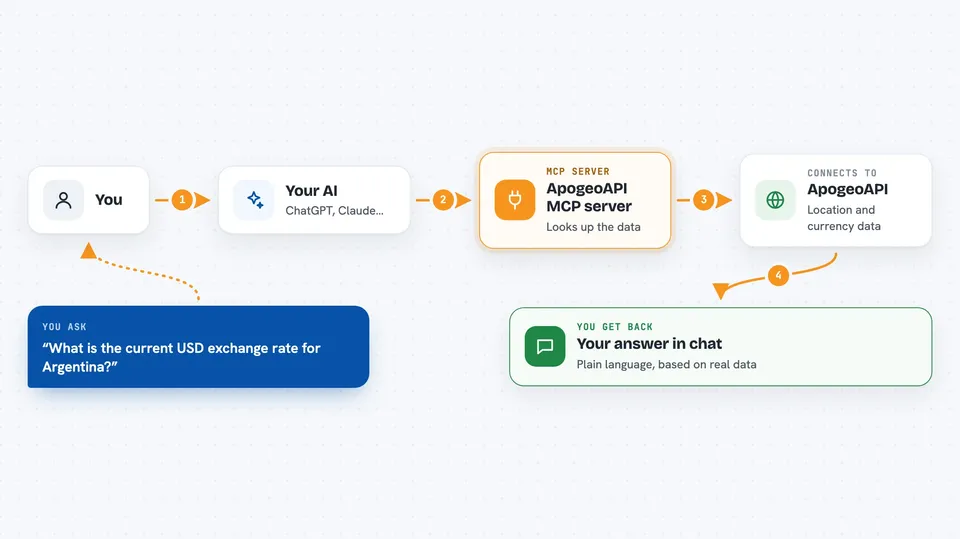
You ask your AI a question in normal words, like the current dollar rate for Argentina. Your AI notices it needs outside information and calls this helper. The helper then talks to ApogeoAPI over the internet, sending your request along with your API key. ApogeoAPI sends back the data, and the helper hands it to your AI, which turns it into a clear answer in your chat. You never have to open a website or copy numbers yourself.
 Click to zoom
What you can do with it
- Look up full details for any country, like capital, region, population and currency
- Search for countries by typing part of their name
- Get all states or provinces inside a country
- Get all cities inside a state
- Check the live USD exchange rate for a country's currency
- Find out where an IP address is located, including city and timezone
- Search across countries, states and cities in one go
Try asking your AI
- “What is the current USD exchange rate for Argentina?”
- “Geolocate the IP address 8.8.8.8”
- “List all states in Brazil”
- “Search for cities called Springfield”
What it gives back to you
You get answers written in plain language in your chat, based on real data from ApogeoAPI. Depending on what you asked, that could be a single fact like a currency rate, a short profile of a country, or a list of states or cities. The AI often formats these as a neat list or small table so they are easy to read. Nothing is changed on your computer; it is just information coming back to you.
Before you start
What you need
- A free ApogeoAPI account from app.apogeoapi.com
- An API key from your ApogeoAPI dashboard (a kind of password for apps; the site gives you one)
- The Claude desktop app or Cursor, or another AI tool that supports MCP servers
- Node.js installed on your computer (the free program that runs the helper)
Good to know
Some tools, like states, cities, currency rates and IP geolocation, need a paid ApogeoAPI plan, so check your plan before relying on them.
Install it with your AI
Add ApogeoAPI MCP server to your AI, no technical skills needed
You don't install anything by hand. You copy one prompt, paste it into an AI that can work on your computer, and it checks, installs and connects the server for you, asking you when it needs something.
Sign in to get the install prompt
Members get a ready-made prompt that lets the Claude desktop app check ApogeoAPI MCP server, install it and connect it for them, step by step. You don't need any technical skills: you copy, paste and answer a few questions. Your connected AI can also find and install any of the 4,361 MCP servers here for you.
Who it's for
Anyone who often needs country, city or currency facts at work, like people in logistics, travel, finance, sales or customer support.