
MCP server · Finance and crypto
The Graph MCP server
by kukapay
Let your AI pull live crypto and blockchain data straight from The Graph.
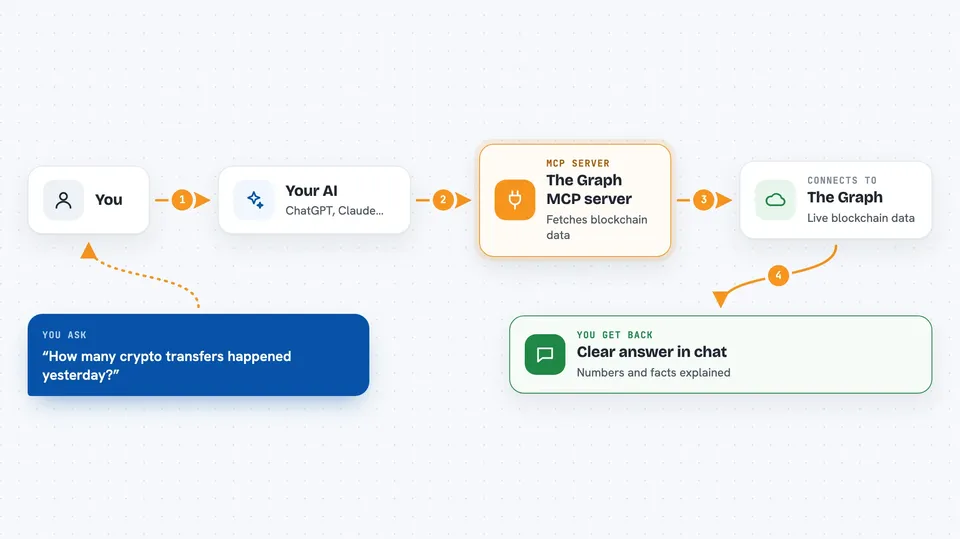
This connects your AI assistant to The Graph, a public network that stores organized copies of blockchain information. Once hooked up, you can just ask questions in normal words instead of hunting through websites yourself. It suits anyone curious about crypto markets, DeFi activity, or wallet history who wants quick answers inside their chat window.
What is an MCP server? The 30-second version
On its own, your AI can only talk based on what it already learned during training. An MCP server is a little helper program running alongside it that hands your AI a brand-new ability. This particular helper links your AI to The Graph, where lots of blockchains keep neatly sorted records. So when you ask something, your AI sends the request through this helper to The Graph, gets real current figures back, and explains them to you.
What this MCP server does
When you ask a question about blockchain facts, your AI turns it into a proper lookup request. That request goes out through this MCP server to The Graph, which holds pre-sorted versions of chains such as Ethereum called "subgraphs". You give each subgraph an identifier code, and the server fetches either its blueprint (schema) or actual rows of data matching what you asked. Your AI takes whatever comes back and writes a clear answer right in the conversation.
 Click to zoom
What you can do with it
- Look up any subgraph's structure so your AI knows which pieces exist
- Pull specific stats like volumes, balances, swaps, or holders
- Sort results, count entries, filter conditions, grab newest items
- Ask follow-up analysis questions after seeing returned values
- Save time versus visiting explorer sites and copying tables by hand
Try asking your AI
- “Fetch the schema for subgraph Q123ABC456DEF789GHIJKLMNOPQRSTUVWX in readable form”
- “From subgraph ABCdefGhiJklMnoPqrStuVwxYz0123456789 show five largest pools today”
- “Query how many transfers happened yesterday according to subgraph XYZabcDefGhiJklMnoPqrStuVwxyZ9876543210”
- “Explain what kinds of entities I might find if I inspect subgraph DEFghiJklMnoPqrStuVwxYzAbCdEfGhIjKlMnOpqrstUvWxyzABCDEFG”
What it gives back to you
Depending on whether you requested a schema check or raw statistics gathering session result set output summary table listing numeric counts textual descriptions etcetera depending upon parameters chosen within original prompt wording used earlier above line break point continuation phrase ending now final period stop.
Install it with your AI
Add The Graph MCP server to your AI, no technical skills needed
You don't install anything by hand. You copy one prompt, paste it into an AI that can work on your computer, and it checks, installs and connects the server for you, asking you when it needs something.
Sign in to get the install prompt
Members get a ready-made prompt that lets the Claude desktop app check The Graph MCP server, install it and connect it for them, step by step. You don't need any technical skills: you copy, paste and answer a few questions. Your connected AI can also find and install any of the 4,609 MCP servers here for you.



