
MCP server · Security
Vorim AI MCP server
by Kzino
Give your AI agents identities, permissions and a tamper-proof audit trail you can check.
Vorim AI is a service that gives each AI agent its own identity, a set of allowed actions, and a record of what it did. This MCP server connects that service to your AI chat app, so you can set up and check agents just by asking. It is handy for people who let AI helpers do real work and want to know who did what.
What is an MCP server? The 30-second version
On its own, your AI can only chat with you. An MCP server is a small helper program that gives your AI a new skill or a connection to another service. This one connects your AI to Vorim AI, so the AI can register agents, check permissions and pull audit records for you. You just ask in plain words, and the helper does the talking to Vorim behind the scenes.
What this MCP server does
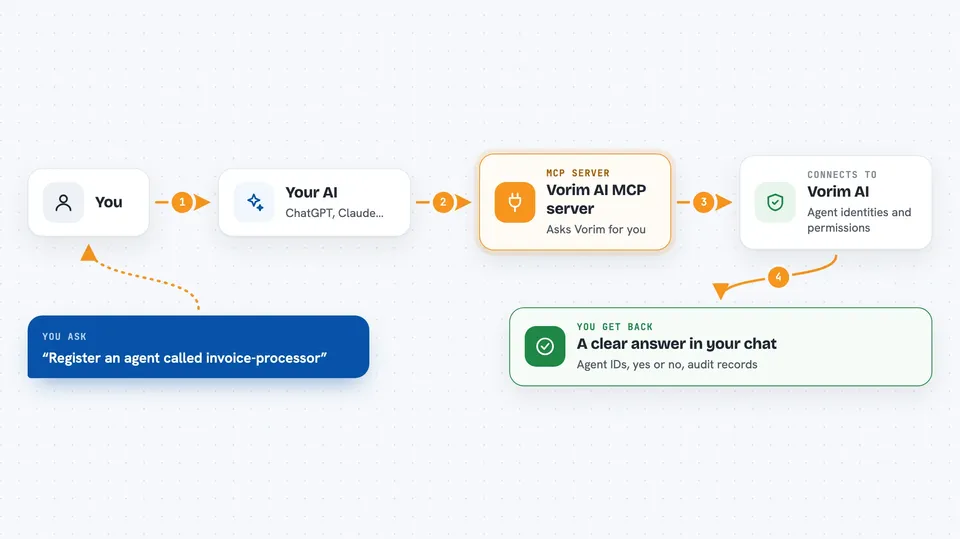
You ask your AI something like registering a new agent or checking whether an agent is allowed to do something. Your AI passes that request to this helper program, which talks to the Vorim AI service over the internet. Vorim creates the agent, checks the permission, or gathers the audit events, and sends the answer back. Your AI then shows you the result in the chat, in plain language.
 Click to zoom
What you can do with it
- Register a new AI agent with its own cryptographic identity
- Check whether an agent has permission to do something
- Grant or revoke a permission for an agent
- Log an audit event when an agent takes an action
- Export a signed audit trail for a date range
- Look up an agent's public trust score
- Delegate a credential to an agent for a set time
Try asking your AI
- “Register an agent called invoice-processor with read and execute permissions”
- “Check if agent agid_acme_a1b2 has permission to execute”
- “Log a tool_call event for the agent: action=process_invoice, result=success”
- “Export the audit trail for the last 30 days”
What it gives back to you
You get back clear answers in your chat: agent IDs and details, a yes or no on permissions, lists of agents or permissions, and audit records or an export bundle. Trust scores come back as a number you can read at a glance. When you register, grant or revoke something, the AI tells you what changed.
Before you start
What you need
- A free Vorim AI account (sign up at vorim.ai, no credit card)
- An API key from Vorim (Settings, then API Keys; it looks like agid_sk_live_...)
- Node.js installed on your computer, so npx can run the helper
- An MCP-compatible app like Claude Desktop, Cursor, VS Code or Google Antigravity
Good to know
This server can create, change and permanently revoke agents and permissions, and it can export audit records, so treat your Vorim API key like a password and check before revoking anything.
Install it with your AI
Add Vorim AI MCP server to your AI, no technical skills needed
You don't install anything by hand. You copy one prompt, paste it into an AI that can work on your computer, and it checks, installs and connects the server for you, asking you when it needs something.
Sign in to get the install prompt
Members get a ready-made prompt that lets the Claude desktop app check Vorim AI MCP server, install it and connect it for them, step by step. You don't need any technical skills: you copy, paste and answer a few questions. Your connected AI can also find and install any of the 4,609 MCP servers here for you.
Who it's for
People who run AI agents that do real tasks and need to prove who acted, what they were allowed to do, and what happened.



