MCP server · Analytics
NBA Stats MCP server
by labeveryday
Lets your AI look up live and past NBA scores, player stats, standings and awards for you.
This is a small helper that connects your AI assistant to real NBA data. Once it is set up, you can just ask about games, players and teams in normal words, and your AI goes and finds the numbers. It is handy if you follow basketball, run a fantasy league, or write about the NBA.
What is an MCP server? The 30-second version
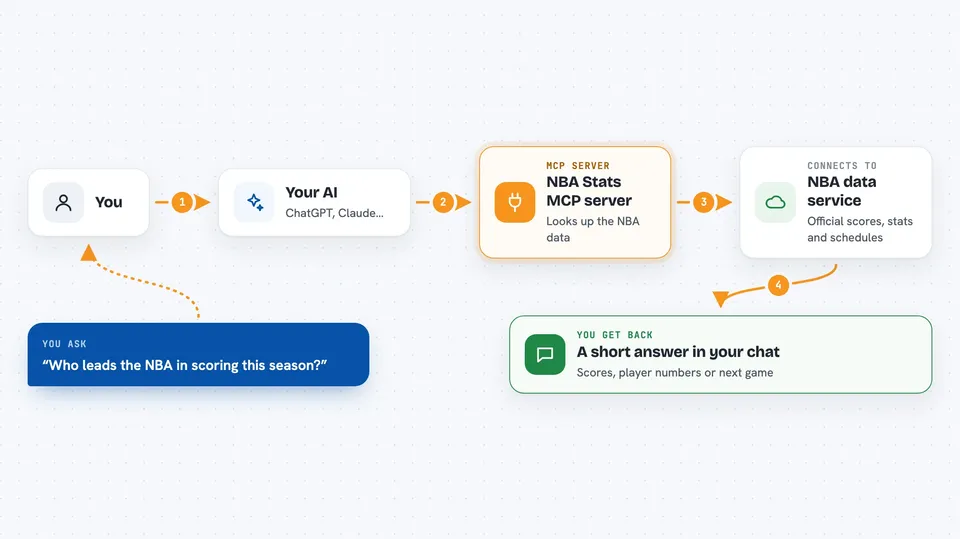
On its own, your AI can only chat with you using what it already learned. An MCP server is a small helper program that gives your AI a new skill, in this case a connection to official NBA data. When you ask a question, your AI passes it to this helper, the helper fetches the answer from the NBA, and your AI tells you the result. You do not need to understand the plumbing; you just ask in plain English.
What this MCP server does
You ask your AI something like who leads the league in scoring or when the Celtics play next. Your AI sends that request to this helper program running quietly on your computer. The helper then talks to the official NBA data services and pulls back the scores, stats, schedules or awards you asked about. Your AI reads that information and writes it out for you in the chat. You never have to look anything up yourself.
 Click to zoom
What you can do with it
- Check today's NBA games and final scores
- Look up any player's season, career or advanced stats
- See a full box score for a specific game
- Compare two players side by side
- View league standings by conference
- Find a team's upcoming schedule
- See season awards and all-time leaders
Try asking your AI
- “Show me today's NBA games”
- “What are LeBron James' stats this season?”
- “Who are the top 10 scorers this season?”
- “When do the Celtics play next?”
What it gives back to you
You get back a short written answer in the chat, like a summary of scores or a player's key numbers. Behind the scenes it also brings structured details and links to official NBA photos and team logos. For most people, the plain text answer is all you need to read.
Before you start
What you need
- The Claude desktop app (or another app that supports MCP servers)
- Python 3.10 or newer installed on your computer
- The uv or uvx tool, which the setup instructions use to run the server
Good to know
The data comes from public NBA services, so scores and stats can lag a little behind live TV, and very new or unusual names may not match cleanly.
Install it with your AI
Add NBA Stats MCP server to your AI, no technical skills needed
You don't install anything by hand. You copy one prompt, paste it into an AI that can work on your computer, and it checks, installs and connects the server for you, asking you when it needs something.
Sign in to get the install prompt
Members get a ready-made prompt that lets the Claude desktop app check NBA Stats MCP server, install it and connect it for them, step by step. You don't need any technical skills: you copy, paste and answer a few questions. Your connected AI can also find and install any of the 4,066 MCP servers here for you.
Who it's for
Basketball fans, fantasy league players, sports writers and anyone who wants quick NBA facts without opening a stats website.