MCP server · Security
Ghidra MCP server
by LaurieWired
Let your AI look inside program files, read their code, and give parts clearer names for you.
Ghidra is a free tool that people use to look inside programs when they do not have the original code. This MCP server connects your AI assistant to Ghidra, so the AI can read a program's insides and help make sense of it. It is handy for security researchers, students, and anyone curious about how a piece of software works.
What is an MCP server? The 30-second version
On its own, your AI can only chat with you. An MCP server is a small helper program that gives your AI a new skill or a connection to another app. This one connects your AI to Ghidra, a program that takes software apart so you can see how it is built. Once connected, your AI can ask Ghidra to look things up and even make small changes for you.
What this MCP server does
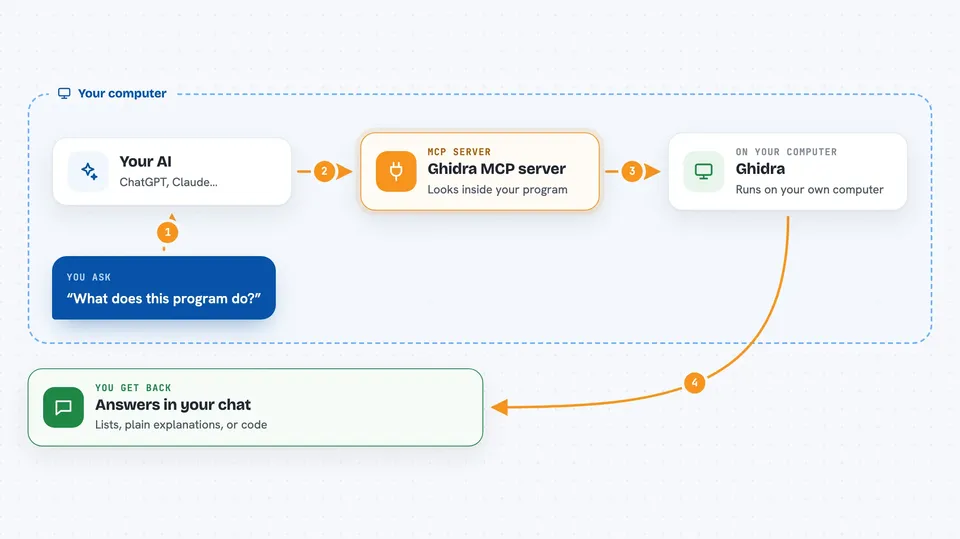
You open a program file in Ghidra and turn on the GhidraMCP plugin. Then you ask your AI something about that program in plain words. Your AI passes your question to this helper, which talks to Ghidra and gets the answer. Ghidra sends back things like the program's code, its list of functions, or its imports and exports. Your AI shows you the result in the chat and can rename parts of the program if you ask.
 Click to zoom
What you can do with it
- Decompile a program so you can read its code in a friendlier form
- List the methods and classes inside a program
- Show the imports and exports of a program
- Rename a method or a piece of data to something clearer
- Ask questions about what a specific part of the program does
- Get a summary of the main functions in a file
Try asking your AI
- “List all the methods in this program and tell me what each one seems to do”
- “Decompile the function at address 0x401000 and explain it in plain English”
- “Rename this method to something more descriptive based on what it does”
- “What are the imports and exports of this file?”
What it gives back to you
You get answers in the chat, usually as lists of names, short explanations, or blocks of code that your AI has tidied up. If you asked it to rename something, it will tell you the new name it used. Everything shows up as normal text you can read and copy.
Before you start
What you need
- Ghidra installed on your computer (it is free)
- Python 3 installed
- The GhidraMCP plugin downloaded and added to Ghidra
- An MCP client like Claude Desktop, Cline, or 5ire
Good to know
This server can rename methods and data inside your Ghidra project, so it changes your work; keep a backup or use a copy if you are not sure.
Install it with your AI
Add Ghidra MCP server to your AI, no technical skills needed
You don't install anything by hand. You copy one prompt, paste it into an AI that can work on your computer, and it checks, installs and connects the server for you, asking you when it needs something.
Sign in to get the install prompt
Members get a ready-made prompt that lets the Claude desktop app check Ghidra MCP server, install it and connect it for them, step by step. You don't need any technical skills: you copy, paste and answer a few questions. Your connected AI can also find and install any of the 4,361 MCP servers here for you.
Who it's for
Security researchers, reverse engineering students, and anyone who wants help understanding how a program works.