
MCP server · Social media
termgram MCP server
by liagha
Lets your AI read, search and send Telegram messages, and tell you when new ones arrive.
termgram is a Telegram client that runs in your computer's terminal, and it comes with a helper that connects your AI assistant to your Telegram account. Once it is set up, you can ask your AI to read chats, search your messages, or send something for you. It is handy if you already use Telegram a lot and want your AI to work with your chats instead of you copying things back and forth.
What is an MCP server? The 30-second version
On its own, your AI can only chat with you. It cannot see your Telegram messages or send anything there. An MCP server is a small helper program that gives your AI a new skill, and here that skill is a connection to your Telegram account. When you ask your AI something about your chats, it quietly asks this helper, and the helper talks to Telegram for you.
What this MCP server does
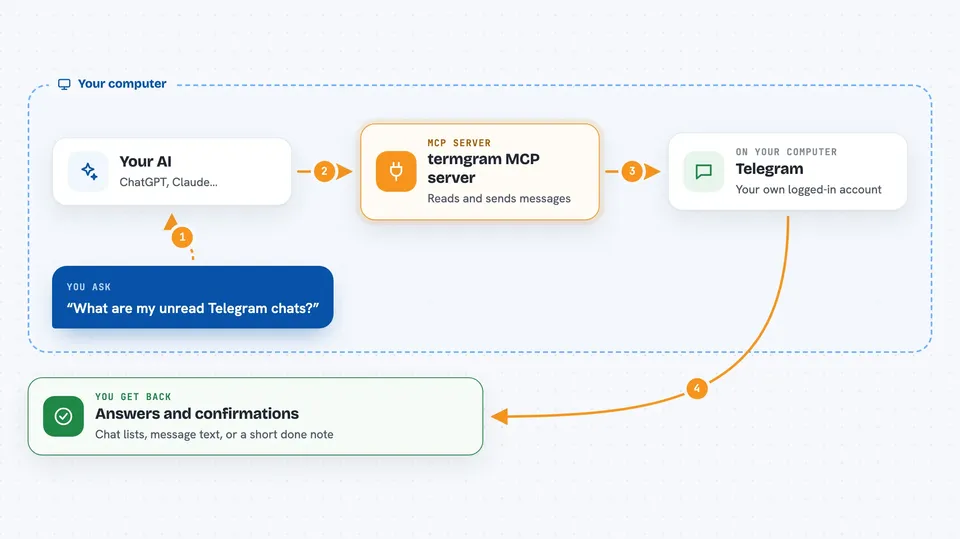
You ask your AI something in plain words, like what your unread chats say or to send a message to someone. The AI passes that request to termgram-mcp, which is running on your own computer. That helper talks to Telegram using your logged-in session and does the work. Then it hands the result back to your AI, which shows it to you in the chat. It can also push a note to your AI the moment a new message lands, if you turn that on.
 Click to zoom
What you can do with it
- List your chats with unread counts and the last message
- Read the recent messages in any chat
- Search across all your chats, including offline
- Send text, photos, documents, voice notes or albums
- Schedule a message for later
- Reply, react, pin, edit or delete messages
- Get a heads-up in your AI when a new message arrives
Try asking your AI
- “What are my unread Telegram chats right now?”
- “Search my Telegram for anything about the invoice from last week”
- “Send a message to saved saying I will be ten minutes late”
- “Tell me when Alice messages me”
What it gives back to you
You get answers in the chat: lists of chats, message text, search results, or a short confirmation that something was sent or changed. When a new message comes in and you have notifications on, your AI gets a small note with the chat, sender, time and text, and can mention it to you. Sending or editing shows up as a simple done message, not a wall of technical detail.
Before you start
What you need
- A Telegram account
- An API ID and API hash from my.telegram.org (a pair of codes Telegram gives you for your own account, free)
- The termgram program installed on your computer, with the termgram-mcp helper
- An AI app that can use MCP servers
Good to know
This helper can read your private messages and can send, edit or delete things in your Telegram account, so only connect it to an AI you trust and be careful with commands that change or wipe data.
Install it with your AI
Add termgram MCP server to your AI, no technical skills needed
You don't install anything by hand. You copy one prompt, paste it into an AI that can work on your computer, and it checks, installs and connects the server for you, asking you when it needs something.
Sign in to get the install prompt
Members get a ready-made prompt that lets the Claude desktop app check termgram MCP server, install it and connect it for them, step by step. You don't need any technical skills: you copy, paste and answer a few questions. Your connected AI can also find and install any of the 4,609 MCP servers here for you.
Who it's for
People who live in the terminal and use Telegram all day, and anyone who wants their AI to read and send Telegram messages for them.


