MCP server · Social media
Content Distribution MCP server
Post one piece of content to DEV.to, Hashnode, Reddit, Bluesky and more, adapted for each place.
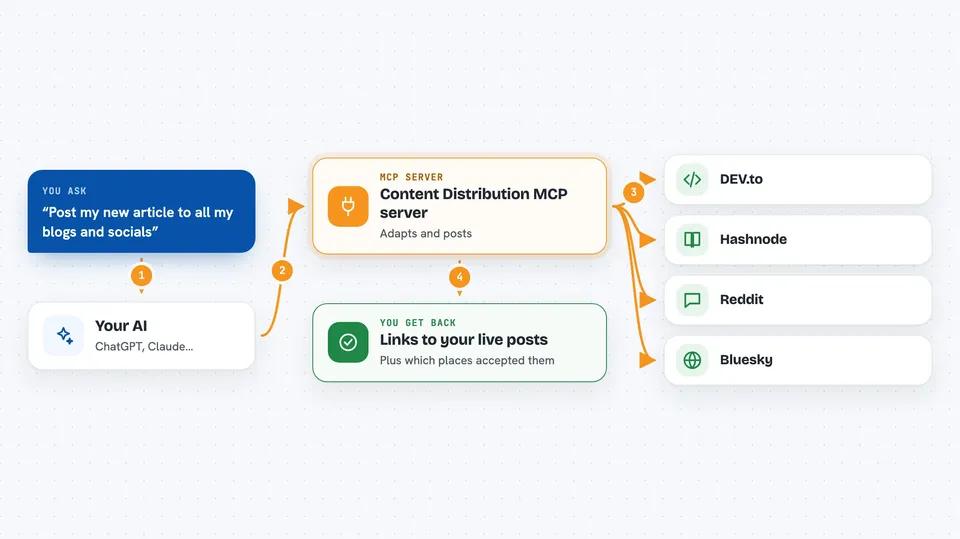
This is a helper that lets your AI publish the same article or update to several sites at once. You write your message once, and your AI rewrites it a little for each place, then posts it. It is handy if you write blog posts, share tutorials, or post in online communities and are tired of copying and pasting everywhere.
What is an MCP server? The 30-second version
On its own, your AI can only chat with you. An MCP server is a small helper program that gives your AI a new skill or a connection to an app or service. This one connects your AI to publishing platforms like DEV.to, Hashnode, GitHub Discussions, Reddit and Bluesky. Once it is connected, your AI can actually post your content there when you ask, instead of you doing it by hand.
What this MCP server does
You tell your AI what you want to publish and where. Your AI writes a version of your text for each place, following the rules of that site. Then it asks this helper to publish each version. The helper talks to each platform using your saved login details, posts the content, and remembers what it already posted so it does not post twice. At the end you get back the links to your live posts.
 Click to zoom
What you can do with it
- Publish one article to several platforms at the same time
- Adapt your title and text for each platform's rules
- Schedule posts for a later date and time
- Check where each piece of content went live
- See the rules for each platform, like character limits and allowed tags
- List your saved profiles and the communities you post in
- Take a post down again if you need to
What it gives back to you
You get back a short report in the chat: which platforms accepted your post, and the live link for each one. If something could not be posted, it tells you why, for example that a platform needs you to finish in your browser. You can also ask for the status of a piece of content and get a per-platform list.
Before you start
What you need
- Node.js 18 or newer on your computer
- A free account on each platform you want to post to
- Login keys for those platforms, saved in a small settings file
- An MCP host like Claude Desktop or Claude Code
Good to know
This helper can post and delete things on your public accounts, so check what your AI is about to publish before you say yes.
Install it with your AI
Add Content Distribution MCP server to your AI, no technical skills needed
You don't install anything by hand. You copy one prompt, paste it into an AI that can work on your computer, and it checks, installs and connects the server for you, asking you when it needs something.
Sign in to get the install prompt
Members get a ready-made prompt that lets the Claude desktop app check Content Distribution MCP server, install it and connect it for them, step by step. You don't need any technical skills: you copy, paste and answer a few questions. Your connected AI can also find and install any of the 4,361 MCP servers here for you.
Who it's for
Writers, bloggers, developers and community managers who share the same content in several places and want to stop doing it by hand.