MCP server · Social media
Discord MCP server
by iprashantraj
Let your AI read and manage your Discord server: channels, messages, roles, members and moderation.

This is a small helper that connects your AI assistant to Discord. Once it is set up, you can ask your AI in plain words to look at your server or make changes there, like creating a channel or sending a message. It is handy for anyone who runs or helps run a Discord community and wants to save clicks.
What is an MCP server? The 30-second version
On its own, your AI can only chat with you. An MCP server is a small helper program that gives your AI a new skill or a connection to an app. This one connects your AI to Discord, so it can look things up and do things on your server when you ask. You stay in charge: the AI only acts when you tell it to.
What this MCP server does
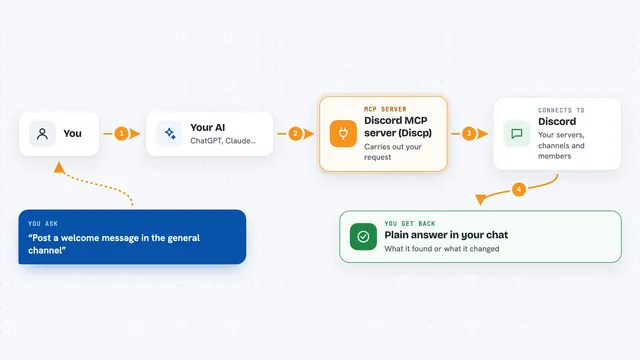
You ask your AI something about your Discord server, like listing channels or sending a message. The AI passes that request to this helper program running on your computer. The helper talks to Discord using a bot you created, then sends the result back to your AI. Your AI shows you the answer or confirms the change it made. It can also run on its own as a small Discord bot with a few slash commands.
 Click to zoom
What you can do with it
- List your servers, channels and categories
- Create, rename, move or delete channels and categories
- Read, send, edit, delete and search messages
- Send direct messages and add emoji reactions
- Create and manage forum posts and threads
- List members, view profiles and manage roles
- Kick, ban, unban or timeout members
Try asking your AI
- “List all channels in my Discord server”
- “Send a message to the announcements channel saying we are back online”
- “Create a new role called VIP with a purple color”
- “Search recent messages for the word refund”
What it gives back to you
You get answers in your chat, like a list of channels, a list of members with their roles, or the text of recent messages. When you ask it to change something, it tells you what it did, such as the name of the new channel it created. Search results come back as matching messages with who wrote them. Everything appears as normal text in the conversation.
Before you start
What you need
- A Discord account and a server you can manage
- A Discord bot token from the Discord Developer Portal (a kind of password for your bot; the portal gives you one for free)
- Node.js installed on your computer
- An AI app that supports MCP, like Claude Desktop or Cursor
Good to know
This helper can delete channels, ban members and change roles, so only grant your bot the permissions you actually need, and consider turning on read-only mode if you just want the AI to look at things.
Install it with your AI
Add Discord MCP server to your AI, no technical skills needed
You don't install anything by hand. You copy one prompt, paste it into an AI that can work on your computer, and it checks, installs and connects the server for you, asking you when it needs something.
Sign in to get the install prompt
Members get a ready-made prompt that lets the Claude desktop app check Discord MCP server, install it and connect it for them, step by step. You don't need any technical skills: you copy, paste and answer a few questions. Your connected AI can also find and install any of the 4,361 MCP servers here for you.
Who it's for
Community managers, moderators and server owners who want to run their Discord with less clicking.