MCP server · Social media
Bluesky MCP server
by keturiosakys
Lets your AI read your Bluesky profile, feed, posts, likes, followers and search Bluesky for you.

This is a small helper that connects your AI assistant to Bluesky, the social network. Once it is set up, you can ask your AI questions about your account and posts, and it will go look things up on Bluesky for you. It is handy if you use Bluesky and want to check or search it without clicking around the app.
What is an MCP server? The 30-second version
On its own, your AI can only chat with you using what it already knows. An MCP server is a small helper program that gives your AI a new skill or a connection to an app or service. This one connects your AI to Bluesky, so it can look up your profile, your feed, your posts and search results when you ask. You stay in the chat, and the helper does the fetching behind the scenes.
What this MCP server does
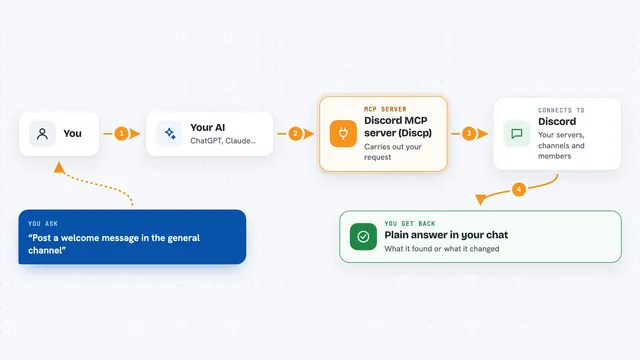
You ask your AI something about Bluesky, like what is in your feed today. The AI passes your request to this helper program. The helper signs in to Bluesky with your handle and an app password, then asks Bluesky for the information. Bluesky sends it back, and the helper hands it to your AI, which writes it up for you in the chat. You never have to open the Bluesky app yourself.
 Click to zoom
What you can do with it
- Look up your own Bluesky profile, bio and follower count
- Show your personalized Bluesky timeline
- List your recent posts with their engagement numbers
- List posts you have liked
- See who you follow and who follows you
- Search Bluesky for posts about any topic
- Search Bluesky for user profiles by keyword
Try asking your AI
- “What's in my Bluesky feed today?”
- “Search for posts about TypeScript on Bluesky”
- “Who are my most recent followers?”
- “Show me posts I've liked recently”
What it gives back to you
You get answers written out in the chat, usually as lists or short summaries. For example, a list of posts with the author and text, or a list of profiles with names and bios. Your profile comes back with your display name, bio and follower count. Numbers like likes and replies are included where Bluesky provides them.
Before you start
What you need
- A Bluesky account
- Your Bluesky handle (like alice.bsky.social)
- An App Password from Bluesky (a special password just for apps; you create it in Bluesky settings under Privacy and Security, and it looks like xxxx-xxxx-xxxx-xxxx)
- Bun or Node.js version 22.6.0 or newer on your computer
Good to know
It signs in to your Bluesky account with an app password, so keep that password private and only use it in your own config file.
Install it with your AI
Add Bluesky MCP server to your AI, no technical skills needed
You don't install anything by hand. You copy one prompt, paste it into an AI that can work on your computer, and it checks, installs and connects the server for you, asking you when it needs something.
Sign in to get the install prompt
Members get a ready-made prompt that lets the Claude desktop app check Bluesky MCP server, install it and connect it for them, step by step. You don't need any technical skills: you copy, paste and answer a few questions. Your connected AI can also find and install any of the 4,361 MCP servers here for you.
Who it's for
Bluesky users who already chat with an AI assistant and want to check, search or summarise their Bluesky activity without leaving the chat.