
MCP server · Finance and crypto
RiskState MCP server
by likidodefi
Ask your AI how much risk is allowed on BTC or ETH right now, before you place a trade.
RiskState is a service that answers one question: how much can you risk on BTC or ETH right now? This MCP server connects that service to your AI, so you can just ask in plain words and get a clear answer back. It is handy if you trade crypto yourself or run a trading bot and want a second opinion before you commit money.
What is an MCP server? The 30-second version
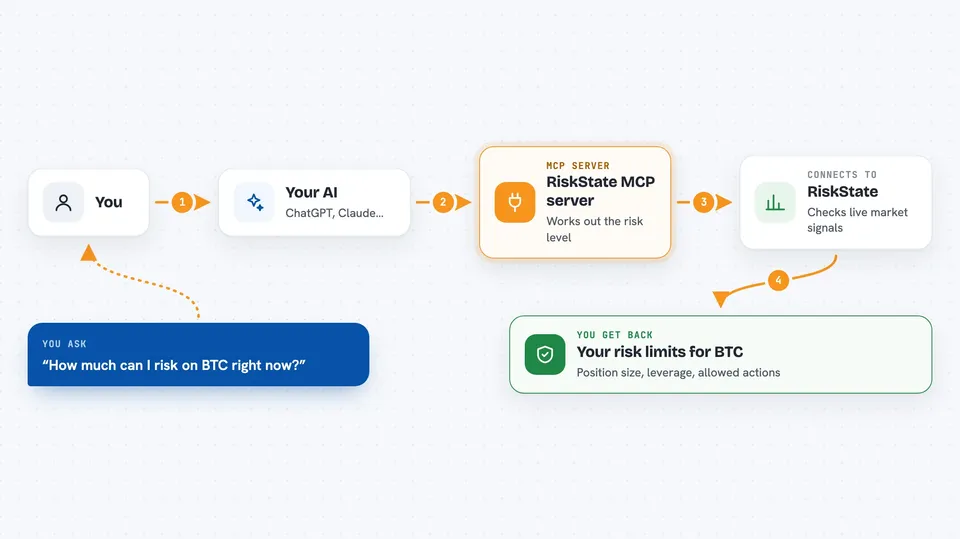
On its own, your AI can only chat. It cannot look up live market risk data. An MCP server is a small helper program that gives your AI a new skill, and in this case it connects your AI to RiskState. Once it is connected, you ask a question, your AI passes it to RiskState, and RiskState sends back the current risk limits for BTC or ETH.
What this MCP server does
You ask your AI something like how much you can risk on BTC right now. Your AI sends that question to the RiskState helper. The helper talks to the RiskState service, which looks at many live market signals and works out a risk level. The service sends back a policy level, a maximum position size, a leverage limit, and a list of actions that are allowed or blocked. Your AI shows you that answer in the chat, and you decide what to do.
 Click to zoom
What you can do with it
- Check the current risk policy level for BTC or ETH
- See the maximum position size allowed as a percentage of your portfolio
- See the maximum leverage you are allowed to use
- See which actions are allowed and which are blocked right now
- Test a specific trade you are considering and see if it would be allowed
- Check whether the market is near a structural turning point
- Check whether a trading setup is actionable right now
Try asking your AI
- “What is the risk state for BTC right now?”
- “How much of my portfolio can I put into ETH at the moment?”
- “Would a 2x leveraged long on BTC be allowed right now?”
- “Is any ETH setup actionable at the moment, or should I wait?”
What it gives back to you
You get back a short, readable summary plus the underlying numbers. That includes the policy level, the maximum position size, the leverage limit, and lists of allowed and blocked actions. For a specific trade, you get a yes or no plus the reasons if it is not allowed. Everything appears right in the chat as text.
Before you start
What you need
- An API key from riskstate.ai (free during beta; it is a kind of password for apps)
- Node.js 18 or newer if you install the package yourself
- The Claude desktop app or Claude Code if you want to add it there
Good to know
This server only reads and advises; it never places orders, but the numbers it gives are a risk opinion, not financial advice, and you are still the one making the trade.
Install it with your AI
Add RiskState MCP server to your AI, no technical skills needed
You don't install anything by hand. You copy one prompt, paste it into an AI that can work on your computer, and it checks, installs and connects the server for you, asking you when it needs something.
Sign in to get the install prompt
Members get a ready-made prompt that lets the Claude desktop app check RiskState MCP server, install it and connect it for them, step by step. You don't need any technical skills: you copy, paste and answer a few questions. Your connected AI can also find and install any of the 4,609 MCP servers here for you.
Who it's for
People who trade BTC or ETH themselves, and anyone running or building a crypto trading bot that needs a risk check before placing orders.



